


 Back
Back 

A smooth accounts payable (AP) function supports strong vendor relationships, clean financial records, and consistent compliance. That makes it vital to the health of your entire business.
This guide explains in straightforward terms how AP works, including its key stages and which common inefficiencies to address first for the most significant impact on profitability.
You’ll also learn how automation creates smooth, predictable payment cycles—even at scale.
Key Takeaways
- A reliable accounts payable process keeps cash flow steady and suppliers content, helping businesses perform at their best.
- Accounts payable teams face challenges such as shifting regulations, manual data entry errors, unclear approval workflows, and siloed systems, creating inconsistent data.
- Clear, documented AP procedures and consistent invoice management controls reduce delays and disputes.
- AP automation strengthens accuracy and compliance while freeing teams to focus on higher-value tasks that demand their skill.
What Is Accounts Payable?
Accounts payable (AP) is the money a business owes to suppliers for goods and services it has purchased but hasn’t yet paid for (i.e., bought on credit).
AP work sits inside the business’s wider financial management framework. It appears as a current liability on a company’s balance sheet, as it represents obligations due within 12 months.
AP also describes the team that manages payments for the purchases of goods, and the procedures that team follows.
For example, AP team members process supplier invoices, ensuring they’re paid accurately and on time and that transaction data is recorded in line with local regulations.
That work involves these steps:
As well as invoice management and payment scheduling, AP teams have some or all of the following responsibilities:
- Vendor onboarding and maintenance.
- Expense report reviews.
- Dispute and exception handling.
- Compliance and internal controls.
- Reporting and financial data analysis.
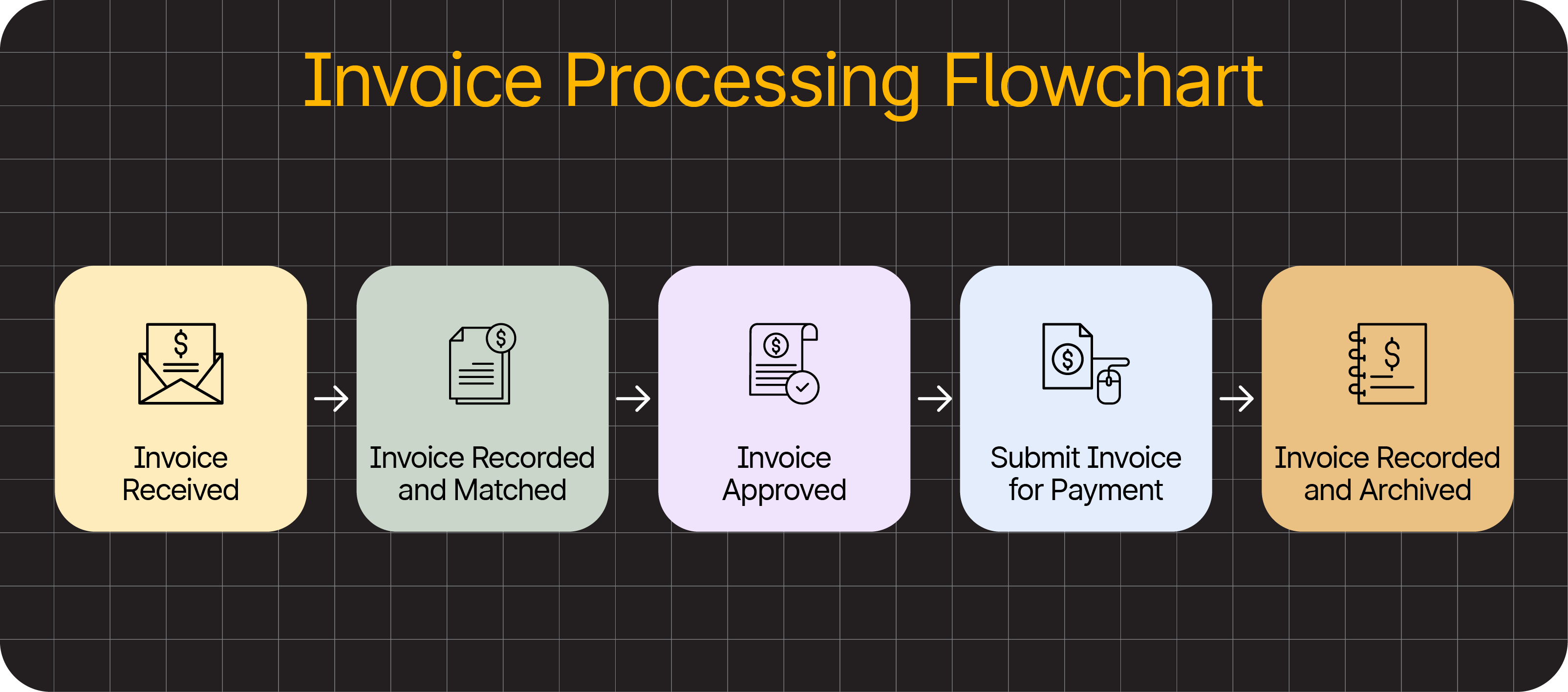
Where accounts payable manages and tracks outgoing payments, accounts receivable does the same for incoming payments, where your company is the supplier. Both are crucial to cash flow predictability and forecasting.
Why Accounts Payable Matters for UK Businesses
Proper accounts payable management protects your company’s financial health by streamlining spending and making cash flow more predictable.
For example:
- Swift invoice processing prevents late-payment penalties. Avoiding charges leaves more money to invest in staff, infrastructure, products, and services.
- Consistent financial controls help your business comply with tax and record-keeping regulations, even across different jurisdictions.
- The same consistent controls keep financial data clear and up to date for accurate forecasting and well-informed strategic decisions.
- Timely payments build trust with vendors, protecting early payment discounts and fair rates on essential raw materials, stock, and services.
When AP workflows are clear, payments are quick, financial records are reliable, and finance teams can focus on analysis and growth instead of chasing invoices or fixing errors.
Note: Reliable payment behaviour is vital for your reputation—15% of suppliers told a government survey they avoid working with customers who pay late.
Mapping the Accounts Payable Process
Companies handle supplier payments in different ways. Some do it manually with spreadsheets, while others achieve better efficiency with automation.
Whatever the approach, most AP workflows follow these high-level steps.
1) Capture and Code Invoice Data
An invoice arrives from a vendor via email, mail, or an electronic data interchange (EDI) system.
The AP team receiving invoices captures key information and enters it into an accounting system, either manually or with automated data extraction.
2) Match and Validate Invoice
The new invoice data is cross-referenced with the original purchase order (PO) and, where relevant, a goods or services receipt.
Comparing all 3 documents—known as 3-way matching—catches more errors than checking against the PO alone (2-way matching).
Discrepancies must be resolved for the process to continue. Efficient controls are crucial to avoid bottlenecks and stop mistakes from reaching financial statements.
3) Route Invoices for Approval
An AP team member or automation routes the verified invoice to the right stakeholder for approval.
The right stakeholder depends on company policy. It could come down to invoice value, supplier, or spend type, the department, or specific regulatory risks.
For example, an invoice for a cross-border transaction over £10,000 might need several senior approvals. A recurring invoice from an approved UK vendor could pass with less scrutiny.
You can set your own approval thresholds in AP automation software. Here’s what the option looks like in Tipalti:
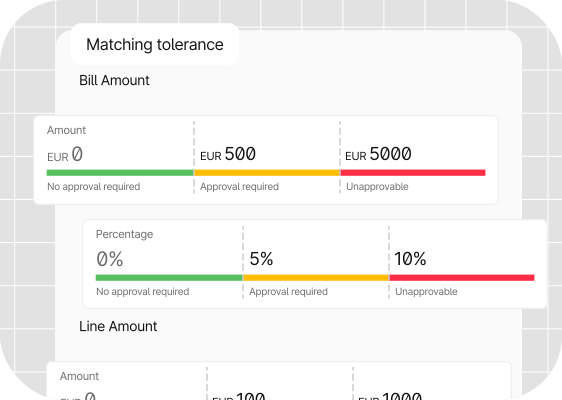
Note: Manual invoice routing happens by email or paper, whereas automated routing runs in the background and notifies each stakeholder when an invoice needs their attention.
4) Schedule and Make Payment
The AP team schedules payment for the approved invoice in line with the agreed payment terms.
For example, it may use a global payments tool to pay via debit or credit card within 30 days. That way, the company avoids a late-payment penalty and protects the supplier relationship.
5) Record and Reconcile the Transaction
The AP team or tool posts the payment to the general ledger (an accounting system in most cases) and ensures it matches the bank account transaction, supplier balance sheet, and AP liability account.
The first step is to record the transaction. The second is reconciling it.
When all these actions run smoothly, AP becomes a reliable function that supports healthy cash flow, clear records, lasting vendor relationships, and consistent compliance.
But without the proper measures, errors and inefficiencies can create a different story.
Note: 42% of AP teams told a SSON survey that invoice processing delays are one of their biggest challenges.
Key Accounts Payable Challenges (and How to Overcome Them)
Many UK finance teams face the same disruptive challenges when trying to build or optimise AP workflows.
Here are the most common risks and obstacles, with tips to help you minimise rework and delays.
Manual Data Entry and Inconsistent Coding
Manual data entry is one of the fastest ways to introduce errors into your financial records.
It’s also a common cause of AP bottlenecks, affecting the average number of days it takes to process an invoice—a valuable metric for accounts payable departments.Almost a third (29%) of UK respondents in Tipalti’s 2025 Global Finance Outlook survey said manual processes have caused errors in their financial deliverables. Also, 40% said they spend too much time fixing mistakes.
While staff are generally accurate when typing details into a system by hand, it’s easy for people to become tired, distracted, or careless after repeating the same simple tasks every day.

One mistyped PO number at the capture stage can cause serious delays at approval. This can snowball into incorrect VAT treatment being applied to multiple invoices and trigger interest charges if HMRC identifies underpayments.
How to avoid data entry errors: Invest in automated capture and validation tools to free your AP team from simple but repetitive work. A tool that blends traditional optical character recognition (OCR) with modern AI can achieve 98–99% data extraction accuracy.
Modernise AP with Intelligent Automation
Accounts payable automation is a reliable, cost-efficient way to cut errors from your finance workflows while improving team productivity and regulatory compliance.
Unclear Approval Workflows
AP processes stumble when no one is sure who should approve a vendor invoice or which tasks should come first.
Roles may seem clear, but when people get busy or take time off, outstanding invoices often sit untouched.
When an invoice is already close to its due date, even a delay of a few days can result in late payment, leading to additional costs and strained relationships.
For example, UK suppliers can charge statutory interest of 8% plus the Bank of England base rate on late commercial payments.
How to ensure fast invoice approvals: Keep things moving with clear approval and escalation rules. Every invoice should reach someone with sign-off authority, even when the usual approver isn’t available. You can set this up to happen automatically with the right AP software.
Lost and Mismatched Documents
When purchase orders, receipts, and invoices are in different systems, it takes longer for AP teams to find and match them.
It’s no coincidence that Tipalti found that the average team uses 3.9 different logins or systems to make a supplier payment, and matching POs to invoices is one of their least efficient AP processes.
Every time a team member has to copy data or move files across apps, it is another chance for errors to slip into the workflow.
HMRC even highlights this risk for UK businesses in its Guidelines for Compliance 8 (GfC8):
A risk area for VAT exists where data is transmitted across system interfaces and loss or change can occur.
While managing a few invoices across systems suits some small businesses in the short term, risks multiply when companies make mass payments at scale.
For a UK marketplace paying thousands of partners or affiliates every month, missing or mismatched documents can trigger VAT misstatements across hundreds of transactions, making HMRC reviews more likely.
How to organise financial documents: Centralise AP documents where possible, so stakeholders have easy access. Invoice management software with ERP integration is the simplest solution. Even a shared drive is more efficient than email chains and offline folders.
Evolving Regulations and VAT Expectations
UK VAT and data protection regulations pressure finance teams to keep smooth AP processes and clean documentation.
Non-compliance can be costly and disruptive. For example, HMRC may issue:
- Financial penalties for VAT misstatements.
- Interest charges on underpaid VAT.
- More frequent or in-depth audits due to perceived risk.
With rules constantly evolving, companies must continually adapt their workflows to stay compliant.
For instance, a recent consultation on e-invoicing points to the UK adopting EU-style digital reporting requirements, following the trajectory set by Making Tax Digital (MTD).
This is a pressing issue for many AP departments. European finance teams responding to a SumSub survey named changing regulations their biggest compliance challenge.
How to stay resilient to changing regulations: Keep clear AP policies and consistent digital records. Use systems that provide full audit trails. Centralised, automated workflows make it easier to adapt when requirements change.
4 Reasons Accounts Payable Teams Need Automation
Manual AP processes become more complicated to manage as invoice volumes grow and controls tighten.
Automation is a more reliable way for fast-growing businesses to handle payments. It removes repetitive tasks and helps to keep data aligned across systems.
Automation is particularly valuable for those managing global payouts, multi-entity workflows, or large partner and affiliate networks—where manual work becomes chaotic fast.
Here’s how automation supports cleaner, more predictable AP cycles.
1) Automation Saves Time and Increases Productivity
Automation removes much of the manual work that slows AP teams down.
With the right system, staff no longer have to type details into ERP or accounting software, or chase approvals through email chains.
OCR, machine learning, and AI combine to extract key invoice data accurately. Algorithms then handle routine checks and push validated invoices to the right approvers.
Meanwhile, staff get to focus on exceptions and supplier queries. They can ultimately process more payments in fewer working hours, without compromising on accuracy.
2) Automation Strengthens Compliance
Automation applies consistent rules across coding and approvals. This reduces human error, helping teams stay aligned with UK VAT and record-keeping expectations.
Instead of relying on staff to remember thresholds or approval limits, the system enforces them automatically and keeps documentation organised.
Checks such as 2-way and 3-way matching happen in the background, with every action forming part of a clean, searchable audit trail.
3) Automation Improves Data Consistency
Rules, validation checks, structured data capture, and integrations keep records clean across every stage of the AP process.
Connections to ERP and accounting systems ensure teams are always working with the same up-to-date data and can find what they need to inform decisions.
For example, connecting Tipalti to Oracle NetSuite eliminates the time-consuming effort of exporting bank data to spreadsheets and re-importing it back to your ERP.
This simple connectivity—illustrated below—speeds up invoice processing for a faster financial close.
Meanwhile, dashboards provide a real-time view of every invoice’s status, along with outstanding liabilities.
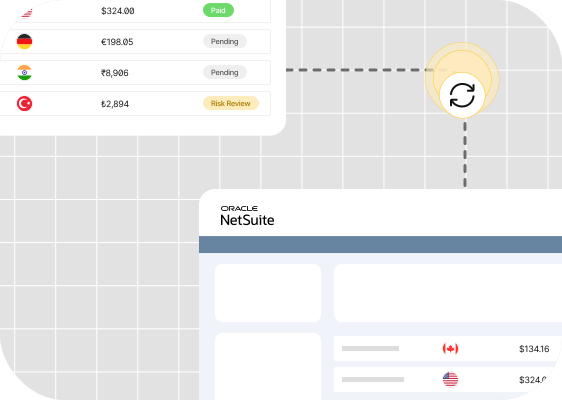
At any given time, every stakeholder is aware of what’s happening and what’s required of them to ensure payments flow smoothly and records are accurate.
These benefits matter even more for companies operating across multiple tax jurisdictions, where a single view of payables is essential for audit preparation and consistent controls.
4) Automation Creates Growth Opportunities
All together, automation’s benefits help companies scale sustainably without increasing headcount.
Less time spent entering data and chasing documents means finance teams can focus on activities that drive revenue growth: analysis, forecasting, planning, and supplier management.
And finance leaders agree, as 70% say not having AP automation could restrict their company’s ability to scale. That shows automation is as much about growth-readiness as productivity.
Pro Tip: Learn more about why using dedicated financial automation software, such as Tipalti’s Accounts Payable solution, can benefit AP teams.
Smooth AP Is the Future of Financial Strategy
Accounts payable is becoming a more visible part of financial operations as companies across the UK seek tighter control of procurement spending and clearer performance insights.
These changes, combined with HMRC’s evolving regulations, mean expectations placed on AP teams will continue to rise.
However, that doesn’t necessarily mean more hiring or stress. What matters is building an AP function that is consistent, transparent, and resilient.
Clear workflows and reliable controls provide teams with the stability they need to manage cash flow effectively, while keeping suppliers and auditors satisfied, even as the landscape evolves.
See how Tipalti’s Accounts Payable solution combines AI and automation to strengthen payment operations of any scale.
Accounts Payable FAQs
What’s the difference between accounts payable and accounts receivable?
Accounts payable (AP) tracks the money you owe suppliers, whereas accounts receivable (AR) tracks the money customers owe you.
In AP processes, you’re the buyer. In AR processes, you’re the supplier.
Can I outsource accounts payable?
Many companies outsource AP responsibilities to reduce admin work, but it can create visibility and communication gaps.
Automation is an alternative to outsourcing that keeps financial data and controls in-house.
Learn more in our guide to accounts payable outsourcing.
What are the primary responsibilities of an accounts payable team?
Most AP teams handle:
• Invoice processing and approvals
• Payment processing
• Supplier record management
Many also support audit preparation, bookkeeping, and financial reporting.
Which types of software does my accounts payable team need?
Most teams depend on an accounting or ERP system, plus tools for invoice capture, approvals, and payment processing.
Integrating these systems ensures that data stays up to date across the business.