


 Back
Back 

Diligent invoice management is crucial to maintaining sustainable spending and fostering strong vendor relationships.
Yet, many UK businesses still handle approvals using confusing email chains, disconnected spreadsheets, and even paper copies.
Ensuring faster approvals doesn’t have to mean losing control of compliance.
This guide explains a better approach, including what a smooth and reliable invoice approval workflow looks like and how to streamline the process with AP automation.
Key Takeaways
- Smooth invoice approval workflows help keep spending under control and supplier relationships strong.
- Manual invoice approvals—involving email threads, attachments, and even paper copies—slow UK finance teams and increase errors.
- Automation handles repetitive tasks such as capturing and verifying invoice data, and routing approvals to the right people.
- The best AP automation tools harness AI and machine learning to make approvals run like clockwork, increasing efficiency and profitability.
What an Invoice Approval Workflow Is (and Why Yours Matters)
An invoice approval workflow is the set of steps in the accounts payable (AP) process where a team, member, or automation tool checks that an invoice is ready for payment.
The approval workflow determines three key factors:
- Who reviews the invoice.
- What checks are carried out.
- When approval is required.
A consistent and secure approval workflow ensures that every invoice received is correctly managed and paid before it is recorded in the company ledger.
That helps to make cash flow predictable, prevent fraudulent and duplicate payments, and ensure VAT accuracy—all while providing clean audit trails.
Invoice approval is one stage of a wider invoicing process, but how smoothly it goes depends heavily on every other step.
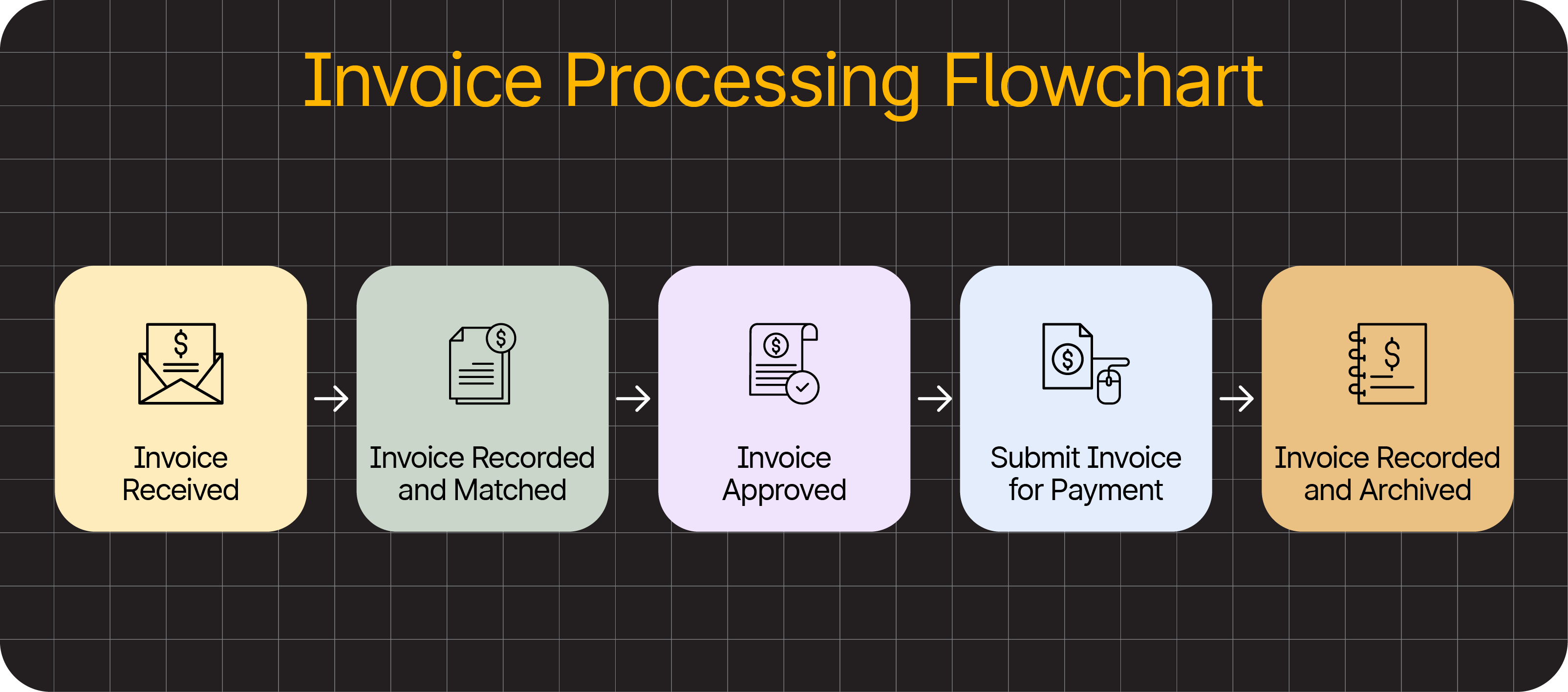
Here’s the complete invoicing workflow for context, including the approval stage:
Additionally, understanding the distinction between an approval workflow and an approval policy will enable you to implement the most effective versions of both.
The approval workflow is the process by which invoices are moved from receipt to payment. It covers the steps taken and their cadence.
The approval policy outlines the rules governing these movements. It includes who can approve which types of invoices and at what values.
Note: 42% of AP teams told a 2025 SSON survey that invoice processing delays are one of their biggest challenges—suggesting many companies could benefit from streamlining their approval workflows.
The Invoice Approval Process Explained
Mapping your current invoice approval workflow makes it easier to identify where inefficiencies slow your team.
While every business runs differently, most approval workflows involve or depend heavily on the invoicing stages below. The most direct ‘approval’ work happens at steps four and five.
1) Receive the Invoice
Accounts payable receiving a request for payment triggers the start of the approval workflow.
Suppliers today still use a mix of formats, including PDFs and printed documents.
An increasing number also use supplier portals or e-invoicing networks, like Peppol. This is generally the most efficient and secure way, although processing times depend on the system.
The first task is to capture the invoice and store it in a central location, such as invoice management software, an accounting tool, or a shared folder.
This ensures that invoices aren’t overlooked and that the approval workflow begins with a complete and organised record.
2) Capture Invoice Data
The AP team records the invoice’s key details, either manually or using technology.
Typical fields include:
- Supplier name
- Invoice number
- Purchase order (PO) code
- Total amount and VAT
- Line items where relevant
Many teams still enter this information manually, but optical character recognition (OCR) and AI-based capture tools are becoming increasingly common, helping to reduce errors.
Automating data capture like this saves time. It also reduces the chance of human error while increasing security.
3) Validate the Invoice Details
The AP team or automation checks the invoice’s details to make sure they add up and are consistent with the PO and goods received notes.
Quantities, unit prices, and VAT must all align. The invoice can’t progress to approval until all issues are resolved.
Fraud checks happen here, too, meaning:
- The supplier should be recognised and approved.
- The invoice must be genuine.
- There can’t be any duplicate entries.
Effective validation catches issues before they impact tax returns, protects cash flow, and avoids audit issues during audit checks.
Even minor discrepancies increase the risk of HMRC inquiries, especially during routine VAT return reviews.
4) Route the Invoice for Approval
After validation, the invoice is sent to the appropriate individuals for sign-off.
Approval structures vary between businesses, usually depending on the number of stakeholders and available resources.
Smaller teams often rely on a single manager for approvals. Larger ones tend to involve department heads, project owners, or finance controllers.
Some companies also use different approval paths for different sizes and types of transactions.
A high-value invoice from a new supplier might need closer review, for example. A small recurring invoice from a known vendor may be approved with lighter scrutiny.
Regardless of how approval routing is structured, the goal is to make sure every payment is signed off by someone with the appropriate level of authority.
5) Approve, Reject, or Query the Invoice
The person or team with the right authority either approves the invoice, rejects it, or sends it back for additional information.
Here’s how each possible decision typically plays out:
| Approve the invoice | Everything appears accurate. The approver confirms that the items were delivered and the payment amount is correct. The invoice is prepared for payment. AP schedules it for the next payment run and posts it to the accounting system to maintain the audit trail. |
| Reject the invoice | The invoice isn’t legitimate, or its details are incorrect. The approver stops the payment and either: • Contacts the supplier for a new invoice, if the issue is simple to correct. • Escalates the issue internally, if it’s down to budget, contract terms, or delivery disputes. |
| Query the invoice | Something doesn’t look right, but it doesn’t justify outright rejection. The approver sends the invoice back to accounts payable or procurement to get clarification, supporting documents, or internal corrections. If the issue is resolved internally, the invoice goes through approval again. If the issue can’t be solved internally, the invoice is rejected. |
Clear decisions and communication at this stage help stop the lengthy back-and-forth that often delays payments. For example, a department head on leave shouldn’t cause a 10-day approval stall.
In a Department for Business & Trade survey, 36% of UK businesses attributed late invoice payments to administrative errors, and 31% put them down to disputed invoices.
Late payments strain relationships. In fact, 15% of suppliers told another government survey they don’t offer repeat business to customers whose payment behaviour is unreliable.
Payment timeframes are under scrutiny from the UK government, too. Under the Late Payment of Commercial Debts (Interest) Act 1998, suppliers can charge statutory interest of 8% plus the Bank of England base rate on overdue invoices.
These problems typically stem from slow or inconsistent approval workflows. That is why many UK finance teams are now seeking ways to make the process more reliable.
Simplify Invoice Management with Smart Automation
Let invoicing automation handle your payment workflows with self-service supplier onboarding, automated validation, and approval routing features built for compliance and profitability.
4 Common Approval Bottlenecks for UK Finance Teams (and How to Overcome Them)
The same few challenges hold companies all over the UK back from approving invoices quickly, consistently, and securely.
Here are the most common reasons for payment processing delays, with tips to help you overcome each one.
1) Manual Data Entry
Typing invoice data into accounting software makes it easier to avoid errors that can enter your approval workflow. Such mistakes cause rework and discrepancies.
Almost a third (29%) of respondents in Tipalti’s 2025 Global Finance Outlook survey said manual processes have caused errors in their financial deliverables. 40% said they spend too much time fixing them.
It only takes one mistyped invoice number or PO reference for an approver to reject or query an invoice unnecessarily. These simple errors might force AP and procurement to recheck quantities and pricing, or trigger back-and-forth communications with the supplier.

How to avoid manual data entry risks: Switch to OCR or structured digital capture so that most invoice data is extracted directly from the document. Look for a solution that pairs OCR technology with AI agents to achieve the 98–99% data extraction accuracy that modern AP teams require.
2) Unreliable Paper-Based Steps
Paper invoices are easy to misplace, difficult to share, and hard to track once they’re in circulation.
Plus, paper records alone don’t meet the legal requirements of HMRC’s Making Tax Digital (MTD) initiative, which requires VAT-registered companies to store invoice data in approved digital systems. It means a team member must add them manually.
Both humans and OCR tools can struggle to read handwritten invoices, making them even more problematic than printed versions. Once again, inaccurate captures cause delays while approvers clarify details, frustrating everyone involved.
How to improve on paper-based workflows: Store all invoices digitally in a central location, such as an accounting or ERP system, to provide your entire team with access to the same clear, up-to-date records.
3) Slow or Unclear Approval Routing
AP workflows stall when there’s confusion over who needs to approve an invoice or which transactions to prioritise.
Even if day-to-day responsibilities are clear, staff absences and busy workloads can quickly lead to invoice approvals going ignored.
If a deprioritised invoice is already close to its due date, even the slightest delay can push it into late payment territory—potentially triggering penalties and damaging supplier trust.
How to keep invoicing workflows moving: Set clear approval rules and escalation paths so that invoices always find their way to someone with sufficient authority, even if the usual approver isn’t available.
4) Limited Visibility of Invoice Statuses
When AP teams and approvers can’t easily see where invoices are in the approval status, they spend too much time chasing updates manually instead of prioritising other responsibilities.
A lack of visibility also makes it harder to forecast financial performance, manage suppliers’ expectations, and prevent late-payment penalties.
How to provide real-time visibility on invoicing: Use a shared dashboard or tracking tool to give all AP staff and team members with approval responsibilities and budget ownership quick access to live invoice status information.
How AP Automation Strengthens Invoice Approval Workflows
AP automation eliminates the most time-consuming and error-prone aspects of invoice management, removing approval blockers, improving data accuracy, and creating clean audit trails.
More specifically, the best AP automation tools offer these four benefits.
Faster Capture and Fewer Data Errors
OCR, machine learning, and artificial intelligence (AI)—or a combination of the three—pull key details from each invoice with a level of accuracy that human staff can’t consistently reach.
Without the team typing anything by hand, data from new supplier invoices flows smoothly into the business’s accounting system, where validation and matching occur.
Automatic Validation and Matching
The system utilises various rules and algorithms to verify each invoice against purchase orders, receipts, supplier records, and online tax databases, including those for the UK and EU VAT numbers.
2-way and 3-way matching rules reliably flag duplicates and discrepancies early in the invoicing process, ensuring approvals run smoothly further down the line.
Accurate line-level VAT capture reduces the risk of HMRC queries or corrections.
Note: 2-way matching checks data alignment between the PO and invoice. Three-way matching goes further to verify the PO, invoice, and sales receipt.
Smart Routing and Reminder Notifications
Each verified invoice automatically moves from the extraction and validation stages to the team or person responsible for approving it.
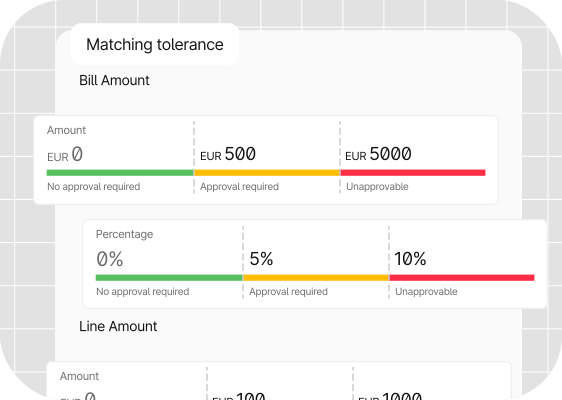
Companies set rules for routing invoices based on factors including total value, spending categories, department, and project. A smaller team might have all invoices go to one finance manager.For example, here’s how matching tolerance works in Tipalti’s automation system:
The system also follows automated escalation paths so that invoices never sit idle if an approver is unavailable.
Real-Time Invoice Status Tracking
Dashboards display the current status of each invoice in the accounts payable process—whether waiting, being queried, or ready for payment.
Real-time visibility ensures approvers and stakeholders know what’s expected of them at any moment. This increases accountability to keep the whole financial operation running smoothly.
Most automation tools are an improvement on manual invoice approval processes. However, the best go further to make the lives of CFOs and their teams even easier.
What to Look For in an Invoice Approval Workflow Tool: A Simple Checklist
The right invoicing solution for your business needs to make every stage of the approval workflow easier, faster, and more accurate.
Choose a tool with these essentials for the best possible return on investment.
| What to Look For | Why It Matters |
|---|---|
| Accurate invoice capture | Clean data reduces rework and improves VAT accuracy by preventing errors early. |
| Automated validation and matching | PO, GRN, and invoice checks catch discrepancies before they reach approvers. |
| Flexible approval routing | Ensures invoices reach the right people at the right time, even during staff absences. |
| Real-time status visibility | Live status tracking helps AP teams meet payment terms and manage cash flow. |
| Consistent financial controls | Thresholds, permissions, and audit trails support HMRC reviews and internal checks. |
| Supplier onboarding and verification | Reduces fraud risk by validating supplier details and tax information upfront. |
| E-invoicing compatibility | Keeps the business aligned with UK and EU digital reporting requirements as they evolve. |
| ERP and accounting integrations | Smooth posting into systems like NetSuite, Xero, and QuickBooks Online keeps records aligned. |
Getting these core capabilities right helps UK businesses achieve consistent approvals and minimise the errors that lead to late payments or VAT issues.
With the essentials in place, the next step is exploring how higher-level automation can support faster growth and tighter financial control.
How Tipalti Takes Automated Invoice Approval Workflows to the Next Level
Tipalti’s intelligent features build on basic automation to remove more manual work and further increase accuracy across every invoice’s lifecycle, from receipt via approval to reconciliation.
Tipalti’s automation software:
- Produces clean, reliable data from the start. The Invoice Capture Agent reduces time spent processing invoice data with AI that automatically reads and accurately fills each field.
- Speeds up approvals with consistent coding. The Invoice Coding Agent auto-fills GL and custom fields with the correct expense accounts.
- Stays compliant as digital standards evolve. Support for e-invoicing formats and secure exchange networks helps organisations keep up with compliance changes without rebuilding entire workflows.
- Keeps records aligned across systems. Integrations with popular accounting and ERP tools, including QuickBooks Online, Oracle NetSuite, and Xero, eliminate manual data entry.
- Reduces fraud risk early in the process. Automatic supplier onboarding and tax validation can prevent fraud and payment errors from the start of every partnership.
- Creates a traceable, tamper-proof audit trail. Every invoice, change, and approval action is logged and time-stamped, ready for HMRC checks.
Tipalti’s 24/7 AI Assistant combines deep knowledge of your financial controls and workflows—including invoice approvals—with advanced reasoning to provide quick answers to conversational prompts such as:
- “Show me all invoices under $5,000 that are waiting for approval.”
- “Who is approving INV–2045?”
- “How many invoices are within 7 days of their due date?”
It all happens in a slick conversational interface that looks like this:
The smart, always-on sidekick is built to save finance professionals in all roles time on routine tasks, like finding information.

The convenience is a huge benefit, considering that knowledge workers spend an average of 3.2 hours per week searching for data to perform their roles, according to Slite.
Case Study: How Tipalti’s Automation Cut Outset Global’s AP Close Time in Half
Outset Global is one of many UK companies that have seen their payment workload drop after automating invoice capture, approvals, and reconciliation.
With fewer manual steps slowing things down, the team gained clearer visibility over spend and moved through approvals much faster.
As more finance teams look for ways to reclaim time and reduce manual effort, such tools are shaping what modern invoice management looks like.
The Road Ahead for UK Invoice Approval
Growing invoice volumes, tighter margins, and shifting expectations around digital record-keeping mean manual processes won’t hold up for long.
Automation—already a competitive advantage—is becoming the new baseline for invoice management.
The companies using the smartest, most intuitive tools will be the ones moving fast, staying compliant, and keeping tight control over their cash flow.
Don’t wait to experience the future of accounts payable. Learn what smart invoice management automation can do for approvals and more.