


 Back
Back 

Manual invoice handling remains one of the biggest bottlenecks for European finance teams. Discrepancies, delays, and mounting compliance checks waste hours every week—and even minor errors can lead to costly penalties under EU tax rules.
OCR invoice processing helps accounts payable (AP) departments validate invoices faster, reduce errors, and stay compliant.
This guide explains how OCR technology transforms invoice processing for EU businesses, its benefits for cross-border compliance, and how AI delivers even greater speed and accuracy.
Key Takeaways
- OCR technology turns data from scanned and digital documents into text that your invoicing software can process.
- While OCR accelerates AP efficiency and helps ensure compliance across EU markets, in isolation, it’s a legacy solution with limitations.
- AI-powered invoice processing reduces manual entry, errors, and fraud risk to keep businesses productive and compliant.
- Tipalti blends OCR with AI to achieve 98–99% data extraction accuracy, giving EU finance teams peace of mind throughout the AP process.
What Is OCR Invoice Processing?
Optical character recognition (OCR) invoice processing turns data from scanned or digital documents into searchable, editable text to make processing it more efficient.
OCR technology is useful for European AP teams as it makes data machine-readable, which speeds up invoice handling and reduces errors.
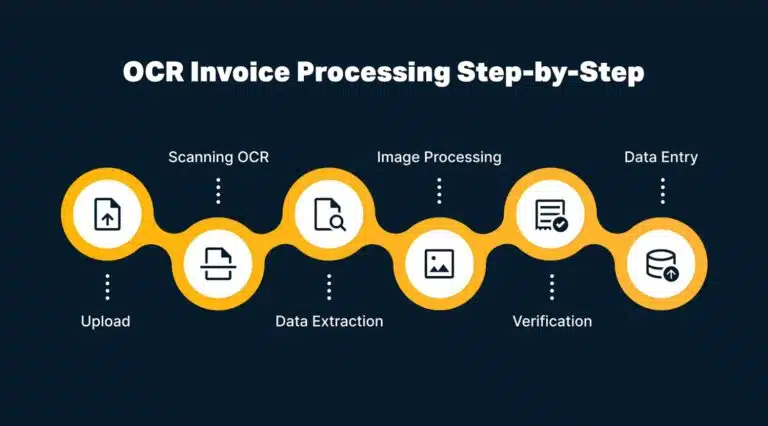
The process typically goes like this:
Without depending on time-consuming manual data entry, it is far easier for teams to:
- Keep deals moving smoothly for improved cash flow and supplier relationships.
- Stay compliant with ever-evolving EU regulations, avoiding penalties.
Most firms use OCR in a broader AP automation solution rather than as a standalone tool.
With the right blend of AI and automation tech, they can scale up invoice volume and speed up processing without increasing headcount.
To benefit, you first need to know how OCR will fit into your AP management workflow.
How OCR Invoice Processing Works in Accounts Payable
OCR simplifies invoice management by turning unstructured data into searchable records that your accounting system recognises.
Here’s how the process works from receipt to archiving.
1) Upload and Digitise Invoices
An AP team member scans paper invoices or uploads PDFs and Word documents into the OCR software to create digital records.
2) Preprocess Images for Clarity
Before data extraction, the system cleans up scanned images by adjusting contrast, correcting rotation, and removing background noise.
Better image quality = more accurate results.
3) Scan and Extract Invoice Data
Following preprocessing, OCR software scans each invoice and pulls out key details like:
- Vendor names
- PO and invoice numbers
- Dates
- Quantities
- Tax information
- Totals
Machine learning algorithms help the best OCR tools adapt to different invoice layouts. That’s crucial for capturing country-specific VAT formats or mandatory fields to comply with Peppol (a standardised procurement system used across Europe).
4) Verify and Validate Invoice Details
Working alongside AP automation, OCR verifies the accuracy of extracted data. It verifies that VAT numbers match each member state’s format, dates are accurate, and totals fit line items.
It cross-references this information against purchase orders, goods receipts, and vendor records to flag any mismatches.
Note: Automation catches most errors, but human review adds an extra safeguard for anomalies, such as first-time vendors or unusual formats—while also helping the system learn faster from each correction.
5) Export and Store Data (i.e., Data Entry)
The verified data flows into ERP or accounting software to update records and trigger payments.
The best OCR tools integrate with widely used applications like Xero, Sage, and SAP. Tipalti’s integration library contains these and many more.
Finally, the system archives invoices in a searchable database, making them easy to reference or export as CSV files.
Note: Secure storage is crucial for VAT audits and GDPR compliance as most EU member states mandate keeping records for 5–10 years, depending on the record type.
How OCR Invoice Processing Benefits EU Businesses
OCR solutions process data faster and more accurately than humans, keeping busy finance functions running smoothly.
As your company scales and invoice volumes grow, reliable OCR technology lets teams focus on the less robotic aspects of business finance, such as managing relationships and negotiating terms.
Here are the key benefits of OCR and automated invoice processing.
1) It Saves Time and Money
Analysing and processing invoice data used to take hours of manual typing. OCR software handles the job in minutes, boosting productivity and cost efficiency.
Those time savings add up fast: 63% of AP professionals say they spend more than 10 hours a week processing invoices, the Institute of Financial Operations & Leadership (IFOL) reports.
When invoices flow through your finance team fast and accurately, staff have time for other tasks.
Ultimately, you get more from your team without having to increase headcount. That extra productivity has been a real win for Tipalti user The Node.
With Tipalti, what once took days now takes 20 minutes a week—letting us pay 700 creators across 50+ countries without adding finance staff.
Rémy Chapot, CEO, The Node
2) It Reduces Human Error
While not perfect, OCR systems maintain high accuracy far better than tired and distracted staff, catching costly errors before they affect your business.
With the support of other AP tools, OCR software automatically detects issues such as:
- Typos and transpositions
- Incorrect due date formats and currency symbols
- Discrepancies in pricing, tax rates, and payment terms
- Misaligned rows and columns (which drag out processing times)
- Duplicates in ERP or accounting software
With fewer errors in your accounts payable workflow, you minimise incorrect and duplicate payments—and the stress that typically follows.
For example, Stay22 slashed payout mistakes and streamlined its global operation by swapping manual document processing for Tipalti’s OCR and invoicing automation.
At the time, we were lacking control to prevent errors. Data was manually copied between systems, so there was a high risk of errors.
José Pontes, Director of Finance, Stay22
With Tipalti, the partner success team’s time spent on payment issues dropped by 90%.
Eliminate Invoice Errors and Stay Ahead of EU E-Invoicing Mandates
See how Tipalti’s e-invoicing solution combines OCR and AI to help EU finance teams stay compliant, eliminate manual data entry, and prepare for upcoming digital reporting mandates.
3) It Improves Compliance With EU Regulations
When OCR invoicing cuts errors from the accounts payable process, you maintain accurate records that withstand scrutiny from both internal audits and cross-border VAT checks.
Added reliability builds trust across finance teams, ensuring payments are on time and data stays audit-ready.
In the EU, where rules vary by country, OCR helps you comply with several key requirements:
| Regulation/Standard | How OCR Invoice Processing Aids Compliance |
|---|---|
| EU e-invoicing directive (2014/55/EU) | Turns digital and scanned invoices into standard formats that meet e-invoicing rules across member states. |
| Peppol | Captures and checks key fields like VAT numbers and totals so invoices move through the Peppol network without errors. |
| DAC7 | Keeps supplier and payment data accurate for easier tax reporting and fewer corrections. |
| VAT in the Digital Age (ViDA) | Makes specific invoice data easy to search and share, for real-time VAT reporting and cross-border checks. |
| GDPR | Stores and processes digital invoice data securely, so that sensitive data stays protected and auditable. |
OCR invoice processing helps ease many compliance headaches, saving companies money and overcoming a key productivity barrier.
After all, nearly 45% of European financial services firms reportedly faced high operational compliance costs, according to a Sumsub survey. Over half said keeping up with regulations is their primary challenge.
Once you understand the benefits, it’s equally important to recognise OCR’s limitations. These gaps explain why many EU finance teams are turning to more advanced tools to improve accuracy and compliance.
How Accurate Is OCR Technology?
OCR is only accurate 85%–90% of the time. That’s not high enough in AP, where a single error or discrepancy can cause payment issues and compliance breaches.
Limitations include poor scan quality, handwritten text, and complex invoice formats. While human review improves results, it also adds time and cost.
While OCR invoice processing is helpful, it’s only one cog in a larger AP automation machine.
To reach the 98–99% accuracy modern finance teams need—and meet evolving EU mandates—you must pair OCR with artificial intelligence.
Note: We explain OCR’s limitations in detail in our guide Five Reasons Why OCR Isn’t Enough.
OCR and AI: Automate the Invoice Approval Workflow With Confidence
Pairing OCR with AI turns basic text recognition into intelligent invoice processing.
While OCR reads and extracts data, AI algorithms make sense of it, analysing patterns across thousands of invoices to learn how these diverse documents really work.
Not all invoice formats follow the same rigid templates. Suppliers from Germany, France, Spain, and other countries may have their own conventions for financial documents.
Over time, machine learning improves recognition, learning which fields matter for Peppol submissions and how different countries format VAT numbers, for instance.
However, scalability is the real test for most growing EU businesses.
OCR and AI-powered invoice automation make it easy to handle higher volumes, multiple currencies, and complex approval chains without hiring extra staff or compromising compliance.
How Tipalti Blends OCR and AI for Smarter Invoice Data Extraction
Tipalti is an AI automation solution that streamlines how finance teams capture, validate, and process invoices (tasks that OCR cannot handle in isolation).
More specifically, Tipalti’s Invoice Capture Agent reads invoices at the header and line-item levels.
Unlike basic OCR, it adapts to invoice variations, precisely extracting data from complex line items and table formats.
Here’s what the tool looks like in action, scanning an invoice image’s individual items:
This AI-powered data capture minimises manual intervention. Approvers can focus on reviewing exceptions and managing vendor relationships, rather than checking every data input.
Tipalti’s AI becomes more accurate with every invoice processed, learning from past corrections to better handle new document types, languages, and country-specific formatting requirements.
Seamless integration with ERP systems means verified data from scanned documents routes into your accounting software, updating records and triggering payments without any extra steps.

Note: Tipalti’s invoice management tools connect to most well-known ERP and accounting systems via pre-built integrations and powerful APIs. Share structured data with SAP, Oracle Cloud, Sage, QuickBooks, and more.
OCR and AI in Action: Lenus’ Story
Danish health-tech firm Lenus works with suppliers across Europe. Invoices arrive in various formats and languages, so the company requires automation that can handle this complexity.
Lenus now uses Tipalti’s solution to automatically process invoices, standardise payments in vendors’ local currencies, set payment timeframes, and generate clear reports.
Combining OCR with Tipalti AI creates a reliably accurate, automated solution to classic AP frustrations.
According to Senior AP Accountant Dayane Piassi Casagrande, it’s helping growth, too:
One of the great things about implementing the right technology for specific functions is that your team can focus on growing the business—because automating those processes means they won’t become the limiting factor as your company scales.
Dayane Piassi Casagrande, Senior AP Accountant
OCR and Beyond: 3 Steps to Smoother Automated Invoice Processing
Getting the most out of OCR and AI automation requires more than simply replacing manual processes with software.
Here’s how to set your finance team up for success.
1) Standardise Your Data (Where You Can)
Encourage suppliers to use consistent invoice formats where possible.
The cleaner your incoming invoices, the faster AI learns your patterns and the fewer exceptions you’ll need to review manually.
Collaborate with key vendors to establish preferred formats that include all required fields for compliance, such as proper VAT formatting and Peppol-compatible data structures.
These conversations will help the whole supply chain run smoothly.
2) Let the System Learn
Don’t let exceptions discourage you early on. The system needs this feedback loop to improve accuracy for your specific vendors and invoice types.
Every time your AP team corrects an error or adjusts coding, that feedback trains the model.
Within weeks, you’ll see fewer invoices flagged for manual review as the AI recognises patterns from different use cases and applies past corrections to new invoices.
3) Ensure End-to-End Integration
AI works best when connected across your entire AP platform, from capture through to payment and reconciliation.
Connectivity means visibility across entities, countries, and currencies from a single system.
Most importantly, ERP integration ensures verified records flow freely into your accounting software. For example, Tipalti connects to Microsoft Dynamics 365 to keep payment activity up-to-date:
Tipalti users can achieve the same connectivity with SAP, Oracle, Sage, and more.
Whatever your chosen system, synchronising prevents duplicate data and maintains consistent records across jurisdictions.
The Future of OCR in EU Finance
As invoice volumes grow and EU regulations evolve, scalability and compliance will define the best-performing finance teams.
The EU’s ViDA proposal is particularly significant. By 2028, e-invoicing will become mandatory for all intra-EU transactions, accelerating the shift to real-time reporting and digital audit trails.
Finance teams that adopt AI-powered automation today will be best placed to scale efficiently while staying fully compliant.
Those ready to advance their AP strategy now can look beyond legacy OCR to a more intelligent, comprehensive invoicing solution like Tipalti. It delivers the best balance of speed, accuracy, and control.
See how Tipalti helps EU finance teams automate invoice processing, ensure compliance, and scale with confidence.
Go Beyond OCR—Automate Invoice Processing with Built-In Intelligence
While legacy OCR tools fall short in terms of compliance and accuracy, Tipalti’s AI-powered Invoice Management solution transforms invoice processing for EU finance teams.