


 Back
Back 

As your business grows, managing invoice approvals shouldn’t feel like playing catch-up.
Yet, manual data entry, disconnected tools, and chasing approvals are part of many businesses’ everyday operations. To address this, they’re seeking smarter, automated workflows that simplify and enhance the reliability of approvals.
This guide explains what an invoice approval workflow is, the steps involved, and how automation can help accounts payable save time, comply with EU requirements, and maintain a positive relationship with suppliers.
Key Takeaways
- An invoice approval workflow is the steps your finance team follows to process invoices.
- Manual invoice workflows are slow, error-prone, and expensive—causing delays, mispayments, and EU tax compliance risks.
- AP automation streamlines invoice management for faster, more accurate processing, clear audit trails, and stronger compliance.
- Automating invoice approval workflow with a solution like Tipalti reduces costs, improves vendor relationships, and provides finance teams with real-time control.
What Is Invoice Approval Workflow?
An invoice approval workflow is the steps accounts payable (AP) use to receive, verify, and approve invoices for payment.
An efficient workflow is essential for AP teams to process invoices accurately, on time, and in compliance with EU reporting and tax compliance regulations.
There are 500 invoices sent every second in the EU, according to the European Commission. However, as many as 47% of EU businesses report late payment.
Delays cause cash flow issues that impact everything from buying stock to paying employees, and pursuing green transition (shifting towards a sustainable, low-carbon economy).
In one in four cases, late payments lead to bankruptcy for small-to-medium enterprises (SMEs).
A well-structured invoice approval workflow tackles these issues. Reducing payment delays can save EU companies an estimated €158 million per day and fuel a healthy supply chain.
For your business, efficiency means avoiding EU late payment penalties, improving cash flow visibility, and fostering stronger supplier relationships.
What Are the Steps of the Invoice Approval Process?
The invoice approval workflow starts when you receive an invoice and ends when the invoice is paid and reconciled in your accounting system.
Your approach to each step significantly impacts the speed, accuracy, and compliance of invoice payments.
And this is what specific task each step in the process entails:
| Approval Workflow Step | Approval Workflow Task |
|---|---|
| Receive and enter the invoice into the accounts payable system | Collect the incoming invoice (via PDF, paper, or e-invoice) and extract key details, including: • Date • Business name, address, and number • Purchase order (PO) number • VAT number and rate • Line items • Totals |
| Validate the supplier and review the invoice details | Confirm that order details, totals, and supplier information are accurate—and that the invoice isn’t a duplicate. This step helps prevent fraud and reduce payment errors that delay approval. |
| Match the invoice with supporting documents | Compare the invoice with its corresponding PO number and goods receipt number (GRN). Matching ensures accuracy and prevents double payments or billing mistakes. |
| Code the invoice | Assign the appropriate general ledger (GL) code, tax code, and custom fields as needed. This organised system allows finance teams to categorise expenses, track spending, and ensure accurate reporting for tax and budgeting requirements. |
| Route the invoice for approval | Send the validated invoice to the right person or department. Efficiency is crucial at this stage to prevent delays. |
| Handle exceptions | Reach out to vendors or corresponding departments for clarifications and adjust requests on invoices with discrepancies (e.g., PO mismatches or incorrect totals). |
| Schedule invoice for payment | Once approved, schedule the payment according to your cash flow plan and the vendor’s preferred method (e.g., SEPA, Bankgiro, Global ACH, or PayPal). |
| Record invoice for auditing purposes | Save the invoice and supporting documents in your enterprise resource planning (ERP) system for accurate record-keeping, tax compliance, and audit readiness. Organised archives are essential to meet EU VAT Directive regulations. |
An effective invoice approval workflow relies on AP teams having the right resources and systems to extract data, communicate with approvers, and speed up payment processing.
As your business grows, any inefficiencies in your workflow will have a compounding effect that can compromise AP performance and vendor relationships.
Manual Invoice Approval Workflow vs. Automated Invoice Approval Workflow for EU Businesses
There are two ways to manage your invoice approval workflow: manually (i.e., the traditional method) or with automation.
Manual Invoice Approval
A manual workflow relies heavily on human input for data entry, chasing approvals, and record-keeping. Each step involves AP departments using a combination of paper, email, or phone-based processes.
For example, AP team members may print out and manually log invoice details in a spreadsheet. Then, email or physically deliver invoices to approvers for sign-off, before initiating a bank transfer and recording payment in the accounting system.
Automated Invoice Approval
An automated invoice approval workflow uses AP automation software to streamline repetitive tasks.
Upon receipt, technology extracts details, categorises, matches, and routes invoices for approval. It also automates payment and updates records, integrating with an ERP system for auto-reconciliation.
Note: Essentially, workflow automation solves the inefficiencies that manual business processes create.
This isn’t to say a manual workflow doesn’t work. If you only process a few invoices a month, traditional methods can be suitable, particularly for processing recurring invoices in a consistent process.
However, a manual invoice approval process isn’t future-proof. Let’s look at some of the issues traditional methods cause for scaling businesses.
Manual invoice approvals slowing down your AP process?
Invoice approval is critical to streamlining your end-to-end AP process, helping reduce costs, speed up payments, and ensure EU compliance. Learn how to optimise the full workflow for long-term success.
The Challenges of a Manual Invoice Approval Workflow for Growing Businesses
While a manual invoice approval workflow is manageable at first, it becomes a burden for scaling businesses as the volume increases.
If each step relies on people, spreadsheets, and email chains, processes slow and errors increase.
Here are some of the most common challenges businesses face with manual workflows:
| Manual Workflow Challenge | What It Leads To |
|---|---|
| Manual data entry slows processing | AP struggles to keep up with increasing invoice volumes, which causes stress on teams, leads to backlogs, and results in delayed payments. |
| Lack of safeguards increases fraud risk | Without built-in validation checks, teams are more vulnerable to duplicate payments or fraudulent invoices. |
| Document retrieval is time-consuming | Searching for or chasing supporting documents (e.g., PO numbers or delivery notes) creates roadblocks, delaying approvals and reducing efficiency. |
| Email-based approvals cause bottlenecks | Waiting for approvers to respond extends invoicing processing times and creates gaps in cash flow visibility. |
| Error resolution adds extra admin | Spending extra time contacting suppliers to correct mistakes or discrepancies puts more demand on AP teams, increasing the risk of late payment. |
| Supplier follow-ups drain resources | Constant calls and emails from vendors about delayed payments take AP teams away from higher-value tasks (e.g., optimising working capital or negotiating payment terms). |
A manual invoice workflow is difficult to scale without extra headcount and the costly process of hiring and training.
The EU’s move towards electronic invoicing (e-invoicing) also means traditional methods are quickly becoming outdated.
The European Commission’s Directive 2014/55/EU requires all public authorities and entities in the EU to receive and process e-invoices that comply with the European standard.
Some EU member states also currently mandate e-invoicing for business-to-business (B2B) and business-to-consumer (B2C) transactions.
E-invoicing rules require that invoices be automatically imported into an AP system without requiring manual entry.
E-invoices contain data in a structured format, specifically designed for AP systems. They eliminate the need for paper, PDF, Word, and JPG invoice formats—saving businesses money on processing and promoting faster payments across the EU.
The EU’s VAT in the Digital Age (ViDA) initiative will mandate e-invoicing for all cross-border B2B transactions from 2030.
In other words, moving away from manual processes improves workflow and keeps one in line with EU objectives.
Note: To simplify interoperability for e-invoicing and sharing other procurement documents across member states, European and international countries use the Pan-European Procurement Online (Peppol) framework. Learn how it works and why it matters to your business in our comprehensive Peppol guide.
How Automated Invoice Approval Workflow Solves Manual Inefficiencies
Invoice processing automation accelerates approvals and payments by replacing manual emails and spreadsheets with intelligent routing, matching, and compliance checks.
By automating the invoice lifecycle, a tool like Tipalti reduces AP workload by up to 80%, cuts payment errors by up to 66%, and increases financial close by up to 25%.
Freeing teams from laborious processes allows them to focus more on tasks that drive growth.
For example, implementing Tipalti’s accounts payable solution enabled wine marketplace Vivino to scale operations, close faster, and build a foundation for strategic growth initiatives.
We’ve been able to skill up. There’s way less time being spent on AP. It has freed up time to be smarter about treasury and currency, and it has also enabled us to close faster because we’re not scrambling to get invoices submitted. [With Tipalti], everything is pretty seamless.
Rebecca Simmons, Global Corporate Controller, Vivino
Here are some of the common benefits of using automation across your invoice workflow:
| Automation Benefit | How It Improves Efficiency |
|---|---|
| Consistent, on-time payments | Automated scheduling ensures prompt payments, strengthening relationships while allowing you to capitalise on early-payment discounts. |
| Fewer manual errors and reduced fraud risk | Automated data capture and validation eliminate keying mistakes and flag duplicate or suspicious invoices before payment. |
| Built-in compliance and regulatory control | Software automatically captures business and VAT data, and provides real-time audit-transparency to meet EU tax and DAC7 requirements. |
| Full visibility and audit-ready transparency | Real-time dashboards and audit trails give finance teams instant insight into invoice status and payment history, promoting accurate record keeping and smarter decision making. |
As the table shows, switching to automation isn’t all about speeding things up. It’s about giving your finance team the tools to work smarter, stay compliant, and keep vendors happy.
Pro Tip: If you operate an online platform or marketplace, the Directive on Administrative Cooperation 7 (DAC7) requires you to report seller and transaction data to EU tax authorities on an annual basis.
Learn about your obligations in our DAC7 EU compliance guide.
The Key Features of Invoice Automation Software for EU Businesses
Invoice automation software utilizes a combination of artificial intelligence (AI) agents and digital workflows to streamline invoice processing with minimal human intervention, thereby saving you time and money.
Here are the key features of an AP automation solution that handles your invoicing needs and supports you as your business grows. Look for these when choosing software.
1) Self-Service Supplier Hub
The most important step in any invoice approval workflow is ensuring your vendors are payable. A supplier management hub is a portal where vendors submit their payment details and invoices.
Tipalti lets you collect and authorise contact, payment, and VAT identification from vendors before they submit invoices—protecting data with enterprise-grade data encryption.
This level of security ensures you know a vendor’s identity and no one unauthorised gets paid.

It also provides suppliers with a single platform to submit invoices, track payment history, and receive status updates—streamlining communication throughout the invoice life cycle.
2) AI-Powered OCR
AI-powered optical character recognition (OCR) eliminates the need for manual invoice data entry—automatically extracting details with high accuracy.
Tipalti’s accounts payable Smart Scan feature combines OCR with machine learning (ML) models to recognise patterns and named entities—converting data into computer-readable numbers, words, and symbols.
Better still, Smart Scan understands context. It automatically categorises invoices (e.g., by vendor, product, or department) and spots anomalies that indicate potential duplicate or fraudulent invoices. Catching these issues early prevents delays later in the process.

In the background, Tipalti’s Finance AI Agents continuously monitor invoice data for compliance, accuracy, and fraud detection—flagging issues before they reach approvers. This intelligent layer enhances control while reducing AP workload.
Note: Tipalti supports e-invoicing and connects to the Peppol network, so you can capture data accurately and achieve full compliance across multiple countries.
3) Automated 2-Way and 3-Way Invoice Matching
Two-way and three-way matching automatically compares invoices with purchase orders and receipts, helping finance teams quickly flag discrepancies before they cause payment errors.
Where manual matching requires finding supporting documents in spreadsheets or filing cabinets, AP automation software matches invoices seamlessly during data extraction.
Two-way matching scans a vendor’s invoice and PO number, assessing details such as name, quantities, and price totals.

Three-way matching auto-checks the GDN or receiving note, alongside the invoice and PO number. This additional safeguard verifies that you’ve received the goods correctly and that the prices match.
Automating these checks protects against errors, fraud, and disputes, ensuring correct payments without manual research delays.
4) Customisable Approval Workflow
Customisable approval workflows tailor invoice processing to your needs to speed up progress without hitches.
Automation software lets you create rules based on categories such as:
- Invoice amounts
- Vendor type
- Purchase type
- Department
For example, a low-value order may only require a single approval, whereas larger purchases may require multiple approvals from different departments.
Setting up rules enables the software for automatic approval routing. You can also implement role-based approvals to ensure sign-off by stakeholders with the right level of authority and expertise.
Tipalti sends real-time notifications to approvers when invoices require attention, and automated reminders to avoid delays.
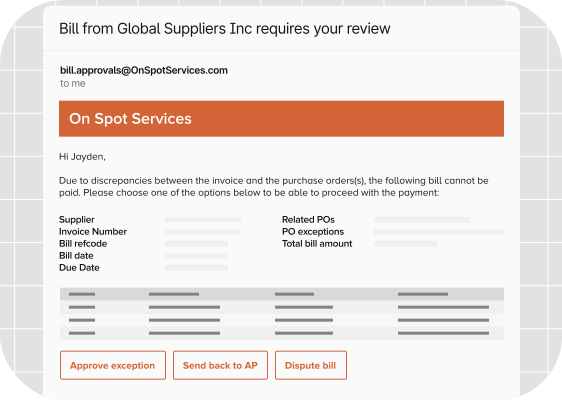
Additionally, can set up approval deadlines to pay invoices within a certain timeframe—so you grab early payment discounts and avoid late payment penalties.
5) Real-time Reconciliation
Manually updating your ERP can be time-consuming and lead to potential discrepancies or inaccurate reporting (caused by human error or a scattered audit trail). Automation solves this inefficiency by integrating and sharing data with your ERP.
For example, Tipalti integrates with major ERPs, including Oracle NetSuite, SAP, Microsoft Dynamics, Xero, and Sage.
When an invoice is successfully paid, Tipalti and your ERP reconcile in real-time, seamlessly integrating payment status into the general ledger and sub-ledgers.
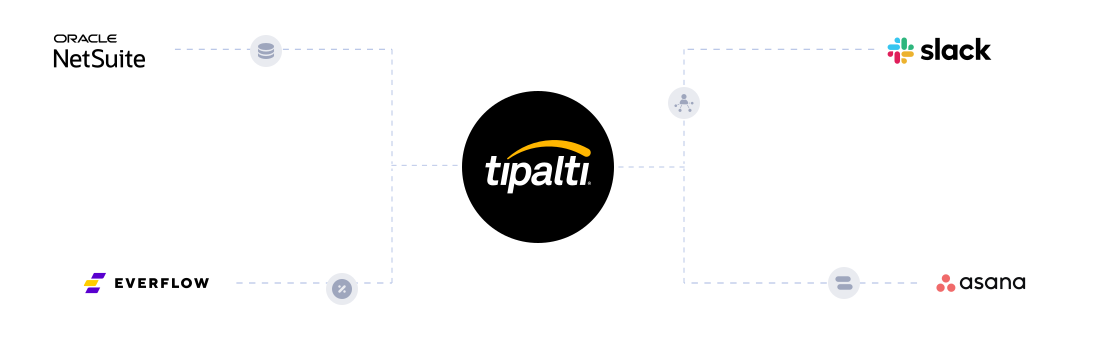
With faster financial close and timely, accurately logged transactions, you’ll strengthen your audit trail for consistent reporting and compliance.
6) Spend Analytics Dashboards
Automation consolidates invoice processing, keeping financial data in one place for easier monitoring.
For instance, Tipalti’s customisable spend analytics dashboards show current request status, so AP teams can track when invoices are paid, pending, or in review.
Real-time visibility enables you to manage your cash flow more effectively and make informed budgeting decisions.

It also helps finance teams identify saving opportunities and spot bottlenecks to further increase efficiency.
7) AI Chatbot Assistance
While AI agents work autonomously to automate invoice capture, matching, approvals, and reporting, a chatbot assistant supports AP teams by performing specific tasks on demand.
The tool combines deep knowledge of your finance workflows with natural language processing to understand prompts and deliver relevant solutions.
For example, if you want to quickly find out how many invoices are pending approval, you can ask Tipalti AI Assistant and get an instant answer.
AP teams can prompt the AI Assistant to complete many repetitive invoicing tasks, such as:
- Generating reports
- Matching invoices
- Suggesting approvers
- Creating purchase requests
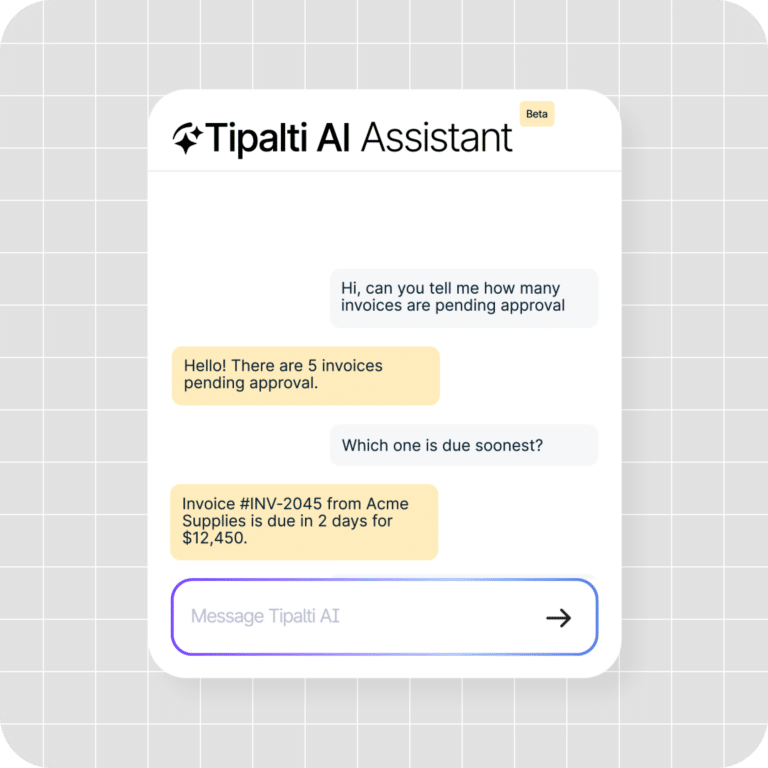
Together with AI Agents, the AI Assistant creates a powerful and intuitive invoice approval workflow that enables both finance teams and approvers to enhance clarity and productivity.
To recap, here’s how Tipalti automation software helps you overcome common approval workflow challenges:
| Challenge | Tipalti Automation Feature | Outcome |
|---|---|---|
| Late payment inquiries | Self-service supplier hub | Suppliers can track invoice and payment status anytime, reducing back-and-forth with AP. |
| Manual data entry & human error | AI-powered OCR | Extract invoice data automatically with over 99% accuracy, eliminating rework and mistakes. |
| Compliance anxiety | Two-way and three-way matching, plus real-time reconciliation | Accurate, clear data ensures transactions stay compliant and audit-ready across EU regulations. |
| Approval bottlenecks | Customisable approval workflows and AI Assistant | Speed up approvals with automated routing, timely reminders, and AI task handling. |
| Multi-entity data confusion | ERP integrations and spend analysis dashboards | Get real-time finance visibility and control for all stakeholders. |
How to Improve Your Invoice Approval Workflow
An optimised invoice approval workflow saves time and money in your end-to-end payables process—enhancing clarity and keeping everyone in the loop.
Automation plays a key role in achieving efficiency, but so does team organisation. Here are four tips to improve your invoice approval workflow.
Identify your Invoice Approval Requirements
Define scenarios that require different approval steps to create rules for automated routing. This identification will help AP software categorise and send invoices to the correct person or department—without human intervention.
Here are some invoice types that might need specific approval stages:
- Specialised goods or services that require expert review to confirm the accuracy of delivery, specifications, and pricing.
- New vendor invoices that need high-level approval to validate the supplier’s identity, reliability, and legitimacy before payment.
- High-value invoices that call for multiple layers of management authorisation to justify purchases and confirm accuracy.
- Invoices with errors or discrepancies that must go through internal review and vendor follow-up before approval.
Implementing the right checks for each scenario streamlines approvals, enhancing accuracy and minimizing risk.
Outline Approval Roles and Responsibilities
Clear approval roles ensure that invoices are directed to the correct person each time, preventing mistakes that increase workload or prolong reconciliation.
Some common roles and responsibilities include:
- Department managers or budget holders review and approve invoices related to their spending.
- Procurement officers verify contract terms and ensure compliance with suppliers.
- Finance directors or controllers provide final approval for high-value invoices.
- Compliance officers or internal auditors periodically review approval trails.
When everyone is clear about their responsibilities, approvals flow smoothly in line with company policies and audit requirements.
Consolidate Accounts Payable in a Single Processing System
Keeping your invoice approval workflow within a connected ecosystem enables you to receive, process, and record invoices in one place. Invoice processing is easier to track, giving you a single source of truth and a clear audit trail.
Utilize AP software integrations and application programming interfaces (APIs) to consolidate your business toolkit and achieve real-time financial control.
For example, Tipalti connects with finance tools, payment portals, ticketing platforms, and communication tools.
Uniting finance, stakeholders, and vendors removes silos, preventing the confusion, delays, and lost information that can be caused by disconnected tools.
Regularly Review Your Invoice Approval Workflow
Monitoring your invoicing process helps you measure effectiveness and spot ways to improve.
Here are some key performance indicators (KPIs) to track for a clear picture of AP accuracy and efficiency:
- Average approval time. How long does it take to process an invoice, from receipt to final approval?
- Invoice life cycle time. Total time from invoice receipt to payment and reconciliation.
- Error rate. How many invoices contain data or matching errors?
- Cost per invoice. Average processing cost for each invoice
- Automation processing rate. The number of invoices processed without manual input.
Tipalti’s spend analytics dashboards and reports provide instant visibility into your financial data, empowering your team with insights to increase speed, reduce errors, and lower costs throughout your invoice workflow.
Invoice Approval Workflow FAQs
How do I set up an invoice approval workflow?
For operational efficiency, use automated invoice approval. Manual processes are time-consuming and don’t adhere to EU e-invoicing mandates. AP automation software streamlines the invoicing process, from invoice receipt to payment and archiving. It also complies with EU tax laws and DAC7 requirements for online platforms.
When implementing an automation system, set clear roles for invoice routing and approvals. This clarity enables software to send invoices to the correct department or individual based on the category, thereby speeding up approvals and ensuring timely payments.
How do you approve an invoice?
An authorised approver confirms the validity of the invoice business details, goods or services, and delivery before approving payment.
AP software speeds up the accounts payable process by automatically verifying and matching supplier invoices before routing them to the correct approver.
Who approves invoices?
Designated personnel with budgetary control approve an invoice. This is typically a department manager, chief finance officer (CFO), procurement officer, or business owner. Depending on the purchase, an invoice might require single-level or multi-level approval.
Improve Invoice Approval Workflow Efficiency and Compliance with Tipalti
An effective invoice approval workflow saves hours of admin, freeing your team to focus on strategic tasks like securing early payment discounts and strengthening vendor relationships.
By combining AI-powered invoice processing with clear approval roles, you can ensure that accurate invoices reach the right people faster, thereby improving cash flow visibility and overall efficiency.
Ready to move on from manual processes?
See how Tipalti’s end-to-end Accounts Payable automation eliminates manual data entry, shortens approval times, and keeps you compliant with DAC7 and Peppol—so your finance team can finally focus on strategy instead of chasing invoices.