

Managing a complex flow of blanket purchase orders, direct materials, and multi-deliveries makes manufacturing invoice processing more costly and error-prone than basic invoicing.
One delayed payment for raw materials can be enough to stall production and disrupt an entire supply chain. To reduce invoicing mistakes and increase efficiency, many growing manufacturers turn to AP automation.
In this guide, you’ll learn how manufacturing invoice processing works, the challenges finance teams face, and how automation improves workflows.
Key Takeaways
- Manufacturing invoice processing is complex, with AP teams required to manage inconsistent formats, partial shipments, and price variances.
- Late payments or mismatched invoices can hold up production or misstate inventory.
- Efficient processing requires cross-department coordination and strict 3-way matching to ensure accurate payments and audit trails.
- Connected AP automation, from supplier onboarding through payment and ERP reconciliation, reduces manual workload and errors while strengthening inventory management.
How Manufacturing Invoice Processing Works: A Step-by-Step Breakdown

Manufacturing invoice processing is a workflow that accounts payable (AP) teams use to take a supplier bill for raw materials or parts and move it from receipt to a reconciled entry in your general ledger.
Managing this process efficiently ensures suppliers are paid on time and keeps production moving without operational hold-ups. It also gives finance teams accurate visibility into what your company owes.
However, while the workflow looks straightforward on paper, matching high volumes of invoices against goods and services moving through the supply chain can strain finance teams.
Here’s a breakdown of a typical manufacturing invoice processing workflow:
Step 1) Multi-Channel Invoice Capture
The AP process starts when a supplier submits a bill for raw materials, components, equipment, or MRO (maintenance, repair, and operations) services.
In multi-plant manufacturing, invoices can arrive in various formats from an expansive supplier network. Common formats include:
- E-invoices
- Emailed PDFs
- Supplier portals
- EDI (Electronic Data Interchange) feeds
To prevent delayed payments and supply chain bottlenecks, AP teams need to accurately capture information such as contact details, line items, and pricing to match invoices. A standardized workflow is crucial to minimizing human error in the process.
Step 2) 3-Way Matching Against the PO and GRN
The matching process links invoice data with the right paperwork so approvers can green-light payment.
With 3-way matching, AP compares the invoice against the purchase order (PO) and goods received note (GRN) to confirm that quantities, pricing, and received goods align before payment. It’s then cross-referenced against two critical procurement documents:
- Purchase order (PO). Confirms agreed-upon pricing, line item specifications, and payment terms.
- Goods received note (GRN). Confirms the quantity and condition of materials checked in an inspection report.
This is a crucial step to avoid duplicate payments, unit-of-measure (UOM) cost distortions, or potential fraud. Everything must align across all three documents within your set tolerance thresholds for an invoice to move to the next stage.
Step 3) Approval Routing and Exception Handling
Cleanly matched invoices are routed for payment approval or automatically signed off, depending on the invoice type.
Bills with discrepancies, such as price variances or short shipments, should trigger a review. These will be routed to the appropriate plant manager or purchaser based on rules such as plant, entity, or spend category, rather than being added to a single generic approval queue.
Exceptions are typically based on set rules. For example, if a vendor bills for 400 units, but the GRN confirms only 300 were logged into your inventory, AP should route it for resolution.
Catching inaccuracies prevents overpayments and skewed cash flow forecasts that impact financial planning.
Step 4) Executing and Reconciling Payments
Once an invoice is approved, AP can execute payment in accordance with the supplier’s agreed-upon payment terms and method (e.g., ACH, wire transfer, or SEPA). Prompt payments keep vendors happy and reduce the risk of shipment hold-ups.
Reconciling payments against the PO and GRN in your ERP system is crucial to keep inventory valuations and landed costs accurate. Late reconciliation or incorrect matching can misstate raw material costs and skew margins.
For manufacturers operating multiple plants or entities, reconciliation must also occur at the appropriate level. Linking payments to the plant or entity that raised the PO keeps costs clear.
Additionally, storing invoices and supporting documents in a secure, searchable database is important to maintain a robust audit trail and accurate balance sheets.
4 Operational Challenges in Manufacturing Invoice Processing (And How Automation Solves Them)
The biggest obstacle to efficient invoice processing for a growing manufacturing company is traditional AP workflows.
Outdated processes are a significant challenge for AP teams, with 56% admitting their systems can’t scale without major upgrades, according to Tipalti’s Global Finance Outlook report.
Additionally, 66% of finance professionals report rising manual work, and 43% are dealing with more compliance issues than ever before.
The complexity of dynamic, multi-location manufacturing invoice processing only compounds issues.
By modernizing workflows with payment automation, finance leaders can dramatically improve operations. Tipalti users report reducing invoice processing time by up to 80% and cutting errors by up to 66%.
Here are four of the most common invoice processing bottlenecks and how manufacturing AP automation helps overcome them:
1) Managing Split Shipments Against Blanket POs
Direct material suppliers often fulfill blanket POs across multiple delivery batches spread over several weeks or months. It’s a function that makes accounts payable in a manufacturing company more demanding than in other industries.
When partial deliveries are billed separately, manual AP teams can struggle to reconcile invoices, leading to issues such as duplicate payments or blocked disbursements.
For example, say an automotive components manufacturer issues a blanket PO for 15,000 castings to be delivered over six months. The vendor ships 3,000 units in the first batch and bills for that amount.
An AP professional has to manually verify if the open balance on the PO supports the invoice, chasing the relevant dock manager or sourcing paper receiving docs every time.
Suppose any of these orders have discrepancies, such as damage claims or commodity adjustments, the time required for investigation and verification increases. Multiply this by hundreds of invoices a month, and matching becomes a significant drain on AP capacity.
How Automation Improves Invoice Matching
A dedicated AP automation solution matches and aligns invoices on receipt, so teams don’t have to resolve them from scratch.
Real-time 3-way matching works at a granular level. The software automatically cross-references each partial invoice, comparing quantities, prices, and other line-level details.
Here’s how Tipalti’s AI-powered PO Matching solution analyzes contextual descriptions to match bills and POs automatically:
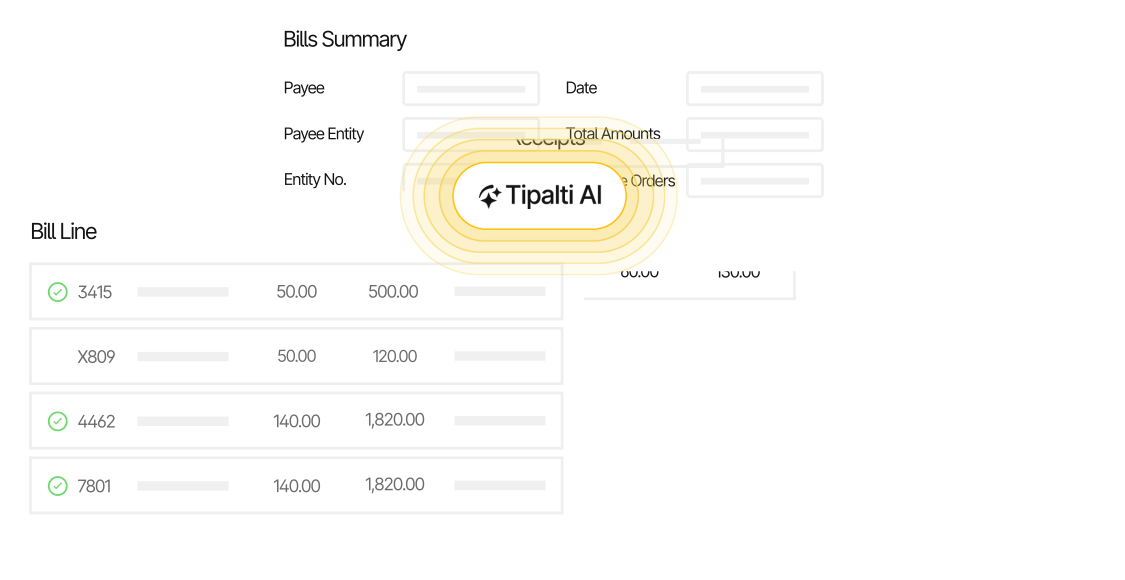
Instead of a single invoice tied to a single PO, an automated system tracks fulfillment across multiple invoices over the full term of the blanket order.
By following your set rules for suppliers and bill amounts, AP automation also flags edge-case anomalies for human review before disbursement.
It allows the finance team to free up time while maintaining full control over blanket balances, thereby avoiding duplicate payments.
2) Handling Custom Part Numbers and Unit Conversions
Invoices from manufacturing suppliers often have part numbers or units of measure (UOM) that don’t match how you log items internally.
For example, a supplier might list raw materials in metric tons, whereas your internal PO and inventory log measure them in pounds.
Reconciling this manually requires someone to cross-reference SKUs and convert units for every line item across every invoice. Constantly switching between formats can increase data entry errors, which ultimately leads to more exceptions and longer per-invoice processing time.
How AP Automation Streamlines Invoice Data Capture
AI-powered OCR extracts line-item details such as part numbers, quantities, units, and prices from each invoice and matches them against the PO.
AI OCR software uses natural language processing (NLP) to understand invoice labels and code the extracted text to the correct fields in your database without manual tagging.
The software captures invoices in 145+ languages, then performs a logic check to ensure the math adds up so that quantities and unit prices match the totals. It also assigns a confidence score to fields. If AI isn’t fully sure that it read an invoice correctly, it routes it for human verification. This helps ensure the data is accurate before it enters your system.
Once the data is captured, each line is checked against the PO. If a part number or unit of measure falls outside your set tolerances, the invoice is held for review, so your team only handles the exceptions.
3) Managing AP Across Multiple Plants, Entities, and Countries
Many manufacturers run AP across several plants, warehouses, distribution centers, and legal entities, even when most of their suppliers are domestic. Each site raises its own POs, receives its own goods, and has its own approvers. Without a shared system, invoices are routed via email and reconciled on an entity-by-entity basis.
Cross-border suppliers add another layer. Navigating varying tax forms such as W-8BEN, along with required sanctions screening for Anti-Money Laundering (AML) rules, multi-entity approvals, and global payments, is where legacy systems break down at scale.
Say, a manufacturer’s headquarters are in the US, with a production facility in Germany. An invoice for components from a supplier in China must be routed to the right plant manager in Germany, processed in Euros, vetted for tax compliance, and paid from the right subsidiary account.
Doing this manually at scale risks compliance gaps and processing delays that can result in regulatory penalties and dissatisfied partners.
How AP Automation Supports Multi-Entity AP and Compliance
A centralized multi-entity platform automates cross-border compliance in a single, connected process, freeing finance teams from gathering data and applying rules on an entity-by-entity basis. In a complete AP automation platform, compliance starts from onboarding.
For example, AP teams can invite suppliers to a custom supplier portal that guides new payees through collecting local tax forms and setting up payments.
AP software automatically validates tax documentation and screens vendors against global OFAC and sanctions databases to ensure compliance with international Know Your Customer (KYC) and AML rules.
Once suppliers are active, the system automatically routes invoices to the appropriate approvers within each entity. Then, executes multi-currency cross-border payouts based on the supplier’s chosen payment method.
With compliance and payments handled in one place, controllers gain consolidated governance and reporting for managing finances. It allows teams to scale with invoice volume without expanding headcount.
4) Preventing Downtime Risks Caused by Payment Delays
When an invoice is stuck on hold due to a pricing or unit discrepancy, payments are delayed. If resolution requires an AP clerk to manually cross-reference invoices and contact the appropriate personnel for review, you quickly end up with a backlog of unpaid bills.
Persistent late payments can lead to credit holds, and suppliers may hold back critical material shipments. That puts production schedules, order fulfillment, and inventory accuracy at risk.
Depending on your supplier contracts, late payments can also trigger fees that add to what you owe.
The cost of late payments isn’t solely financial. The resulting reputational damage can signal financial instability, erode trust with suppliers, and impact your growth.
How AP Automation Accelerates Payments
AP automation software flags invoice exceptions and sends an alert to the appropriate AP team member based on set rules, such as spending category or pricing tolerances.
For example, if a fuel surcharge on a raw materials invoice exceeds $500, the system can route the invoice to the logistics manager at the specific plant while sending cost variances to a procurement manager. Here’s how automated tolerance thresholds look in Tipalti’s automation system:
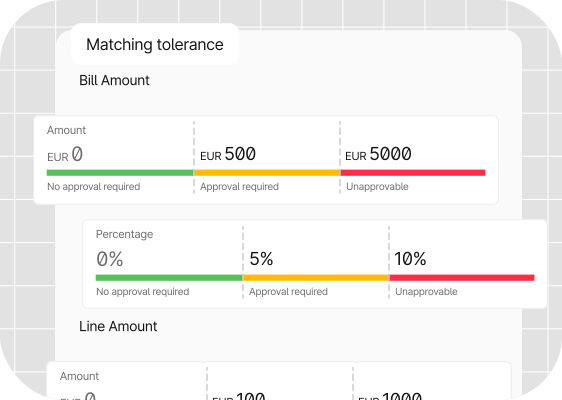
The system also follows automated escalation paths, so invoices never sit idle if an approver is unavailable.
Removing this bottleneck helps keep suppliers paid on time and reduces the risk of AP delays affecting production schedules.
Case Study: How Endera Scales Invoice Processing Without Adding to the Team
Endera was managing AP manually across multiple systems, including BILL, QuickBooks, and its ERP, Infor SyteLine.
Entering 400-500 invoices per month led to double data entry, inefficiencies, and a lack of centralization.
After connecting Tipalti’s AI automation platform to Infor SyteLine, the electric vehicle company eliminated manual data entry, saving time and streamlining the process.
Endera can now process twice as many invoices without adding headcount. Minimizing manual tasks has also reduced errors and made data more reliable.
Tipalti has made my job incredibly fast. I now process 800 to 1,000 invoices a month as one person, which would have required one and a half people without Tipalti.
Molly Schwab, Accounting Specialist, Endera
Manual vs. Automated Manufacturing Invoice Workflows Compared
Switching from manual to automated manufacturing invoice processing reduces AP workload and input errors. This directly impacts how much processing costs, how accurately you track inventory costs, and whether suppliers keep credit lines open.
The table below compares the two approaches across key components of a manufacturing AP workflow.
| AP task | Manual Invoice Processing | Automated Invoice Processing |
|---|---|---|
| Cost per invoice | $9.40 on average* | Up to 80% lower* |
| Processing time | 9.2 days* on average | Up to 80% faster |
| Error rate | Prone to manual data-entry and matching errors, increasing with volume and multi-entity processing. | Up to 66% fewer errors |
| PO matching | Manually cross-checking invoices, POs, and GRNs line by line. | Automated 3-way matching with dynamic updates for partial deliveries. |
| Exception handling | Relies on human reviews. Receipts can be lost in email chains. | Immediate flagging and routing to the correct personnel, with automated notifications. |
| Multi-entity approval routing | Relies on memory or informal rules between siloed teams. | Automatic rules-based routing by threshold, plant, or department. |
| Supplier onboarding and compliance | Tax form collection and validation handled manually per vendor. | Self-service onboarding with automated tax validation and continuous sanctions screening. |
| Reconciliation | Invoices reconciled by entity, often at month-end. | Automatic ERP sync for accurate audit trails and inventory accounting. |
| Supplier impact | Slow payments can trigger credit holds, production delays, and supplier churn. | Accurate, timely payments that build supplier trust and reduce the risk of production delays. |
*Invoice processing cost and processing time data are based on accounts payable metrics by Ardent Partners.
How much does manufacturing invoice processing cost your business?
Leading companies use cost per invoice to measure AP effectiveness and efficiency. Use our invoice processing and payment cost calculator to see how your processes stack up.
Connecting Invoice Automation to Your Manufacturing ERP Stack
In manufacturing, every invoice can impact your GL accounts, current inventory, costing models, and stock valuations across multiple locations. When invoice data isn’t synced directly with your ERP, you risk:
- Delayed batch syncs
- Manual re-keying errors
- Misstated landed costs
All of which disrupts the month-end financial close. The complexity is where general-purpose accounting software falls short in manufacturing.
Basic tools are good for simple invoice-in, payments-out processes. However, many lack the functionality to link line-item details to POs, GRNs, and inventory records that need to move together.
Direct ERP integration syncs AP and operations, sending payment and billing data to your ledger automatically and cutting manual reconciliation. It ensures spend visibility and inventory accounts stay accurate while preventing supply chain friction.
Here are some leading ERP platforms for manufacturing invoice processing and how they integrate with AP automation:
| ERP | Best For | AP Automation Functionality |
|---|---|---|
| SAP Business One | Small and midsize manufacturers managing multiple entities. | Syncs AP and payment data with SAP Business One to keep records consistent. |
| Oracle NetSuite | Mid-market and fast-growing multi-entity manufacturers. | Syncs AP and payment data with NetSuite, including across OneWorld subsidiaries. |
| Infor SyteLine | Discrete and process manufacturers that need deep production scheduling and shop-floor functionality. | Syncs APdata with SyteLine, keeping it aligned with purchasing records. |
| Microsoft Dynamics 365 Business Central | Mid-market manufacturers using the Microsoft ecosystem. | Syncs AP and payment data with Business Central to keep ledger records current. |
| Acumatica | Mid-market manufacturers focused on job costing and warehouse management. | Syncs AP and payment data with Acumatica, including across multiple entities. |
A dedicated invoice automation solution like Tipalti integrates natively with leading platforms or via an API, connecting supplier onboarding, invoice capture, PO matching, approvals, payments, and reconciliation in one system.
Teams can streamline the AP process and maintain a single source of truth for payment status, cash flow, and inventory data.
5 Signs It’s Time to Upgrade Your AP Workflow
If your organization relies on complex supply chains or manages multiple facilities, outdated AP processes will eventually reach the breaking point. Here are some operational red flags to look out for as you scale:
1) Frequent payment holds. Invoices routinely awaiting review due to mismatches or missing approval point to a problem with your workflow. It’s an indication that processes should be handled by set rules, freeing up AP capacity for oversight and strategic work.
2) Reconciliation delays. Chasing unreconciled invoices from weeks prior can stall ledger updates and skew inventory costs. A recurring backlog is a sign that payment data and supporting documents need to switch from manual month-end reconciliation to real-time syncing.
3) High-volume exception handling. AP teams spending hours manually resolving discrepancies via email chains is often caused by AP data that’s siloed from POs and receiving records. Automation handles exceptions at the point of matching to avoid administrative bloat and vendor friction.
4) Lack of real-time vendor visibility. If finance leaders struggle to see a clear picture of in-process invoices and blanket PO balances, you risk blind cash flow forecasting and surprise accruals. Switching from disconnected tools to an integrated system ensures real-time visibility into liabilities and payment statuses.
5) Rising cost-per-invoice. Increasing processing costs as volume grows is a clear sign of an inefficient workflow. It usually means more manual work is being added to a process, rather than the process itself scaling. Implementing AP automation reduces processing costs without expanding your finance team.
If you recognize any of these issues in your processes, your AP workflow has likely outgrown your infrastructure. Upgrading to manufacturing AP software is the fastest way to accelerate financial close and ease the burden on your team.
Scale Invoice Volume, Not AP Headcount
In a non-revenue-generating area of the business, such as accounts payable, every hour spent chasing approvals or resolving discrepancies impacts your margins. As your production volume expands, increasing AP efficiency is crucial for delivering value and keeping supply chains moving.
Implementing end-to-end AP automation, from supplier onboarding and invoice capture through approvals, payments, and ERP reconciliation, eliminates repetitive tasks and reduces errors that delay payments. By streamlining manufacturing invoice processing, you’ll free up your team to focus on strategic work that grows your business.
See how Tipalti’s Manufacturing Automation solution helps you cut costs, mitigate risk, and improve visibility—without hiring extra staff.
Manufacturing Invoice Processing FAQs
Why is 3-way matching critical for manufacturing invoice processing?
3-way matching confirms that the invoice, purchase order, and goods receipt note align before money leaves your account. In manufacturing, where invoices involve complexities such as split shipments and custom part numbers, matching ensures you pay only for what’s delivered at the agreed price. Automating the process reduces human errors that can lead to overpayments and production delays.
How does invoice automation handle split shipments?
Automated invoice processing for manufacturing companies extracts line-item invoice data and automatically matches partial deliveries to blanket POs and GRNs. It means each partial delivery clears against the blanket PO on its own, rather than holding the invoice until the full order is fulfilled.
For AP teams, automation cuts manual invoice-by-invoice tracking for partial deliveries, reducing accidental payments and protecting cash flow.
How fast does AP automation software integrate with ERPs?
Timelines vary from a few days to a few months, depending on the AP software, ERP, and setup complexity. Modern AP automation platforms like Tipalti use native ERP integrations and pre-built API connectors that speed up integration. These require less upfront configuration than custom-built connections.
Tipalti’s technical implementation of its platform can take a matter of days, while due diligence, account setup, and customization can take several weeks. The timeline for a specific ERP integration also depends on its configuration.
What’s the difference between PO and non-PO invoices in manufacturing?
PO invoices are typically tied to raw materials, components, or equipment and require strict 3-way matching against purchase orders and goods receipt notes before approval.
Non-PO invoices typically cover indirect expenses such as utilities, professional services, or emergency repairs. With no PO to match, non-PO invoices often route directly for approval based on predetermined rules, such as department or spending thresholds.
