

 Back
Back 
If manual invoice processing is slowing your finance team down, you’re not alone.
As reported in Tipalti’s Global Finance Outlook, nearly half (42%) of companies rely mostly on manual accounts payable workflows, and 66% saw manual work increase in 2025.
But you can’t prioritize the right improvements and investments until you can pinpoint exactly where manual workflows create the most friction.
This guide shows how to reduce manual invoice processing by identifying and fixing key bottlenecks, and selecting the best AP automation software to handle rising transaction volumes.
Key Takeaways
- Manual invoice processing slows down at multiple stages—intake, coding, approvals, and tracking all contribute to delays, increasing operational overhead.
- The biggest efficiency gains come from identifying where time, errors, and rework are concentrated, then improving those areas first.
- Standardizing data and workflows using the right blend of technologies reduces decision-making, errors, and repeated manual effort.
- End-to-end AP automation—like Tipalti Accounts Payable—connects each stage, helping teams scale invoice processing sustainably without increasing headcount.
Where Manual Invoice Processing Really Creates Friction
If time-consuming manual work only happened in one part of the invoicing workflow, it would be easy to resolve, and a full guide like this wouldn’t be necessary.
The problem is, there are friction points that slow teams down and increase the risk of error at every new step, from onboarding new suppliers to tracking invoice statuses.
Here’s what those manual inefficiencies look like, stage by stage.
Stage 1) Invoice Data Intake
When invoice intake is handled manually, case by case, every new document introduces variability.
Invoices arrive through different channels and in different formats with no consistent structure at the point of entry. PDFs come in via email or paper invoices are scanned, for example.
This forces AP teams to spend time opening files, downloading attachments, and making sure they have the right information to move to data entry and coding.
Stage 2) Data Entry and Coding
Once the right information is present at intake (before or after chasing), invoice details need to be entered into accounting or ERP systems, often line by line.
Coding decisions are also made manually, based on internal rules or individual judgment.
This takes up more processing time and increases risk. Even minor human errors in amounts, supplier details or categorization lead to rework, adding yet more manual data entry.
Stage 3) Invoice Approval and Routing
Manual approval processes rely on every member of the accounts payable team knowing who to forward invoices to, when, and how.
That means understanding (and remembering for every individual invoice):
- How approval workflows change based on department, entity, or value.
- Who the backup approver is when the first choice becomes unavailable.
- When and how to follow up to prevent delays (i.e., preferred method and how long to wait).
In other words, teams have more decisions and more chances to make mistakes that could lead to late payments and impact cash flow.
Stage 4) Invoice Tracking and Visibility
Manual invoice tracking involves checking multiple sources to obtain the latest status information for each invoice.
With no single source of truth, AP teams must scour long email threads, siloed spreadsheets, messaging apps, and even in-trays to spot delays and know which invoices need attention.
Such inefficiency increases approval times and frustrates workforces, but it’s common. A Gartner survey found that almost half (47%) of digital workers struggle to find the information they need to do their jobs well.
The good news, then, is that finding and fixing manual bottlenecks can put you ahead of a large section of your competitors.
Simplify invoice processing with AP automation
Use Tipalti Accounts Payable to automate new supplier onboarding, invoice capture, approvals, and compliance checks. Free your team from manual processes to drive sustainable business growth.
How to Identify Your Biggest Manual Bottlenecks
Rather than overhauling your entire accounts payable process at once, work on identifying where time, errors, and delays affect your bottom line the most.
The best place to start is by paying closer attention to the key performance indicators (KPIs) for invoice management you’re likely already tracking.
| Invoice processing metric | What the metric tells you |
|---|---|
| Average invoice processing time | How long it takes to process an invoice fully from receipt to payment. Long cycle times (e.g., 10+ days in manual workflows) often point to intake backlogs or repeated checks. |
| Average approval turnaround time | The time it takes for an invoice to be approved after intake and verification. Slow turnaround times (e.g., multiple days) suggest unclear routing or reliance on manual follow-ups. |
| Average invoices processed per FTE | The volume of invoices handled by each team member. Lower output per FTE indicates time is being spent on manual tasks like searching for information, chasing approvals, or correcting errors. For perspective, 63% of respondents to IFOL’s AP Automation Trends survey said they spend more than 10 hours a week processing invoices. |
| Average cost per invoice | The total cost of processing each invoice, including time and resources. Higher processing costs (e.g., $10+ per invoice) can be a sign of having too many manual touchpoints across the workflow. |
As well as signposting your biggest time- and cost-saving opportunities, quantitative data helps you justify automation solution investments and get buy-in from other stakeholders.
We included basic benchmarks in the table above as quick examples. However, the right performance markers for your team will be specific to your business, depending on factors such as invoice volume vs. team size, supply chain complexity, and current tech stack.
Even so, poor invoice processing performance—whatever the exact numbers—generally presents the same symptoms:
- Invoices consistently queue at the same workflow stages.
- Frequent corrections, exceptions, or rework.
- Late payments that strain supplier relationships.
- Discrepancies between invoices, purchase orders, or payment records.
- Inaccurate reporting and unpredictable cash flow.
The more transactions a company handles, the harder it is to avoid these symptoms.
Most teams are already feeling the pressure: 80% of respondents to Tipalti’s Financial Outlook survey agreed they need to improve their AP processes to keep up with rising invoice volumes.
It’s also no coincidence that 64% of teams worry that a lack of AP automation will limit their company’s ability to scale.
Where to Start Based on Your Current Challenges
You’ve seen where manual intervention slows invoice and payment processing. Now it’s time to reduce it as much as possible without compromising quality or accuracy.
Before we dive into the optimal improvements for each invoice processing stage, here’s a quick reference guide to help you prioritize changes:
| If your biggest issue is… | Start here to reduce manual effort |
|---|---|
| Invoices arriving in inconsistent formats or with key data missing. | Automate invoice capture and standardize intake so that all documents enter your system in a consistent, structured format. |
| High volumes of manual data entry or frequent coding errors. | Introduce rules-based data entry and coding to reduce repetitive decisions and prevent recurring mistakes. |
| Slow or unpredictable approval processes. | Implement structured approval workflows with clear routing, ownership, contingencies, and automated reminders to keep invoices moving. |
| Limited visibility into invoice status or bottlenecks. | Centralize tracking so every invoice has a real-time status and bottlenecks can be identified quickly. |
| Increasing invoice volume without the budget to add headcount. | Connect the full workflow with end-to-end AP automation to reduce manual touchpoints across every stage. |
This selective approach ensures you focus on high-impact improvements where they’re needed most, rather than attempting a full process overhaul where it might not be necessary.
However, if most or all of those challenges resonate equally, you’re likely ready for staged improvements to your whole invoicing process. That’s when you’ll need a step-by-step roadmap.
How to Reduce Manual Work in Each Stage of Invoice Processing
Follow this 4-part optimization process to make invoicing faster, more cost-efficient, and less error-prone.
1) Streamline Invoice Capture and Data Extraction
Automate invoice capture to extract key data as soon as new documents arrive. Consistency at intake lays the foundation for the rest of the workflow, ensuring teams and systems have complete, accurate data to work with at every step.
Optical character recognition (OCR) software converts PDFs, scans, emails, and electronic invoices into structured data, meaning formatting differences no longer slow you down.
The best platforms also support global invoice formats and e-invoicing requirements, helping teams stay compliant as they scale across regions.
For the highest accuracy levels, adopt platforms that combine OCR with AI. Tipalti’s Invoice Capture Agent, for example, uses OCR and AI to validate extracted data and flag missing information.
Here’s an example of an AI scan in progress:

With Tipalti’s AP automation capturing and checking data, finance teams spend far less time on manual checks. The Supplier Hub also allows vendors to submit invoices directly and manage their own details, reducing back-and-forth and improving data consistency.
2) Standardize Data Entry and Coding
Predefine rules and use templates to reduce the number of coding decisions your team has to make.
Standardizing logic based on supplier, expense category, or business unit creates more consistent categorization while speeding up processes, even at scale.
For example, invoices from a specific provider or supplier can be automatically assigned to the same expense account and cost center. Or you can apply tax treatments based on location or entity. This helps ensure compliance with local tax and regulatory requirements.
Strong AP automation software will let you build rules like these directly into your workflow. Then, repetitive decisions that once slowed your team happen consistently without intervention.
3) Structure and Accelerate Approvals (With Contingencies)
Set up approval workflows to automatically route invoices to the right approvers based on criteria such as invoice value, department, or entity.
Well-defined, automated approval processes keep invoices moving without anyone having to forward documents or send reminders via email.
Here’s an example of the type of automated notification an approver using Tipalti might receive:
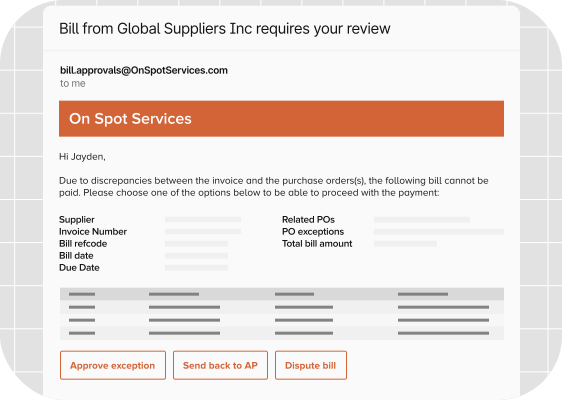
Build in contingencies to stop workflows stalling, too. Assign backup approvers for when key stakeholders aren’t available, and set escalation rules for invoices that sit too long or need closer review.
You can also automate reminders to prompt action at the right time, reducing hold-ups without adding to anyone’s workload.
Minimizing hold-ups at approval is key to avoiding late-payment penalties. Make the process smooth enough, and you can negotiate early-payment discounts from suppliers.
4) Centralize Visibility and Invoice Tracking
Consolidate all invoice information into a single system so every transaction has a clear, real-time status.
Creating a single source of truth stops teams from having to check email threads, spreadsheets, and message chains to know where an invoice sits in the cycle or who is responsible for it.
With a shared up-to-date workflow view, bottlenecks—like late payments on invoices from specific suppliers—surface sooner when they’re easier to fix.
Note: “Single system” doesn’t always mean one tool. Integrating AP automation with ERP and accounting software ensures data syncs automatically without duplication or manual reconciliation. Updates at any stage of processing reflect across the entire workflow in real time.
What Tools Reduce Manual Entry in Invoice Workflows?
Various technologies can make your AP department more efficient at processing invoices.
Different tools target different friction points, and understanding their strengths will help you choose the best-fit solutions (or combination) and optimize your ROI.
Here are the main categories you’ll come across and how each reduces manual work.
| Invoicing software type | How it reduces manual invoice processing |
|---|---|
| Invoice capture tools (OCR / AI) | Extracts structured data from PDFs, scans and emails automatically, cutting manual data entry at intake and improving data quality to prevent issues downstream. |
| Document processing APIs | Handles large invoice volumes across various formats with no manual effort. Helps teams that need flexible extraction or want to funnel invoice data into existing systems. |
| Workflow automation tools | Automates repeatable steps across AP workflows to save time and reduce invoice processing costs. Includes triggering actions based on rules, routing documents between systems and applying automatic checks. |
| ERP / accounting system integrations | Syncs invoice data across systems in real time, eliminating duplicate entry and reducing reconciliation effort. |
| End-to-end AP automation platforms (i.e., invoice processing automation) | Connects capture, coding, approvals, and reporting into a single workflow, reducing manual touchpoints across the entire process. |
Many teams start with point solutions—individual applications built to solve very precise problems. While these reduce manual work in specific steps, they often introduce new gaps or handoffs as invoice volumes and complexity increase.
Note: Learn more about the advantages of full AP automation, including how it enhances compliance and internal controls, in our on-demand webinar, Future-Proof Finance: The Case for End-to-End Automation.
How Tipalti Accounts Payable Reduces Manual Invoice Processing
Tipalti Accounts Payable is built to handle the full invoice workflow, from documents arriving to payments clearing, reducing the need for human intervention at every stage.
Rather than rely on disconnected tools or manual checks, Tipalti’s AI captures, validates, matches, codes and routes invoices automatically, while flagging exceptions and guiding approvals in real time.
Here’s how those capabilities work to speed up invoice processing:
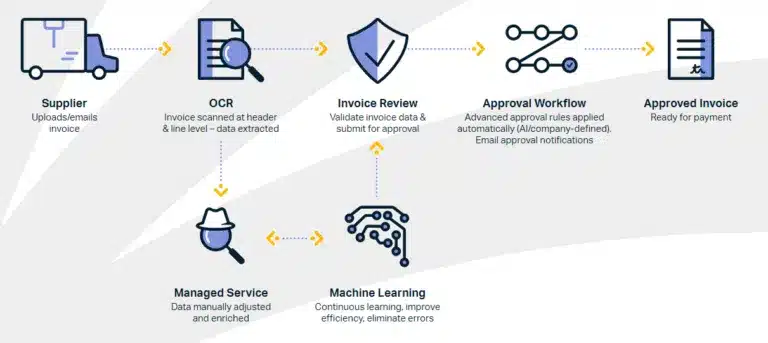
- Automated capture and validation. Invoices are submitted via Supplier Hub, email, or upload, with the Invoice Capture Agent extracting header and line items. Tipalti’s managed services correct exceptions and ensure completeness, so teams don’t need to fix data manually.
- Auto-coding based on smart logic. Expense accounts, tax codes, and custom fields are applied automatically based on historical patterns and predefined rules, eliminating repetitive coding decisions and reducing inconsistencies.
- 2-way and 3-way invoice matching. Invoices are automatically matched against purchase orders and receipts, helping validate accuracy and reduce the need for manual review before approval.
- Custom approval workflows. Invoices are routed based on rules such as entity, department, or value, with email-based approvals allowing stakeholders to review, approve, or update invoices without manual forwarding or follow-ups.
- Centralized visibility and collaboration. All invoice activity is managed in one place with real-time status updates and built-in messaging, reducing time spent searching for information or chasing stakeholders.
- ERP and accounting integrations. Invoice data syncs automatically across systems, improving reporting accuracy and financial visibility for forecasting, while reducing duplicate entry and reconciliation effort.
Together, these automated invoice processing capabilities significantly reduce the need to re-key data, chase approvals, or reconcile across systems. Invoices move from intake to payment with far fewer manual steps through a predictable workflow, like this:
Most importantly, Tipalti AP automation gives teams more time for higher-value strategy work. That’s a significant benefit when you consider that 74% of finance teams report being asked to play a more strategic role in driving business growth (per Tipalti’s Global Finance Outlook).
How Noom Scaled Invoice Processing Without Adding Headcount
Noom’s AP process used to rely on checks, multiple approvals, third-party accountants, and disconnected tools like Google Drive, Excel, and email. Unsurprisingly, payments were difficult to track and manage.
Tipalti Accounts Payable enabled Noom to bring its AP function in-house. The company automated invoice data capture with OCR and integrated NetSuite to centralize workflows and improve visibility across approvals and financials.
Ultimately, Noom was able to scale its supplier base without adding headcount, reduce manual work, and speed up reporting. It saved 2 days on its accounting close.
Pre-Tipalti, we couldn’t add new suppliers, vendors, and partners without adding finance headcount. Now, we can scale and have as many partners as we want.
Marc Balcke, Corporate Controller at Noom
The time savings alone is exponential. Automating payables allows my team to spend more time on strategic initiatives.
Reducing Manual Work Starts With Better Visibility
Reducing manual invoice processing starts with identifying where time, errors, and delays build up across intake, coding, approvals, and tracking. Clear visibility into these stages makes it easier to focus on the changes that will have the greatest impact.
Targeted improvements such as automating data capture, standardizing coding, and structuring approval workflows reduce manual effort at each step. As these changes connect, invoice processing becomes far more consistent, accurate, and easier to scale as volumes grow.
Tipalti combines all these capabilities into a single, end-to-end AP automation system that helps finance teams reduce manual work, improve visibility, and scale without hiring.
See how Tipalti’s AI-powered AP automation translates into real financial impact for your business.
