

 Back
Back 


If you are a business that hires vendors and contractors, it is essential to understand the importance of TINs and the IRS TIN Matching Program.
In this article, we cover the concepts of TINs, IRS TIN matching, and the steps involved in the TIN-matching process.
We have also explained the benefits of automation and TIN-matching services, which streamline TIN matching and enable controllers to remain compliant with tax filing regulations.
What is a TIN?
A TIN (taxpayer identification number) is a nine-digit number issued by the IRS (Internal Revenue Service) to use on U.S. federal income tax returns and other IRS forms.
These are the five types of TIN:
- Employer Identification Number (EIN): Corporations, trusts, nonprofits, and estates need the nine-digit EIN to pay taxes.
- Individual Taxpayer Identification Number (ITIN): The IRS issues ITINs to nonresident and resident aliens and their dependents who can’t get a Social Security Number (SSN).
- Adoption Taxpayer Identification Number (ATIN): In case of domestic adoptions, when adoptive parents can’t get the child’s Social Security Number (SSN) for their tax returns, the IRS issues the ATIN.
- Preparer Taxpayer Identification Number (PTIN): Filers paid to assist in or prepare tax returns need a Preparer Tax Identification Number (PTIN).
- Social Security Number (SSN): The SSN is the primary tax ID issued by the Social Security Administration to U.S. citizens, permanent residents, and some temporary residents.
What is IRS TIN Matching?
Businesses (payers) that hire vendors, freelancers, and independent contractors are required by the IRS to file a 1099 tax form for each payee annually.
The form reports the annual income and tax withheld. IRS TIN matching verifies that a business or individual’s tax identification number matches the IRS database.
With TIN matching, payees can avoid IRS penalties for non-compliance with tax regulations and onboard payees confidently.
TIN matching also enables lenders and financial institutions to ensure they have the correct customer information and to evaluate their creditworthiness.
Although IRS TIN matching is not mandated by law, it is crucial for controllers and accounts payable teams for many reasons.
How the IRS TIN Matching Program Works
Payors can use the IRS’s free web-based tool to check the payee’s TIN against the name/TIN combination in the IRS database.
Here’s how the IRS TIN Matching Program works.
- Accounts Payable obtains the TIN of a business or individual during the onboarding process by requiring a W-9 (or W-8 series) tax form.
- If not already registered, the payer registers for IRS e-Services and then accesses the TIN Matching tool through their account.
- They must agree to the stated Terms of Agreement (TOA) before accessing TIN Matching applications.
- Payers can choose either of these options to check TINs:
- Interactive TIN Matching: Users can enter name/TIN combinations in groups of 25. There is a cap of 9,999 requests per user ID within a 24-hour period. The results are available immediately.
- Bulk TIN Matching: This option allows users to enter 100,000 name/TIN pairs in a .txt file. The results are available within 24 hours.
The file should be prepared in this format: TIN TYPE; TIN NUMBER; NAME; ACCOUNT NUMBER (OPTIONAL)
Tin types are one-digit numbers where:
- 1 – Employer Identification Number (EIN)
- 2 – Social Security Number (SSN)
- 3 – Unknown TIN type
- The results are displayed in numerical format, as shown below, with ‘0’ indicating a match with IRS records.
| TIN Matching results | Description |
|---|---|
| 0 | Name/TIN combination matches the IRS database |
| 1 | TIN was missing, or TIN is not a 9-digit number |
| 2 | The TIN entered is not currently issued |
| 3 | The name/TIN combination does not match IRS records |
| 4 | Invalid TIN matching request |
| 5 | Duplicate TIN matching request |
| 6 | Matched on SSN; TIN type is 3, and the matching TIN was found only in the NAP DM1 database |
| 7 | Matched on EIN; the TIN type is 3, and a matching TIN is found only on the EIN/NC database |
| 8 | Matched on EIN and SSN, TIN type is 3, and the matching TIN is found on both the EIN/NC and NAP DM1 databases |
- When the TIN and name combinations do not match, companies must send a B-Notice and a W-9 form to the payee. If a corrected W-9 is not received in 30 business days, companies must begin backup withholding, which is 24 percent of the income withheld for taxes.
Additionally, the accounts payable team must stay informed of any TIN matching e-service updates and document attempts to correct invalid TINs.
Payers must maintain the confidentiality of the TIN data and use the results only for filing tax returns.
However, before payers can start using the TIN Matching tool, they must be aware of the eligibility criteria for participating in the IRS TIN Matching Program.
The IRS TIN Matching Program: Official Access and Requirements
You can gain official access to the IRS TIN Matching Program by ensuring you meet the following criteria.
Ensure you’re listed in the PAF database
To access the IRS TIN Matching Program, payers need to be listed in the PAF (Payer Account File) database. This database lists payers who have reported backup withholding by filing Forms 1099 or W-2G in the last two years.
In other words, you are added to the PAF database if you have filed any of the following information returns subject to backup withholding:
- 1099-NEC
- Attorney’s fees
- Commissions, fees, or other payments for work you do as an independent contractor
- Rents, profits, or other gains
- Form 1099-MISC
- Settlements paid to an attorney
- Royalty payments
- Form 1099-INT
- Interest payment
- Form 1099-DIV
- dividend
- Form 1099-K
- Payment Card and Third-Party Network Transactions
- Form 1099-B
- Payments by brokers/barter exchanges
- Form W-2G
- Gambling winnings
- Form 1099-G
- Certain Government Payments, Form 1099-G
For the full list of information returns subject to backup withholding, refer to the IRS guide on backup withholding.
If a payer has not filed 1099s or W-2G in the last two years, they will not be in the PAF database and will not be able to gain access to IRS TIN Matching.
To get listed in the database, first obtain an EIN and then file the relevant 1099 or W-2G forms with the IRS.
Register for IRS e-services
If you are in the PAF database, you will need to create an ID.me account and verify your identity.
To verify your identity, you can take a selfie or use a photo of a government ID. The other option is to have a live call with an ID.me video chat agent.
You will receive the ID.me login credentials once you register for e-services. All users in the AP team or organization must complete their individual registration to obtain their username and password.
Apply for TIN Matching
The next step is to complete the TIN Matching application with the ID.me login credentials as an authorized payer of income subject to backup withholding.
The “Responsible Official” (the individual with the authority to complete the application and assign user roles) in the AP team completes the TIN Matching application and assigns user roles.
After the IRS approves the application, the relevant users can access the TIN Matching program.
Access TIN Matching
You can now use the free TIN Matching tool to verify TIN and name combinations in groups of 25 or in bulk.
Why is Accurate TIN Matching Critical for Controllers and 1099 Compliance?
For controllers, accurate TIN matching reduces manual rework, prevents penalties, ensures clean payee data, and helps maintain 1099 compliance.
Let’s look at some of the top reasons why TIN matching is vital for controllers.
Prevent costly IRS penalties due to incorrect or delayed returns
As specified by the federal tax laws (Internal Revenue Code), payers must include the payee’s correct TIN when filing their tax returns.
The IRS imposes penalties for:
- Failure to file
- Filed with a missing/incorrect TIN (or other missing or incorrect information)
- Filed untimely
- Filed on paper when electronic filing was required (incorrect media)
- Filed in an incorrect format (unprocessable)
- Any combination of the above.
The exact amount of penalties is based on several factors, including the tax year, whether you are a small or a large business, and the timing of your submission.
The following table lists the latest IRS penalties for different tax years and filing dates:

Here are the penalties based on the business size:
| Business size | Tax year | Not more than 30 days late | 31 days late to August 1 | After August 1 | Intentional disregard |
|---|---|---|---|---|---|
| Large business | 01-01-2026 to 12-31-2026 | $60/$683,000 | $130/$2,049,000 | $340/$4,098,500 | $680/no maximum cap |
| Small business | $60/$239000 | $130/$ 683,000 | $340/$1,366,000 | $680/no maximum cap | |
| Large business | 01-01-2025 to 12-31-2025 | $60/$664,500 | $130/$1,993,500 | $330/$3,987,000 | $660/no maximum cap |
| Small business | $60/$232,500 | $130/$ 664,500 | $330/$1,329,000 | $660/no maximum cap |
Note that the IRS charges penalties for each incorrect or late return and for each payee statement (the copy of the filed tax return the payer must provide to the payee) that is missing, inaccurate, or delivered late.
The penalties can range from thousands to millions of dollars, depending on the business size and the number of payees.
For example, in 2024 alone, the IRS assessed $17.8 billion for delayed tax returns and collected $3.2 billion for delinquent returns.
Pro Tip: Want to understand the impact of new tax regulations on gig workers?
Explore this in-depth article: Navigating New Tax Regulations: A Comprehensive Guide for Gig Workers
Reduce or avoid B-notices that can impact vendor relationships and projects
B notices (CP2100 or CP2100A) are notices the IRS provides to payers who file tax returns with incorrect TINs, instructing them to begin backup withholding.
The payees will receive B notices if the TIN is:
- Missing
- Incorrect (not 9 digits or contains something other than a number)
- Does not match the IRS’s records
Once they receive the B notice, AP teams must begin backup withholding at a flat rate of 24% of the reportable payment.
They also need to track withholding amounts, carry out additional reconciliation work, remit funds to the IRS, and follow up with the payees for the correct TIN.
The IRS mandates that payers request the vendor’s TIN up to three times (initial, first annual, and second annual) to avoid IRS penalties for incorrect filings.
These tasks not only add to the AP workload but can also strain vendor relationships, as vendors may experience cash flow reductions, particularly in organizations that rely on manual processes.
Enhance efficiency and ensure smoother 1099 preparation and filing
IRS penalties and backup withholding are consequences of TIN-matching delays and errors.
These consequences can impact project timelines and budgets significantly in industries such as real estate, construction, and healthcare, which rely heavily on independent contractors.
Accurate TIN matching prevents delays or errors in the preparation and filing of 1099 forms, while enhancing the AP team’s productivity and workflow efficiency.
Pro Tip: Ensure 1099 compliance by gaining an in-depth understanding of the types, rules, and steps for completing and filing the form.
Read our guide on: IRS Form 1099 Guide: Types, Rules, and FAQs
Typical TIN Matching Process: Manual vs Automated
If you’re relying on manual TIN matching, there are compelling reasons to switch over to an automated process.
Manual TIN Matching
As described above, the manual TIN matching process involves logging into the IRS e-services portal and entering each vendor’s TIN and name combination individually.
If you want to check a large number of TINs, you will need to prepare a .txt file by entering all the details in the correct format.
This is not only cumbersome and time-consuming but is also labor-intensive.
Apart from the negative impact on the AP team’s efficiency, manual processes can lead to TIN mismatches due to these reasons:
- Submission of the wrong tax form: Vendors may submit the wrong form (e.g., a W-9 instead of a W-8, or vice versa), which does not meet the IRS reporting requirements.
- Using DBA instead of the business’s legal name: Payees, particularly sole proprietors, consultants, or tradespeople, often mention their DBA (Doing Business As) on the W-9 instead of the legal name of the business. Confusion between EIN and SSN: Many business owners may not know whether to provide an SSN or an EIN. A sole proprietor, for example, may provide an SSN although they obtained an EIN when registering their business.
- Data entry errors: spelling mistakes, omissions, and incorrect data are common pitfalls of manual data entry. Even minor omissions, such as removing LLC or abbreviating terms, can lead to a TIN mismatch.
Pro Tip: Not sure what a W-9 form is or why it matters for compliance?
This article covers the basics: W9 Form Definition: What are W9 Forms?
Automated TIN Matching
Automation helps controllers and AP teams reduce the risk of mismatches and avoid its harsh consequences, such as penalties, B-notices, and backup withholding.
An integrated system can streamline TIN matching by automatically validating vendor TINs in bulk through the IRS system.
It also ensures vendor details are verified at all critical stages, including onboarding, during monthly close, and year-end 1099 filings to prevent errors, such as wrong tax form submission.
Automation adds value by:
- Eliminating manual IRS portal logins: No need to upload lists or check results manually.
- Reducing data-entry errors: Automation ensures the digital collection and flow of W-9/W-8 information into the TIN matching process.
- Automating TIN matching: By integrating with the IRS database and tax compliance software, the automation platform can perform bulk TIN validation instantly.
- Triggering real-time alerts: Alerts payees to fix mismatches instantly, preventing penalties and delays.
The secret to realizing these automation benefits lies in choosing the right automation platform.
Automate TIN Matching—And Eliminate Costly Errors
Manual TIN matching slows down payables and exposes Controllers to costly IRS penalties. Tipalti automates W-9 collection, TIN verification, and compliance checks—so your team can move faster with fewer errors.
Tipalti’s Streamlined Approach to TIN Matching and Tax Compliance
Tipalti is built to seamlessly handle the challenging tax compliance needs of controllers and AP teams.
In addition to automating TIN matching, the system proactively enforces compliance from onboarding through 1099 filing.
Here are Tipalti’s built-in tax compliance features:
Guided Tax Form Wizard
As a KPMG-verified tax engine, Tipalti recommends the appropriate tax form, including W-9 and W-8/W-8BEN, for vendors during onboarding, eliminating confusion and errors.
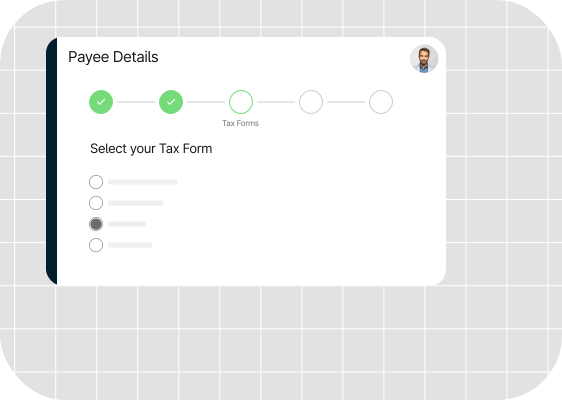
Tipalti’s guided tax form wizard captures tax information
Validation of Payee Information
While automating the collection of tax information of payees, Tipalti’s AP automation platform validates against 3,000+ rules in real time to help prevent ID errors and issues. This reduces the risks of missing or inaccurate details that can lead to TIN mismatch.

Tipalti verifies local and global payee information
Zenwork 1099 Integration for TIN matching
Tipalti integrates with the IRS’s TIN matching service and Zenwork 1099 to verify TINs and ensure that the name and TIN combination match the IRS’s records.
The system not only automates TIN matching but also enables users to view and edit 1099 and 1042-S forms before submitting them.
Error Notifications
The system automatically flags issues, such as incorrect TINs or missing information. These alerts prompt the payee or the AP team to rectify the information before making payments.
Withholding Tax Calculations
Tipalti automatically calculates the applicable withholding tax rate for both U.S. and non-U.S. payees.
Tax Prep and E-filing
In addition to e-billing, Tipalti generates tax preparation reports and supports e-filing of tax returns as mandated by the IRS.
Integrated Global Mass Payment System
Tipalti integrates tax compliance, procurement, and accounts payable with an advanced global mass payment system.
The integration enables users to make compliant payments across multiple countries and currencies using various payment methods.

Fast-track compliant global payments with Tipalti
With Tipalti’s TIN matching combined with AP automation software, you can ensure global tax compliance and enhance the efficiency of AP teams.
Above all, Tipalti’s integration with IRS e-services allows the AP staff to avoid delays in TIN verification caused by e-service updates.
Automate TIN Matching and Prevent IRS Penalties
Staying compliant shouldn’t drain your team’s time. Tipalti verifies TINs automatically, reduces invalid payee data, and streamlines 1099 reporting—perfect for finance teams managing high-volume contractor payouts.
TIN Matching FAQs
What is the IRS TIN Matching Program?
The IRS TIN Matching program is a free tool businesses can use to verify payees’ TINs before making payments.
How to perform TIN matching for my vendors?
To perform TIN matching on the IRS website, follow these steps:
1. Verify that your name features in the PAF database. If you are not listed in the database, file at least one 1099 to ensure the listing.
2. Register for IRS e-services and obtain login credentials
3. Apply for TIN matching and await approval.
4. Once approved, log in to the TIN Matching tool.
5. Enter the TIN and name combinations of vendors (in groups of 25 or in bulk)
6. The results are available immediately for Interactive TIN Matching and within 24 hours for Bulk TIN Matching.
What are the benefits of TIN matching services?
TIN matching services help controllers and AP teams stay compliant and streamline tax reporting and payee onboarding.
An integrated TIN-matching platform, such as Tipalti, automates bulk TIN matching while ensuring that payees submit the correct tax forms.
With built-in tax compliance, payers can avoid TIN matching delays or mismatches and the consequent penalties.
What is the IRS TIN matching bulk file format?
If you choose to upload TIN numbers and names in bulk, you must use the .txt file format.
