


Businesses use Form W-9 to collect tax information from independent contractors, vendors, and other U.S. payees. Accurate W-9 information helps businesses prepare IRS information returns, such as Forms 1099-NEC and 1099-MISC, and avoid tax reporting errors.
This guide explains what a W-9 form is, who needs to complete one, how to fill it out, and how businesses can simplify W-9 collection and validation.
What is a W-9 form?
A W-9 form, officially called the Request for Taxpayer Identification Number and Certification, is an IRS form that U.S. individuals and businesses use to provide their legal name, taxpayer identification number (TIN), and tax certifications to a requester. Businesses use this information to prepare accurate tax information returns, such as Form 1099.
The completed W-9 is submitted to the person or business requesting it, not directly to the IRS.
Form W-9 is used by U.S. persons, including:
- An individual who is a U.S. citizen or U.S. resident alien
- A partnership, corporation, company, or association created or organized in the United States or under the laws of the United States
- An estate (other than a foreign estate)
- A domestic trust (as defined in Regulations section 301.7701-7).
Who needs to fill out a W-9 form?
Any payee who is a U.S. person, including freelancers, vendors, contractors, partnerships, corporations, companies, associations, trusts, or estates, is required to complete a W-9 if their payer requests it to obtain their tax identification number (TIN).
Foreign persons (nonresident aliens) should not use the W-9 form. Instead, they generally provide the appropriate Form W-8 or other applicable documentation.
Where to download the current W-9 form
The March 2024 revision remains the current official Form W-9. The IRS posted a draft revision (Rev. June 2026) in May 2026, but draft forms can’t be used for filing. Keep using the March 2024 form until the IRS publishes the final version. The draft adds a certification for U.S. digital asset brokers and a new exempt payee code 14 for certain digital asset transactions. Download the free, fillable Form W-9 PDF, use a copy supplied by your requester, or submit your information through the requester’s tax collection software.
Follow the instructions included with the form. You can complete it electronically or print it and fill it out legibly by hand. Return the completed form to the requester—not the IRS.
How to fill out a W-9
To complete Form W-9, provide your legal name, business information (if applicable), federal tax classification, address, and taxpayer identification number (TIN). You must also review the required certifications and sign the form when applicable.
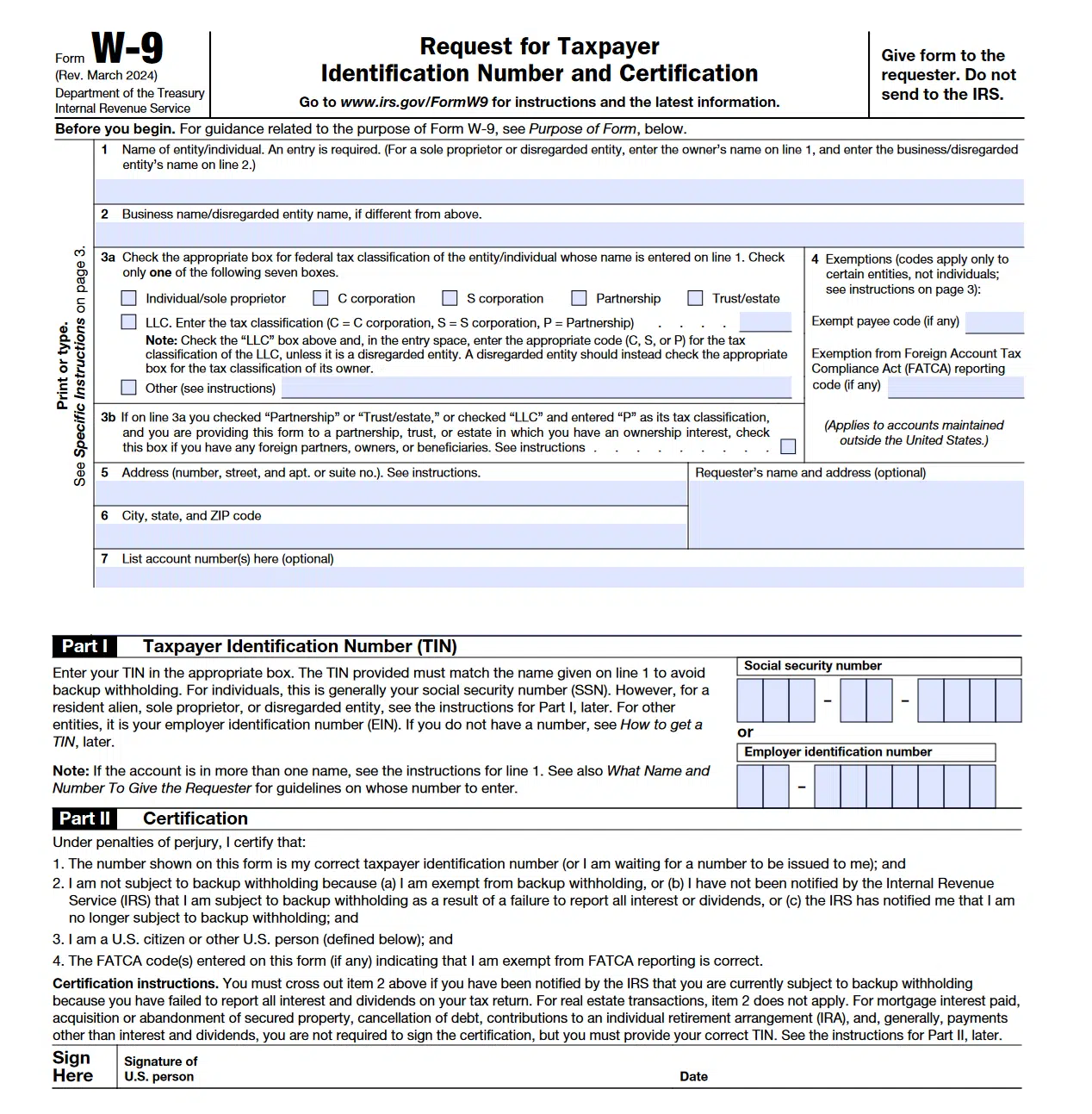
Use the official IRS Form W-9, currently revised March 2024, and follow the line-by-line instructions below.
Line 1: Name
Enter the name shown on your federal income tax return. The name on Line 1 should match the taxpayer identification number (TIN) entered in Part I.
Special situations include:
- Name changes: If you’ve changed your last name but haven’t notified the Social Security Administration, enter your first name, the last name shown on your Social Security card, and your new last name.
- ITIN applicants: If you applied for an Individual Taxpayer Identification Number (ITIN), use the name entered on Line 1a of Form W-7, which should also match the name on the Form 1040 submitted with your application.
- Disregarded entities: If you operate a single-member LLC or another disregarded entity, enter the owner’s name on Line 1 and the business or entity name on Line 2.
- Joint accounts: Generally, list and circle the name of the account holder whose TIN appears in Part I. For joint accounts maintained by a foreign financial institution (FFI), each U.S. account holder must provide a separate Form W-9.
For other business entities, enter the legal name shown on the entity’s federal tax documents.
Line 2: Business Name or Disregarded Entity Name
Enter your business name, trade name, or DBA (doing business as) name if it differs from the name on Line 1.
For a disregarded entity, such as a single-member LLC that has not elected corporate tax treatment, enter the entity’s name here rather than on Line 1.
Line 3a: Federal Tax Classification
Check one box to identify the federal tax classification of the individual or entity named on Line 1.
The seven available classifications are:
- Individual/sole proprietor
- C corporation
- S corporation
- Partnership
- Trust/estate
- Limited liability company (LLC)
- Other (see IRS instructions)
For LLCs, the correct selection depends on how the business is taxed:
- LLC taxed as a C corporation: Check the LLC box and enter “C.”
- LLC taxed as an S corporation: Check the LLC box and enter “S.”
- LLC taxed as a partnership: Check the LLC box and enter “P.”
- Disregarded single-member LLC: Do not check the LLC box. Instead, select the federal tax classification of the owner named on Line 1.
For example, a single-member LLC owned by an individual and treated as a disregarded entity generally checks “Individual/sole proprietor,” while an LLC taxed as an S corporation checks “LLC” and enters “S.”
Line 3b: Foreign Partners, Owners, or Beneficiaries
Certain partnerships (including LLCs taxed as partnerships), trusts, and estates must check Line 3b if they have foreign partners, owners, or beneficiaries and are providing Form W-9 to a partnership, trust, or estate in which they have an ownership interest.
This includes entities that receive a Form W-8 or other documentation establishing a partner’s foreign status, or a Form W-9 with Line 3b checked. Checking this box may trigger additional reporting requirements, including Schedules K-2 and K-3 (Form 1065). Refer to the IRS instructions for complex ownership structures.
Line 4: Exemptions From Backup Withholding and FATCA Reporting
Line 4 includes two optional exemption fields. These generally apply to certain entities rather than individuals.
Exempt payee code: Enter the applicable code if your entity qualifies for an exemption from backup withholding. The IRS provides 13 exempt payee codes.
For example, code 2 applies to the United States or its agencies and instrumentalities.
Individuals and sole proprietors generally are not exempt from backup withholding. Corporations are exempt for certain payment types, but important exceptions apply, including:
- Attorney fees and gross proceeds paid to attorneys
- Medical and healthcare payments
- Payments made in settlement of payment card and third-party network transactions.
FATCA exemption code: Enter the applicable code (A through M) if you qualify for an exemption from Foreign Account Tax Compliance Act (FATCA) reporting.
FATCA reporting generally concerns accounts maintained outside the United States at foreign financial institutions. If you are unsure whether a FATCA exemption code applies, consult the IRS instructions or ask the requesting financial institution.
Lines 5–7: Address and Account Information
- Line 5 — Street address: Enter your current mailing address, including apartment or suite number, if applicable. If your address has changed from the requester’s records, write “NEW” at the top of the form and notify the requester.
- Line 6 — City, state, and ZIP code: Enter the remaining mailing address information.
- Line 7 — Account numbers: List account numbers associated with the requester, if applicable. This field is optional.
The requester’s name and address may also be entered in the optional, unnumbered box.
Keeping your address current helps ensure that Forms 1099 and other tax documents reach you.
Part I: Taxpayer Identification Number (TIN)
Enter the TIN that corresponds to the name provided on Line 1. This is typically a Social Security number (SSN), Employer Identification Number (EIN), or Individual Taxpayer Identification Number (ITIN).
The correct number depends on your tax classification:
- Individuals: Generally enter your SSN.
- Sole proprietors: You may use your SSN or EIN, if you have one.
- Disregarded single-member LLCs: Enter the owner’s SSN or EIN, as applicable, rather than the disregarded LLC’s EIN.
- Corporations, partnerships, and LLCs taxed as corporations or partnerships: Generally enter the entity’s EIN.
- Resident aliens: If you do not have an SSN and are not eligible for one, enter your ITIN in the Social Security number field.
What if you don’t have a TIN yet?
If you have applied for a TIN or intend to apply soon, you may write “Applied For” in the TIN field, as permitted by IRS instructions.
However, this does not automatically exempt payments from backup withholding. A 60-day grace period generally applies only to certain interest, dividend, and readily tradable instrument payments. Other reportable payments, including nonemployee compensation, may be subject to backup withholding immediately while a TIN is pending.
You can apply for an SSN through the Social Security Administration, an EIN through the IRS, or an ITIN using IRS Form W-7.
Part II: Certification and Signature
By signing Form W-9, you certify under penalties of perjury that:
- The TIN provided is correct, or you are waiting for one to be issued.
- You are not subject to backup withholding because you are exempt, have not been notified by the IRS that backup withholding applies, or have been notified that it no longer applies.
- You are a U.S. citizen or other U.S. person for federal tax purposes.
- Any FATCA exemption codes entered on the form are correct.
If the IRS has notified you that you are currently subject to backup withholding because you failed to report interest or dividends, cross out certification item 2 before signing.
When is a signature required?
Signature requirements depend on the payment or transaction:
- Interest, dividends, and certain brokerage accounts: Certification is generally required for accounts opened after 1983, subject to exceptions in the IRS instructions.
- Real estate transactions: You must sign the certification, but item 2 does not apply and may be crossed out.
- Most business payments: For payments such as contractor fees, rents, royalties, and medical services, you generally must provide a correct TIN but are not required to sign unless previously notified that you supplied an incorrect TIN.
- Other transactions: For mortgage interest paid, cancellation of debt, certain retirement account contributions, and similar transactions, a correct TIN is generally required, but a signature may not be.
A requester may still ask you to sign the form even when the IRS does not otherwise require certification.
For joint accounts, the person whose TIN appears in Part I should sign when required. For disregarded entities, the person identified on Line 1 should sign.
How to submit a W-9 form
Submit a W-9 form to the requester (who may be the payer) required to file an information return.
Do not submit the completed form to the IRS. You can submit a signed Form W-9 either electronically or on paper.
You may submit a W-9 form as a PDF to the requester or complete a fillable W-9 online using software, complete the Certifications, and sign with an electronic signature.
Who requests a W-9?
Businesses and other organizations request Form W-9 when they need a U.S. payee’s taxpayer identification number (TIN) and certifications for IRS information reporting.
Common requesters include businesses paying independent contractors, freelancers, vendors, and other service providers. Financial institutions and organizations involved in certain real estate, mortgage, debt, and retirement account transactions may also request the form.
Learn more about the differences between Form W-9 and Form 1099.
When do you need to update a W-9 form?
The W-9 form has no expiration date and remains valid as long as the data stays correct.
Provide an updated W-9 if there is a change in legal name, TIN, address, federal tax classification, or exempt payee status. The Form W-9 instructions include examples of changes in exempt payee status, such as a C corporation electing to be an S corporation or a payee no longer being tax-exempt.
According to the Form W-9 instructions:
“You must provide updated information to any person to whom you claimed to be an exempt payee if you are no longer an exempt payee and anticipate receiving reportable payments in the future from this person.”
W-9 collection and validation for businesses

Requesters in a trade or business collect W-9 forms from U.S. persons and W-8 forms from foreign payees. The payers will use the collected Form W-9s to submit Form 1099 information returns to the IRS and to distribute copies to applicable state tax agencies and the recipients (payees).
It’s best practice to request W-9 (or W-8) forms from all 1099-NEC and 1099-MISC payees or suppliers during onboarding, before their first payment is made. This reduces the time staff spend following up to collect forms near each calendar year-end.
W-9 requesters must prepare and submit 1099 forms when payments to a payee meet the IRS reporting threshold for that calendar year, or when any amount of backup withholding was applied. For calendar 2026 payments reported on Form 1099-NEC for Nonemployee Compensation and for some items reported on Form 1099-MISC, the threshold increases from $600 to $2,000. Starting with 2027 payments, the $2,000 threshold will be adjusted annually for inflation.
W-9 form validation
After collecting W-9 forms, businesses should review payee names, taxpayer identification numbers (TINs), and tax classifications for completeness and accuracy. Eligible businesses can also use the IRS TIN Matching service to compare name and TIN combinations against IRS records before filing 1099 information returns.
These steps can help reduce reporting errors, backup withholding notices, and potential IRS penalties.
Spend less time on manual finance processes
Collecting W-9 forms is just one of the repetitive tasks finance teams manage. See how controllers use AP automation to cut manual work, from invoice capture to reconciliation.
What types of information returns are prepared from the W-9 form?
Requesters use W-9 information to prepare information returns such as Form 1099-NEC (nonemployee compensation), 1099-MISC (rents, royalties, and other income), 1099-INT (interest), 1099-DIV (dividends), 1099-B (broker transactions), 1099-S (real estate), 1099-K (payment card and third-party network transactions), and 1099-C (canceled debt).
They file these with the IRS and, where required, state tax agencies. The W-9 form requester also provides copies to recipients, who use them to prepare their income tax returns. The taxing authorities, such as the IRS, compare the taxable income on the 1099 form to the recipient’s tax return.
What happens if a W-9 is missing or incorrect?
Missing or incorrect W-9 information can lead to backup withholding, delayed tax reporting, and IRS penalties. For businesses managing multiple suppliers or independent contractors, collecting accurate W-9 information during onboarding helps prevent problems when preparing Forms 1099.
Backup withholding for missing or incorrect TINs
If a payee fails to provide a valid taxpayer identification number (TIN), or the IRS notifies a business of certain TIN or reporting issues, the business may be required to withhold 24% of applicable payments and remit the withheld amount to the IRS.
For example, if a contractor is subject to backup withholding and receives a $3,000 payment, the business would generally withhold $720 and pay the contractor $2,280.
A completed W-9 helps establish the payee’s TIN and tax certifications, but collecting the form alone does not eliminate all backup withholding obligations.
IRS penalties and W-9 compliance risks
Businesses may face IRS penalties for filing 1099 information returns late or incorrectly, including when payee names or TINs are inaccurate. Penalties generally increase based on how late a return is filed or corrected.
Payees may also face a $50 penalty for each failure to provide a correct TIN, and a $500 civil penalty for false withholding statements. Requesters must protect the taxpayer information they collect and avoid unauthorized disclosure or misuse.
To reduce compliance risks, finance teams should:
- Collect W-9 forms during supplier onboarding, ideally before the first payment.
- Review names, TINs, and tax classifications for completeness and accuracy.
- Use the IRS TIN Matching service, when eligible, to identify potential name and TIN mismatches before filing.
- Update payee records when business names, tax classifications, or other relevant information change.
For detailed 1099 reporting thresholds, filing deadlines, backup withholding obligations, and current IRS penalty amounts, see our IRS 1099 Rules and Filing Deadlines guide.
Automating W-9 collection and tax compliance with Tipalti
Collecting, validating, and managing W-9 forms across hundreds or thousands of suppliers and contractors can be time-consuming. Tipalti helps finance teams automate W-9 and W-8 collection, validate taxpayer information, and prepare for year-end tax reporting through automated supplier onboarding and tax compliance workflows.
Automated W-9 collection and validation
Tipalti’s Supplier Hub enables suppliers, independent contractors, and other payees to submit W-9 or W-8 information digitally during onboarding, reducing manual form collection and follow-up.
Key capabilities include:
- Digital tax form collection: Collect W-9 and W-8 information through a self-service supplier portal.
- TIN matching and validation: Check tax data against 1,000+ validation rules, including IRS TIN matching, to flag name and TIN mismatches before payment.
- Guided tax form selection: A tax form wizard picks the correct form (W-9, W-8 series, or Form 8233) based on the payee’s country and business structure.
- 1099 preparation reports: Track payments and generate reports to support preparation of Forms 1099-NEC, 1099-MISC, and 1042-S.
- Withholding calculations: Calculate applicable withholding for U.S. and non-U.S. payees based on validated tax data.
By collecting and validating tax information before payments begin, finance teams can reduce year-end administrative work and improve reporting accuracy.

Tipalti helps you do the right [vendor] background checks, making sure thereʼs no issue with the bank accounts, and helps collect the necessary tax information, which is really beneficial when doing 1099s at the end of the year.
Becca Simmons
Head of Finance, EMEA, Vivino
1099 eFiling with Tipalti’s Zenwork Tax1099 integration
Tipalti integrates with Zenwork Tax1099 to simplify information return preparation and filing.
Businesses can import a calendar year’s supplier and payee payment data from Tipalti into Tax1099 to generate and electronically file Forms 1099-NEC, 1099-MISC, and 1042-S with the IRS and applicable state agencies. Tax1099 also distributes copies to recipients.
Together, these capabilities help finance teams manage the process from initial W-9 collection through year-end 1099 reporting.
Automating W-9 collection and tax information validation helps businesses reduce manual errors, maintain more accurate supplier records, and scale compliance as payment volumes grow.
Explore Tipalti’s automated tax compliance solutions to learn how to simplify supplier onboarding, W-9 collection, and tax reporting.
W-9 form FAQs
Here are answers to common questions about Form W-9.
What is the purpose of the W-9 form?
The purpose of the W-9 form is to provide information to trade or business payers to prepare 1099 information returns and submit them to the IRS (and applicable states). The 1099 preparer also provides the necessary copies to each payee (recipient) who meets the 1099 payment threshold or had backup withholding applied. The IRS and states use 1099-MISC and 1099-NEC information to verify that the correct income is reported on a taxpayer’s income tax return.
Why would a company ask me to fill out a W-9 form?
A company typically requests Form W-9 to collect your legal name, taxpayer identification number (TIN), and tax classification so it can prepare accurate IRS information returns, such as Form 1099-NEC or 1099-MISC.
Businesses commonly request W-9 forms from independent contractors, freelancers, vendors, and other U.S. payees during onboarding, before making payments. Receiving a W-9 request does not necessarily mean you’ll receive a Form 1099, since reporting requirements depend on the payment type, recipient classification, and applicable IRS thresholds.
How do I fill out a W-9 form as an individual or a business?
You can complete Form W-9 yourself without hiring a tax professional. You’ll need to provide your legal name, business name (if applicable), federal tax classification, address, and taxpayer identification number (TIN), such as an SSN or EIN. You must also complete the applicable certifications and sign the form when required.
For businesses, the correct information depends on the entity’s tax classification. For example, a disregarded single-member LLC generally enters its owner’s name and TIN, while an LLC taxed as a corporation or partnership generally uses the entity’s name and EIN.
Follow the step-by-step W-9 instructions above for guidance on each field. Once completed, submit the form to the requesting business, not the IRS.
Where can I download a free, printable W-9 form?
You can download the official fillable Form W-9 PDF directly from the IRS. The form is free and can be completed electronically or printed and filled out by hand.
Some businesses also allow payees to submit W-9 information securely through an online supplier portal. Return the completed form to the requester, not the IRS.
Who gets a 1099 form?
Businesses generally issue Forms 1099 to U.S. payees who receive reportable payments meeting applicable IRS thresholds. Not everyone who submits a W-9 receives a 1099, as requirements depend on the payment type and recipient classification.
Learn more about who gets a 1099 form and which payments require reporting.
Do small business owners need to fill out a W-9?
Yes, when a payer requests one. Small business owners who are U.S. persons, including sole proprietors, independent contractors, partnerships, and corporations, complete Form W-9 so the payer can report payments to the IRS.
