

 Back
Back 


Does your business make payments to non-U.S. citizens, such as freelancers, contractors, or corporations located outside of the US?
If yes, you need to know about IRS (Internal Revenue Service) Form 1042-S.
The IRS mandates the filing of Form 1042-S to record the earnings of nonresident aliens who receive income in the United States.
In this guide, we break down who must file Form 1042-S, what’s reportable, key deadlines and e-filing rules, and how automation can support compliance.
Key Takeaways
- IRS Form 1042-S reports U.S.-source income paid to foreign persons, including any tax withheld.
- Withholding agents may be required to file Form 1042-S based on the payee type and payment activity.
- Many U.S.-source payment types can be reportable, and you may need multiple 1042-S forms for one recipient if income types differ.
- If you file Form 1042-S, you must also file Form 1042, which summarizes totals for the year.
- Form 1042-S is typically due March 15 and e-filing rules depend on filer requirements and the tax year (FIRE vs. IRIS).
- Automation helps reduce errors and manual workload across tax form collection, validation, withholding workflows, and year-end reporting.
What Is Form 1042-S?
U.S.-based companies must use IRS Form 1042-S to report to the IRS any payments they make to foreign individuals, such as overseas contractors or freelancers.
Businesses that pay foreign persons and withhold taxes on those payments are considered withholding agents.
Here, it is important to understand who ‘foreign persons’ and ‘withholding agents’ are.
Who Are Withholding Agents?
According to the IRS:
“You are a withholding agent if you are a U.S. or foreign person that has control, receipt, custody, disposal, or payment of any item of income of a foreign person that is subject to withholding.
A withholding agent may be any of the following:
- Individual
- Corporation
- Partnership
- Trust
- Association
- Any other entity, including foreign intermediary, foreign partnership, or U.S. branch of certain foreign banks and insurance companies
The exact title of the IRS form is ‘Foreign Person’s U.S. Source Income Subject to Withholding.’
Who Are Foreign Persons?
The IRS defines a foreign person as “a nonresident alien individual, foreign corporation, foreign partnership, foreign trust, foreign estate, and any other person that is not a U.S. person.”
In other words, ‘foreign persons’ can be:
- Nonresident alien individuals and any non-US person
- The foreign branch of a US financial institution where the branch is a qualified intermediary
- US branch of a foreign corporation or partnership
What Types of Payments Do You Report on Form 1042-S?
Amounts from U.S. sources paid to foreign persons are subject to reporting on Form 1042-S, even if:
- The income is exempt from tax under a U.S. tax treaty or U.S. tax rules (for example, effectively connected income).
- You refunded or released the tax that you withheld
Here is a list of the amounts subject to reporting on Form 1042-S:
- Interest on deposit paid to nonresident aliens
- Corporate distributions
- Interest from financial contracts
- Rents and royalty payments
- Independent personal services
- Annuities and pensions
- Gambling winnings
- Effectively connected income
- Insurance premiums with cash value
In cases where there is more than one type of income, you should use multiple forms. For example, if one person received pension income and royalties, you must use a 1042-S for each.
Note that this list is not exhaustive. Refer to the Instructions for Form 1042-S (2025) on the IRS website for the full list of applicable amounts.
Which Amounts Are Not Subject to Reporting on Form 1042-S?
These are some of the amounts that are not subject to reporting on Form 1042-S:
- Short-term interest from debts that mature in 183 days or less.
- Certain foreign-market bonds are sold only to foreign investors (with proper certifications).
- Older bearer bonds issued before 2012 that don’t require a Form W-8.
- Non-ECI swap/contract payments that are not effectively connected with the conduct of a trade or business in the United States.
- Some chapter 4 payments not subject to chapter 4 withholding
- Certain partnership sale amounts that are exempt because the partnership has less than 10% effectively connected gain.
For the full list of exceptions, see Amounts That Are Not Subject to Reporting on Form 1042-S.
If you also pay U.S. vendors, you may have separate reporting requirements for domestic payees.
Pro Tip: Are you compliant with the current IRS 1099 rules?
Find out the reporting obligations here: IRS 1099 Rules Explained: Reporting Requirements for Businesses
Should You Also File Form 1042 Along With Form 1042-S?
According to Form 1042-S Instructions, “If you file Form 1042-S, you must also file Form 1042, Annual Withholding Tax Return for U.S. Source Income of Foreign Persons.”
Form 1042 acts as the master summary for all 1042-S forms you filed in the year, the gross amount you reported, and the total tax the withholding agent withheld and paid.
The IRS uses it to match and verify the information reported on all your 1042-S forms.

How To Fill Out IRS Form 1042-S
We’ve described the boxes (line items) in Form 1042-S and provided a screenshot of the IRS 2025 form. Read the IRS Form 1042-S Instructions for more details.

Box 1 – Income code
Box 1 requires you to enter the applicable income code that classifies a payment. One form can only have one code. If there are multiple payments from several codes, you need to file more than one form.
The IRS has listed the income codes for various payments. Here are some of them:
| Income codes | Types of income |
|---|---|
| 01 | Interest paid by U.S. obligors—general |
| 02 | Interest paid on real property mortgages |
| 09 | Capital gains |
| 11 | Motion picture or television copyright royalties |
| 12 | Other royalties (for example, copyright, software, broadcasting, endorsement payments) |
| 17 | Compensation for independent personal services |
| 19 | Compensation for teaching |
Box 2 – Gross income
In Box 2, for gross income (not net income), enter the entire amount paid to the recipient, including tax withholding, for each type of income.
Box 3 – Chapter indicator
Enter Chapter 3 for withholdings that apply to foreign persons and Chapter 4 for entities that are foreign financial institutions.
Box 3a or Box 4a – Exemption code
Refer to the exemption codes and the authority for exemption to fill these boxes.
For instance, enter 03 for income that is not from US sources.
| Exemption Code | Authority for Exemption |
|---|---|
| 01 | Effectively connected income (ECI) — income connected to a U.S. trade or business. |
| 02 | Exempt under the Internal Revenue Code (IRC). |
| 03 | Income is not from U.S. sources. |
| 04 | Exempt under an applicable tax treaty. |
| 07 | Withholding Foreign Partnership (WFP) or Withholding Foreign Trust (WFT). |
| 08 | U.S. branch treated as a U.S. person for withholding purposes. |
Box 3b or Box 4b – Tax rate
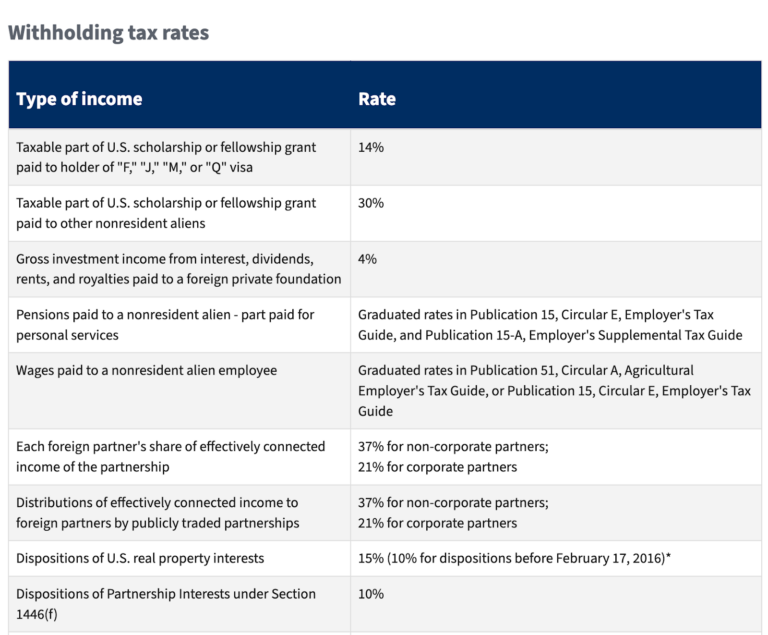
This box refers to the statutory rates at which you withheld tax when paying foreign persons. Generally, the default rate is 30% for U.S. source gross income that is not effectively connected with a U.S. trade or business.
If there is a tax treaty or an IRS exemption, the tax rate may be 0 or less than 30%. The IRS lists the applicable tax rates for different types of income.
In case of an applicable tax treaty, enter the tax rate as zero and provide the relevant exemption code 01 through 24 from IRS Form 1042-S Instructions.
Box 5 – Withholding allowance
Enter the amount exempt from withholding here only if there is a valid treaty that provides exemption from withholding for any of these income codes:
- 16 for scholarship or fellowship grants
- 17 for compensation for independent personal services
- 18 for compensation for dependent personal services
- 19 for compensation for teaching
- 20 for compensation during studying and training
- 42 for earnings as an artist or athlete with no central withholding agreement.
Read the Form 1042-S Instructions for special rules applying to a designated withholding agent with a central withholding agreement with the IRS.
Box 6 – Net income
Complete this box only if you entered an amount in box 5. If no amount is in box 5, leave it blank.
Box 7a through 7d
In Box 7a, enter the total amount of U.S. federal tax you actually withheld under chapter 3 or 4. If you did not withhold any tax, enter “-0-.”
Check Box 7b if the withholding agent withheld taxes but didn’t deposit them with the IRS because they used the escrow procedures specified in 7b instructions.
Check Box 7c only if a partnership withheld tax for a foreign partner’s share in the subsequent year for the preceding calendar year.
Box 7d is for QI (Qualified Intermediary), WP (Withholding Partnership), or WT (Withholding Trust) entities that originally reported payments in withholding rate pools and want to revise it to report the payment to a specific recipient.
Box 8
If you’re a withholding agent reporting income subject to withholding already by another withholding agent, report the amount the other withholding agent withheld.
Box 9
Use this box only if you refunded extra (overwithheld) tax to the payee during the 2026 calendar year and followed the IRS rules for correcting the mistake.
Box 10 – Total withholding credit (combine boxes 7a, 8, and 9)
According to IRS Form 1042-S Instructions, “Box 10 must be completed in all cases, even if no tax has been deposited.”
Box 11 – Tax paid by withholding agent (amounts not withheld)
Box 11 is the tax paid by the withholding agent’s EIN from their own funds and not withheld from the payment to the recipient. Avoid including this amount in Box 10.
Box 12a through 12i
| Box | Field description | Notes |
|---|---|---|
| 12 a | Withholding agent’s EIN | Enter the withholding agent’s employer identification number. Apply with the IRS for an EIN if you don’t have one yet. |
| 12b | Chapter 3 status code | These codes are listed in Appendix B of the 2025 Instructions for Form 1042-S |
| 12c | Chapter 4 status code | |
| 12d | Withholding agent’s name | Self-explanatory |
| 12e | Withholding agent’s global intermediary identification number (GIIN) | Verify the GIIN in the FATCA Foreign Financial Institution (FFI) List |
| 12f | Country code | Enter the country code of your residence from the IRS list of foreign country codes accessible from Form 1042-S Instructions in Box 12f or OC if that country isn’t included in the IRS list. Enter US in box 12f if the withholding agent is a U.S. person or a foreign branch of a U.S. person. |
| 12g | Foreign tax identification number, if any | Enter the foreign tax identification number if applicable |
| 12h | Address | Enter the number and street |
| 12i | City or town, state or province, country, ZIP or foreign postal code | Enter the relevant details |
Box 13a through 13l
| Box | Field description |
|---|---|
| 13a | Recipient’s name |
| 13b | Recipient’s country code |
| 13c | Address (street and number) |
| 13d | City or town, state or province, country, ZIP or foreign postal code |
| 13e | Recipient’s U.S. TIN |
| 13f | Chapter 3 status code |
| 13g | Chapter 4 status code |
| 13h | Recipient’s GIIN |
| 13i | Recipient’s foreign tax identification, if any |
| 13j | LOB (Limitation on Benefits) code if claiming tax treaty benefits |
| 13k | Recipient’s account number |
| 13l | Recipient’s date of birth |
Boxes 14a and 14b – Primary withholding agent’s name (if applicable)/EIN
These boxes are used by an intermediary and flow-through entity reporting in Box 8 the amount withheld by another withholding agent called the Primary withholding agent.
Enter the primary withholding agent’s name and employer identification number. If there is more than one primary withholding agent, enter the name and EIN of only one in boxes 14a and 14b. If there are no primary withholding agents, leave the boxes blank.
Box 15 – Check if prorata basis reporting
A withholding agent uses this checkbox to report to the IRS that “an NQI that used the alternative procedures of Regulations section 1.1441-1(e)(3)(iv)(D) failed to comply with those procedures properly.”
Boxes 15a through 15i
| Box | Field description |
|---|---|
| 15a | Intermediary and flow-through entity’s EIN, if any |
| 15b | Chapter 3 status code |
| 15c | Chapter 4 status code |
| 15d | Intermediary and flow-through entity’s name |
| 15e | Intermediary and flow-through entity’s GIIN |
| 15f | Country code |
| 15g | Foreign tax identification number, if any |
| 15h | Address (Number and street) |
| 15i | City or town, state or province, country, ZIP or foreign postal code |
Boxes 16a through 16e—Payer’s Name, TIN, GIIN, and Status Code
Include the payer’s name, TIN, and GIIN if an authorized agent is filing the form and making payments on behalf of the principal payer.
Box 17a – State income tax withheld
Boxes 17a through 17c relate to any state income tax withheld.
Box 17b – Payer’s state tax no.
In Box 17b, enter the payer’s state tax number.
Box 17c – Name of state
In Box 17c, enter the state name.
When Is the Deadline for Filing Form 1042-S?
The standard deadline is March 15th of the year following the calendar year when the 1042-S payments were made.
You should file only one 1042-S per calendar year. Copy A is due to the IRS, and Copies B, C, and D to the recipient.
If you need more time to file Forms 1042-S, the IRS will grant an extension.
To gain more time, you will need to file Form 8809 (Application for Extension of Time to File Information Returns) by the due date of Form 1042-S.
E-filing note: For 2025 Forms 1042-S due March 15, 2026, filers may use FIRE or IRIS; for 2026 Forms 1042-S due March 15, 2027, IRIS is required.
Pro Tip: Mitigate the risks of non-compliance with year-round tax planning.
Explore the guide: Maintain Year-Round Corporate Tax Compliance with Automation
Electronic Filing Requirements for Form 1042-S
Starting January 1, 2026, filers can use the IRS Information Returns Intake System (IRIS) to e-file 2025 Forms 1042-S (due March 15, 2026). For 2026 Forms 1042-S (due March 15, 2027), filers must use IRIS.
On February 21, 2023, the Department of the Treasury and the IRS modified the regulations related to e-filing of tax returns in the Taxpayer First Act.
As per the regulations, beginning in 2024 (tax year 2023), filers have to electronically file income tax returns if they file 10 or more returns in a calendar year (the earlier threshold for e-filing was 250 returns in a calendar year).
These regulations apply to 1042-S filing as well.
If a withholding agent is a partnership with more than 100 partners, it must also file Form 1042-S electronically.
Financial institutions that report payments under Chapter 3 or 4 also must file Form 1042-S electronically, regardless of the number of forms they have to file.
However, the IRS encourages all filers “to file information returns electronically even if they are not required to do so.”
Penalties for non-compliance
As you may know, the IRS imposes penalties if you file late, file incorrectly, or fail to provide accurate payee statements. The penalty amounts increase the later you file.
These are the 2025 penalties per information return:
- Up to August 1: $130 per form
- After August 1 or failure to file: $330 per form
- If non-compliance was intentional: $660 per form
Note that there are additional penalties if you fail to file electronically when you’re required to, unless you can establish that you had a valid reason for not doing so.
For tax-exempt organizations with more than $1 million in gross receipts, failing to file electronically results in a penalty of $100 for each day of noncompliance, with a maximum cap of $50,000.
On top of that, the individual responsible for filing may be fined $10 per day, up to $5,000. These penalties apply even if they have submitted paper returns.
Automate 1042-S Tax Compliance Workflows
Streamline tax form collection, withholding workflows, and year-end reporting with automation designed to reduce errors and support compliant global payouts.
Can Recipients of Form 1042-S Claim Tax Credits?
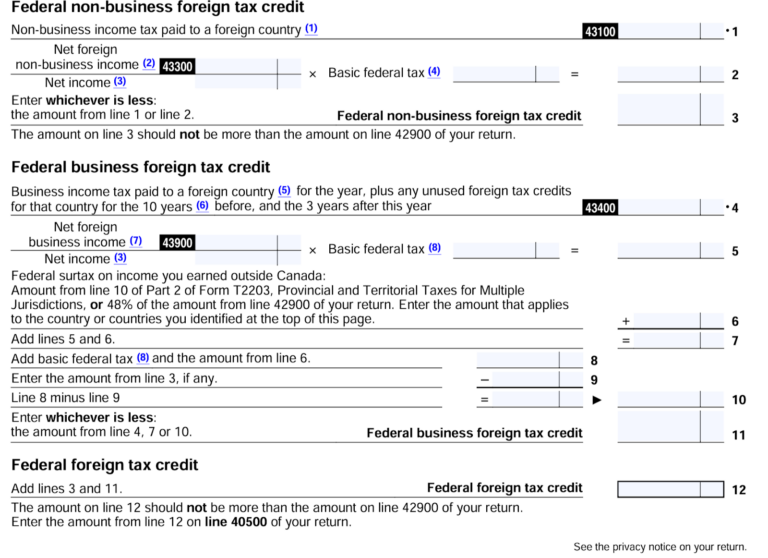
Non-US citizens or non-US groups, including foreign partnerships, corporations, estates, or trusts, who receive Form 1042-S use it to report the US-based income they received, the tax they paid, and claim any applicable tax credit.
For instance, Canadian citizens who receive 1042-S need to complete the ‘T2209 Federal Foreign Tax Credits’ form and attach official receipts to show the foreign taxes that they paid, and other supporting documents to claim foreign tax credits.
However, the credits or rebates the recipients receive depend on the tax treaty their country has with the US.
Can You Use Form 1042-S to Report Wages?
Under the tax laws of the United States, withholding agents should not use Form 1042-S to report wages for income tax purposes. For reporting wages, they must use Form W-2,
However, if earnings are exempt from income tax withholding because of a tax treaty, then withholding agents can use Form 1042-S.
This is to only report wages in excess of the amount that’s exempt from income tax withholding.
Pro Tip: Stay compliant with the latest regulations on backup withholding.
Read our in-depth guide: What Is Backup Withholding and Who Has To Pay It?
5 Best Practices for Controllers to Simplify 1042-S Compliance
Controllers are increasingly being called upon to play a strategic role and deliver financial results amid growing regulatory scrutiny, geopolitical challenges, inflation, and a talent shortage.
These best practices can help controllers streamline 1042-S processes and strengthen tax compliance in general.
1. Upskill Your AP Team
Ensure your team understands the latest regulations related to 1042-S, 1099, and other tax forms.
Provide targeted training on all areas of tax compliance, including e-filing, withholding rules, deadlines, Chapter 3 vs. Chapter 4 requirements, and year-end 1042-S obligations.
2. Centralize Payee and Tax Documentation
Maintain a single system for collecting and storing W-8 forms, 1402-S, 1099, and other forms.
The storage system serves as a centralized repository for withholding records, payee information, and payment histories, ensuring complete audit trails and avoiding data gaps during year-end reporting.
3. Optimize Internal Controls and Workflows
Developing a streamlined tax workflow goes a long way in ensuring compliance.
Here are some ways to optimize controls and workflows:
- Create checklists: Create clear checklists for onboarding foreign payees, validating their tax IDs, applying treaty rates, and preparing 1042-S files.
- Establish a review protocol: Require periodic checks to verify correct withholding rates, treaty eligibility, and proper coding before issuing payments.
- Ensure accurate year-end reporting: Prepare early by reconciling payment data, verifying tax forms on file, and ensuring all payee details are complete before generating 1042-S.
4. Promote Coordination
Close coordination between AP, legal, and finance ensures everyone understands their role in collecting tax forms, validating statuses, and preparing submissions.
5. Invest in Automation
In a 2025 PwC study, 51% of CFOs cited talent shortage as one of the top barriers to delivering their financial goals.
This underscores the importance of automating tax compliance to minimize the need for skilled human resources.
With a mass payments platform with built-in tax compliance, such as Tipalti, controllers can streamline 1042-S preparation and e-filing.
Choose tools that flag compliance issues, such as missing forms, expiring W-8s, inconsistent tax statuses, or suspicious payee accounts, before making payments.
How Tipalti Supports 1042-S Compliance and Reduces Controller Workload
Tipalti directly addresses the top challenges that controllers face with an end-to-end workflow that simplifies tax compliance and eliminates manual effort.
Built with a specific focus on tax compliance, the industry-leading software automates 1042-S compliance with a combination of built-in features and seamless integrations.
The features below highlight why Tipalti stands out as a powerful AP and tax compliance solution.
Automated Data and Tax Form Collection
Payee information flows into Tipalti’s unified system, giving controllers a reliable single source of truth. This eliminates cumbersome manual data collation, which is one of the biggest pain points for 1042-S preparation.
Tipalti’s KPMG-approved tax engine enforces compliance by requiring payees to complete the relevant tax forms and provide their local tax identification number when they self-register on the Tipalti supplier management portal.
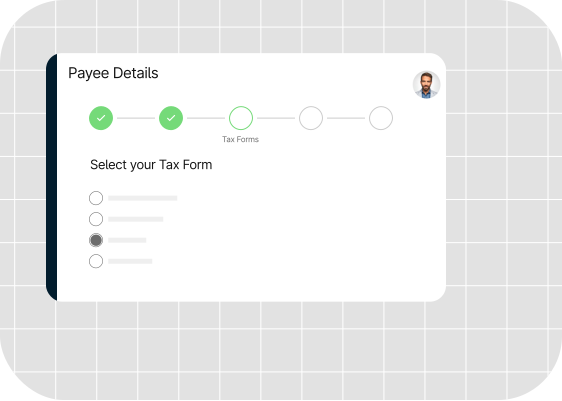
In addition to supporting 1042-S reporting workflows, Tipalti helps teams collect key W-8 forms used for foreign payee compliance, including W-8BEN, W-8BEN-E, W-8ECI, and W-8IMY, as well as other tax documentation required for onboarding and reporting.
For U.S. payees, Tipalti collects an integrated W-9 form on all taxpayer identifiers, including Social Security numbers (SSN) and Employer Identification numbers (EIN).
Validation of Payees, Tax ID, and TIN Matching
Once the correct tax form is selected, Tipalti digitises documents and applies 26000+ rules to approve payees’ contact information, payment data, and tax information.
It validates payees’ TIN (taxpayer identification number) to ensure accuracy in the 1042-S form filling and supports the collection and validation of local and VAT tax IDs in 60+ countries.
Tipalti Detect, a proprietary AI-enabled fraud prevention tool, screens all payees against US and international blacklists to safeguard against money laundering, terrorism, or other illicit activities.

Tipalti’s database is regularly updated with the latest regulatory requirements to ensure full compliance with OFAC (Office of Foreign Assets Control), Anti-Terror, and Anti-Narcotics regulations.
Built-In Withholding, Treaty Benefits, and Tax Prep Tools
Tipalti’s built-in capabilities automate 1042-S compliance by:
- Determining whether a payee is foreign
- Checking if the income type is reportable under Chapter 3 or Chapter 4
- Applying the correct withholding rate
- Applying the relevant tax treaty benefits
- Calculating and withholding the correct tax amount
- Recording withholding for year-end forms
- Storing all tax forms and verification data securely in the portal
These features help expedite the completion of the 1042-S form by ensuring data accuracy and eliminating manual entries.
Seamless E-Filing of 1042-S Through the Tipalti–Tax1099 Integration
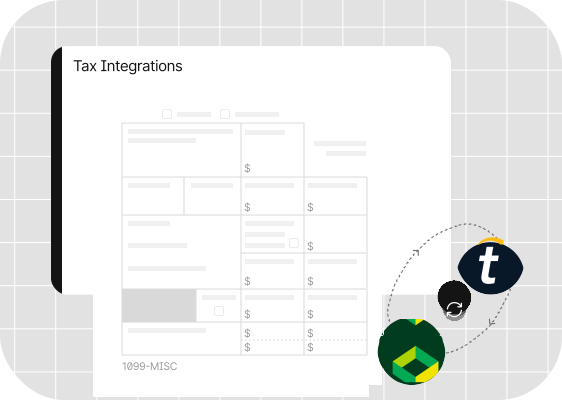
Tipalti’s Tax1099 integration, powered by Zenwork, allows finance teams to overcome the hassles of error-prone manual 1042-S form filing and move to an automated, IRS-compliant e-filing process.
The integration automates e-filing of forms, including 1099-MISC, 1099-NEC, and 1042-S.
Accounting teams can:
- Automatically pull 1099-MISC, 1099-NEC, and 1042-S data directly from Tipalti into Tax1099
- Import Tipalti’s 1099/1042-S Preparation Report and have the forms populated automatically
- Review and edit forms before submission
- E-file directly with the IRS and applicable states that require a filing either through the Combined Federal/ State Filing Program, or through eFile, mail, or CD
- Deliver forms to recipients electronically or by mail
- Retrieve e-filed 1099 or 1042-S form PDFs and view them on your own web or mobile application
Accurate Year-End Reporting
Tipalti’s advanced automation and data storage capabilities ensure that controllers can manage high volumes of 1042-S filings without additional resources.
The platform:
- Prepares and organizes all the 1042-S and other tax data, including amounts paid, tax withheld, recipient details, exemption codes, etc.
- Generates 1042-S tax preparation reports
- Verifies tax information is complete and accurate
- Provides a pre-formatted, submission-ready file at year-end that contains all the information you need for tax reporting.
- Enables easy import of the file into your corporate accounting or tax preparation package to generate individual tax reports.
This gives controllers the flexibility to scale tax reporting as the business grows.
Integrated Global Mass Payments
Tipalti’s global mass payment platform integrates seamlessly with accounts payable, procurement with intake management, and expense management platforms.
Once payees are validated and payments are approved, Tipalti automates global payments across countries and currencies using a wide range of payment methods.
With industry-grade security solutions, Tipalti mitigates risks, such as payment fraud, duplicate payments, and delays.
Tipalti’s solution allowed us to shift from a manual, multi-day workflow to a real-time, robust system that delivers on both efficiency and compliance.
–Sandra Krikstaponyte Product Director, Honeygain
Automate the Process to Streamline Your 1042-S Compliance
In this blog, we’ve covered the steps to prepare and e-file Form 1042-S.
However, it is important to read the instructions given on the IRS.gov website and understand the relevant codes to fill the form accurately.
Keep in mind the deadlines and regulations related to e-filing.
Implementing an automation solution, such as Tipalti Automated Tax Compliance, will help you save time, minimize headcount, and prevent costly penalties of non-compliance.
Form 1042-S FAQs
What is IRS Form 1042-S used for?
Form 1042-S reports U.S.-source income businesses pay to foreign persons (individuals or entities) and the tax they withheld on the income.
How do I e-file Form 1042-S?
Go through the section in this blog on ‘How to Fill out IRS Form 1042-S.’ Once you fill the form, you can e-file it through FIRE or IRIS (depending on the tax year) or using an approved provider such as Tax1099.
How does Form 1042-S affect my taxes?
The form shows the income you received and the tax withheld. You can use it to claim a refund/tax credits, report income, or verify withholding on your U.S. tax return.
Do I need to file Form 1042-S every year?
Yes. If you pay non-U.S. persons or entities, you must file Form 1042-S every year.
What are the IRS Form 1042-S instructions?
The IRS has provided detailed instructions on how to prepare and file Form 1042-S on its website. These instructions include status codes, rules for withholding, income codes, and withholding rates.
How to get the 1042-S form?
You can download Form 1042-S from the IRS website or access it through an e-filing platform, or an AP automation platform, such as Tipalti that generates the form.