

 Back
Back 

Migrating from your current ERP or accounting software to SAP requires thorough planning to ensure a seamless transition that enhances the management of your business processes. Including value-added third-party integrations for AI-driven finance automation, either at the time of SAP migration or later, will enhance your ERP’s functionality.
This guide explores the process of migrating from an ERP or accounting system that no longer meets growing business needs, isn’t cloud-based, or is approaching end-of-life. Your new system for this transition is either future-ready SAP S/4HANA for mid–market or larger companies, or SAP Business One for SMBs.
The guide provides a step-by-step methodology, a checklist, and best practices for your SAP migration.
Why Companies Migrate to SAP—and When Itʼs Time to Make the Move
Companies typically migrate to SAP when their existing ERP systems can no longer support growth, they need stronger compliance and functionality for multi-entity global operations, or they move to cloud software.
Common catalysts for SAP migration include:
- Outgrowing fragmented and siloed systems
- SAP ECC end-of-maintenance deadlines
- Cloud-first mandates
- M&A consolidation
- Need for global operations and tax compliance
- Replacing legacy systems that cannot scale
Key migration scenarios include:
- ECC to SAP S/4HANA
- On-premise to SAP cloud RISE with SAP/private cloud
- SAP Business One to a higher-scale SAP environment
- Non-SAP to SAP
SAP ECC mainstream support ends December 31, 2027, with SAP extended support available through 2030. ECC users need to begin or complete a SAP migration from SAP ECC to SAP S/4HANA as soon as possible. The switch will help them avoid cybersecurity risks related to no longer receiving SAP ECC security updates.
Some businesses may choose to migrate from non-SAP ERP systems to SAP ERP systems, such as SAP S/4HANA, for changes like IPO preparation or multi-entity expansion. Global public companies also use other ERP systems, such as NetSuite.
Pro Tip: It’s time to migrate when your current system no longer supports your business, reporting, or growth needs—or when the vendor is ending support for your legacy ERP.
Key Challenges in SAP Migration (and How to Address Them)
SAP migrations are complex, cross-functional projects that often expose gaps in data quality, financial structures, system configuration, and alignment between teams. Companies also face important architectural decisions—such as cloud vs. on-premise—which influence timeline, cost, and long-term scalability. Understanding these challenges upfront helps prevent issues during cutover and go-live.
Data Integrity Problems
Data integrity issues for data migration in SAP include messy vendor master data, unstructured invoices, and inconsistent naming conventions.
Complex Multi-Entity Financial Structures
Multi-entity companies are complex in structure, requiring a thorough understanding and a process to ensure all the correct entities are included in the SAP migration.
Misalignment between IT and Finance
Migration is often IT-led, but finance owns the data. SAP migration is an essential yet complex project that requires collaboration among functional units to achieve overall business goals.
As a change management process, upper management must clearly communicate the scope, requirements, and ultimate goals of the ERP migration project to all employees upfront. The company should have a natural champion for this extensive SAP migration project who can clearly articulate its benefits to other employees to optimize project acceptance and results.
Configuration Gaps
Proper configuration of system elements must be planned and performed for the SAP migration. These elements include workflows, tax, currencies, and postings.
Cloud vs On-Premise Architecture Decisions
As part of essential pre-implementation planning, decide on the best deployment method for your company. SAP S/4HANA ERP is available in the following options:
- Public cloud (Public Edition)
- Private cloud (Private Edition)
- HEC (SAP HANA Enterprise Cloud) — on-premises with SAP infrastructure management
- Strict on-premises — fully managed by your in-house IT team using your own equipment
You’ll need a cloud migration strategy when choosing SAP S/4HANA in the cloud. SAP Public Edition supports multi-tenant deployments across multiple companies, while SAP Private Edition is single-tenant and dedicated to one organization.
Businesses need to complete the SAP migration to SAP S/4HANA Cloud from SAP ECC before its December 31, 2027, end-of-life deadline, when mainstream support ends. Other companies may choose to migrate to SAP S/4HANA Cloud from non-SAP ERP systems.
Deloitte builds a case for SAP ERP migration to SAP S/4HANA Cloud:
As the deadline for SAP’s ERP migration [to SAP S/4HANA] approaches, many organizations are evaluating the business case and benefits of their move. This requires an understanding of the transition’s business value, pathways to transform, and significance of a cloud-enabled ERP foundation.
SAP’s high-level advice to IT executives for SAP S/4HANA migration in the cloud is:
IT executives should focus on three strategic considerations: choosing between the GROW with SAP and RISE with SAP offerings, exploring possible migration paths, and making necessary IT infrastructure adjustments.
Pro Tip: Accounts payable and payouts are often the most manual and error-prone processes exposed during ERP transitions, leading to delays after go-live.
Implementing a cloud-based AP automation solution can streamline these workflows, reduce risk, and help ensure a smoother post-migration experience.
SAP Migration Checklist: From Planning to Go-Live
This SAP migration checklist covers the main steps to consider during phases for pre-migration, migration, and post-migration phases. Your experienced SAP migration consultant will provide a more detailed checklist tailored to your unique business needs.
Pre-Migration
- Define migration scope
- Map stakeholder alignment
- Conduct a full data audit & clean-up
- Vendors
- Open invoices
- Payment terms
- Tax IDs
- Inventory current customizations and integrations
- Choose SAP migration tools
During Migration
- Build migration timeline and cutover plan
- Sandbox testing
- Validate master data mapping (vendors, GLs, entities)
- Assess and test AP & payouts workflows
- Tools and partners decision:
- Native SAP tools
- iPaaS options
- Implementation partners
Post-Migration
- Run parallel testing for at least one full cycle
- Validate reconciliation + sub-ledger accuracy
- Implement user training for Finance/AP
- Monitor integrations and workflows for stability
- Establish ongoing change management governance
About Pre-Migration
Before migration, your business must define its SAP migration scope. For example, is the migration scope ECC to S/4HANA, a cloud shift, or a hybrid model? Which SAP modules and third-party integrations with your ERP does your business need?
Your business needs complete stakeholder alignment between IT (Information Technology), Finance, accounts payable (AP), Compliance, and Business Intelligence (BI).
Apply your consultant’s recommended SAP data migration steps. Fully assess data conversion and transfer needs with a data audit. Determine which historical, rarely used data will be archived rather than transferred to your new ERP system.
Start the data cleansing process early in the SAP migration to allow sufficient time to eliminate duplicates, errors, and other data quality issues in both transaction data and master data. Establish data structures for compatibility and mappings to prepare for the SAP database migration and transition to your new SAP enterprise resource planning system.
Determine and document current customizations and integrations. Are all customizations essential for the new system? Which new customizations will be required? Has your business started evaluating new value-added third-party integrations?
When choosing SAP migration tools and assistance, consider:
- SAP Migration Cockpit
- Rapid Data Migration
- iPaaS
- Partners
About Migration
For your SAP migration journey, establish a timeline and cutover plans for going live in the new environment. Test the SAP migration in a sandbox environment before going live. Simulate finance workflows early.
Practice the cutover and view test results (perhaps more than once). Ensure the data migration is complete and accurate, validated, and that user testing yields results sufficient to go live and deliver a better user experience.
When your SAP data migration team validates master data mapping, include vendors, GLs, and entities. It’s essential to adequately test AP and payouts workflows before going live.
In the next section of this guide, we cover tools and partner selection.
About Post-Migration
During post-migration, run parallel systems (old system and new SAP) to ensure that results are correct for your new SAP migration and its integrations. Begin training users as soon as possible (either before or immediately upon migration). Document suggestions for improving your next implementation project. To help ensure a smooth transition with employee adoption, apply ongoing change management strategies.
Close AP and Payout Gaps During SAP Migration
SAP migration often exposes gaps in accounts payable and global payouts. Learn how to identify issues early, streamline AP and mass payments, and reduce risk during your SAP Business One migration.
Choosing the Right Tools and Partners for SAP Migration
For a successful SAP migration, your business must select the best SAP migration tools, whether from SAP or third-party providers. Select SAP implementation partners with experience implementing your new SAP software and its third-party integrations.
SAP Implementation Partner Selection
Implementation partner criteria include:
- Industry experience
- S/4HANA certification
- Multi-entity workflows experience
- Use of migration accelerators
Implementation partners to consider in your evaluation include:
- Deloitte
- Accenture
- Capgemini
- Regional SAP consultancies
Implementation partners provide SAP migration services that guide your migration planning and initial assessment, and provide training and detailed migration steps as a roadmap for ultimately going live. Your partners can help you learn how to use SAP’s ABAP (Advanced Business Application Programming) to add customized SAP applications and reports, integrate with other applications, and automate some SAP steps through custom code.
SAP Native Migration Tools
Incorporate native SAP tools, third-party SAP data migration tools, and orchestration tools that enable systems to work well together.
Native SAP migration tools are:
- SAP Migration Cockpit
- SAP Rapid Data Migration
- SAP S/4HANA Data Migration Cloud
SAP Migration Cockpit
SAP Migration Cockpit is also referred to as SAP Data Migration Cockpit and SAP S/4HANA Migration Cockpit. SAP S/4HANA Migration Cockpit is included in your SAP S/4HANA or SAP S/4HANA license.
For a new implementation, the SAP Data Migration Cockpit doesn’t require developer skills, integrates with the SAP Activate methodology, automates data mapping between source and target systems using a migration object for the SAP data model for each data set, and applies preconfigured migration content for SAP S/4HANA.
Companies choose between using SAP Data Services for large-volume data transfers requiring complex transformations or SAP Migration Cockpit for simple data transfers. SAP Rapid Data Migration uses SAP Data Services.
SAP Rapid Data Migration
SAP Rapid Data Migration (with SAP Data Services) is a set of native SAP tools for accelerated data migration that uses pre-built templates and tasks for data extraction, mapping, validation, and loading.
SAP Data Services is a native SAP ETL (Extract, Transform, Load) tool that connects to and integrates structured and unstructured data from various sources, transforms it through standardization, and loads it during data migration and use in SAP.
SAP S/4HANA Data Migration Cloud
SAP S/4HANA Data Migration Cloud is used by businesses to migrate data to SAP S/4HANA, Public Edition. SAP S/4HANA Data Migration Cloud uses the SAP S/4HANA Migration Cockpit, also known as the Migrate Your Data app, available in SAP S/4HANA Public Edition.
Third-party IPaaS and Orchestration Tools
iPaaS (Integration Platform as a Service) and orchestration tools to consider include:
- Boomi
- Celigo
- MuleSoft
Boomi, Celigo, and MuleSoft are automated iPaaS platforms to consider for data migration, with some pre-built SAP connectors. Boomi was originally part of Dell. MuleSoft is a Salesforce company. Orchestration tools are software that sequences automated software workflows and applications to work together.
Celigo’s pre-built SAP connectors are for both SAP S/4HANA and SAP Business One. Boomi only offers a prebuilt connector for SAP S/4HANA, but provides other methods to connect to SAP Business One. MuleSoft offers a pre-built connector for SAP S/4HANA, not SAP Business One.
Tipalti Insight: Tipalti provides pre-built SAP connectors and reduces migration friction by syncing AP data, vendor masters, invoices, and multi-entity payout workflows—minimizing manual rework during S/4HANA transitions.
Best Practices for SAP Data Migration
Following best practices for SAP data migration is important to ensure that your data migration project successfully imports clean data in the necessary formats with sufficient testing. Best practices help your business minimize implementation delays and post-implementation errors that would disrupt company operations.
SAP data migration best practices include:
- Normalize and standardize legacy formats
- Prioritize critical data sets:
- Vendors
- Open AP (accounts payable)
- Tax data
- Cross-border payment history
- Catalog and document custom fields
- Use SAP sandbox environments extensively
- Build contingency and rollback plans
- Perform repeated mock migrations
- Ensure finance reports validate correctly:
- AP aging
- Vendor balances
- General ledger (GL) postings
For SAP data migration, it’s often best to use automated SAP data migration tools, such as Celigo, Boomi, or MuleSoft. Also, consider using native SAP tools for migrating data.
Deloitte highlights essential steps to secure high-quality data in a successful ERP transformation, including a data quality assessment, data preparation, and ongoing data governance in the data management process. Using clean data for SAP migration is essential:
Clean data forms the backbone of a reliable enterprise resource planning (ERP) system. When businesses invest in early-stage preparation, they minimize risks and pave the way for seamless automation. By addressing issues such as incomplete or inconsistent records, businesses can avoid costly disruptions during and after their data migration process enabling operational efficiency.
Avoiding Common SAP Go-Live Mistakes
Don’t take shortcuts to meet your go-live deadline. SAP go-live mistakes will disrupt financial workflows, delay accurate financial reporting, and require rework. Go-live mistakes can negatively impact customer and supplier relationships if sales invoicing and payment delays occur.
Your business must avoid these common SAP go-live mistakes:
- Incomplete UAT (User Acceptance Testing)
- Last-minute configuration changes
- Not validating financial & AP reporting
- Incorrect vendor master mappings
- Missing currency or tax configuration
- Inadequate end-user training for Finance/AP
How Tipalti Streamlines SAP Migration
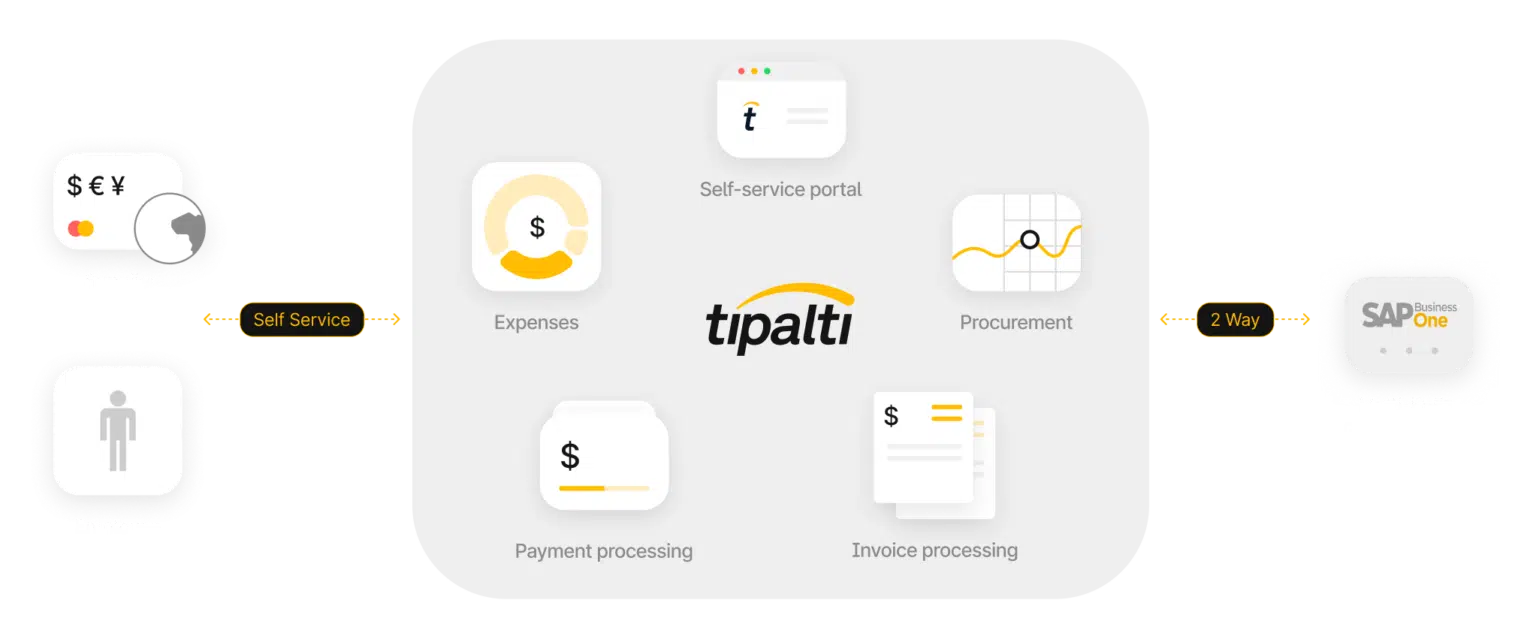
Tipalti finance automation products integrate with SAP environments to:
- Automate AP, global payouts, employee expenses, and procurement
- Improve data quality
- Reduce operational risk during and after SAP migration
Strengthen Data Quality and Reduce Migration Risk
Tipalti improves data quality by replacing error-prone manual data entry with automated workflows. Self-service supplier onboarding improves data accuracy for the vendor master file, W-9 or W-8 forms, and payment information. Maintaining clean data without duplicates reduces data migration risk.
Support Global, Multi-Entity Growth
Tipalti finance automation software scales for global, multi-entity growth. With Tipalti, you can optimize the management of your mid-market, global, multi-entity business by setting up unique automated payables workflows for each entity and gaining real-time visibility through combined views.
Enhance Efficiency with AI and Automation
Tipalti uses AI agents to streamline and automate business workflows. Tipalti AI Assistant enables you to use conversational queries to instantly generate custom reports to analyze spending and accounts payable. By integrating Tipalti with SAP, you can maximize your ERP investment.
Deep SAP Integration for a Smoother Migration
Tipalti’s integration and reconciliation features, along with a sandbox testing environment, improve your data migration process.
Tipalti integrates and syncs data with SAP for payables, expenses, and payments at the sub-ledger level. It integrates with SAP in procurement management, with purchase orders created automatically from approved purchase requisitions. Tipalti instantly reconciles payments with SAP.
Global Payments and Compliance Built In
Tipalti is a licensed Money Services Business (MSB), with added oversight. Tipalti builds in functionality for making efficient global mass payments in 200+ countries and territories, across 120+ currencies and 50+ payment methods.
Tipalti automates global regulatory compliance and tax compliance to help your company avoid penalties for non-compliance and improve its internal controls.
Future-Proof Your SAP Investment
Future-proof your business with an SAP and Tipalti integration to achieve AI-driven functionality and implementation benefits beyond using SAP alone.
Maximize the Value of Your SAP Investment with Tipalti
Your global, multi-entity company gains efficiency, automates business processes and compliance, scales with growth, and strengthens controls with Tipalti finance automation.
SAP Migration FAQs
What is SAP migration?
SAP migration is the implementation of a new SAP ERP system, such as SAP S/4HANA, to replace your current ERP or accounting software. SAP migration occurs when your current system lacks the necessary functionality to meet growing business needs, isn’t deployed in the cloud, or is a legacy system that requires modernization.
What are the main types of SAP migration?
The main types of SAP migration are:
• ECC to S/4HANA
• On-premise to cloud
• Hybrid migrations
• SAP Business One upgrades
What are SAP data migration tools?
What are SAP data migration tools?
SAP data migration tools are automated software tools used to transfer data to a new SAP ERP system. These tools include native SAP data migration tools and third-party iPaaS solutions, such as Boomi, Celigo, and MuleSoft.
How long does SAP migration take?
A complex, global, multi-entity SAP migration for an enterprise company can take 18 to 24 months (or more). A less complex SAP implementation, such as GROW with SAP, can be completed within 6 months.
SAP S/4HANA implementation for SMBs is designated as a GROW with SAP (generally) public cloud solution, with quick, standardized implementation and rapid, but basic, implementation support. Large enterprises ideally choose RISE with SAP, which offers greater customization and transition support, so you should expect the SAP migration to take longer. RISE with SAP is primarily SAP’s Private Cloud with managed services.
Other factors affecting system migration timing are whether your business is completing a brownfield conversion of an existing system from another SAP ERP to SAP S/4HANA (which takes less time) or a greenfield implementation using best practices implemented from scratch. Some companies select a hybrid approach that uses the best elements of each methodology.