

IRS TIN Matching is a free IRS service that allows eligible payers to verify whether a payee’s name and taxpayer identification number (TIN) match IRS records before filing certain information returns, including Forms 1099-NEC and 1099-MISC. Matching TINs before filing helps businesses identify discrepancies, reduce reporting errors, and lower the risk of B Notices, backup withholding, and related penalties.
This guide explains how IRS TIN Matching works, who can use it, and how automation can simplify tax information collection and validation.
What is a TIN?
A TIN (taxpayer identification number) is a nine-digit number used on U.S. federal tax returns and other IRS forms. The Social Security Administration issues SSNs; the IRS issues the others.
While there are different types of TINs, the table below lists three types:
| Type of TIN | Who uses it |
|---|---|
| Social Security number (SSN) | Individuals who are eligible for a Social Security number. |
| Employer Identification Number (EIN) | Businesses and other entities, including trusts, estates, and nonprofits. |
| Individual Taxpayer Identification Number (ITIN) | Individuals who need a U.S. tax ID and are ineligible for an SSN. |
What is IRS TIN Matching?
IRS TIN Matching is a free, voluntary service that lets eligible payers and their authorized agents check a payee’s name and taxpayer identification number (TIN) against IRS records before filing certain information returns. It can help reduce filing errors, backup withholding notices, and related penalties.
How do TIN collection, validation, and IRS TIN Matching differ?
- TIN collection means obtaining the payee’s name and TIN, typically on Form W-9 for U.S. payees.
- Format validation checks whether the TIN contains 9 digits and follows the expected format for that number type.
- IRS TIN Matching checks whether the payee’s name and TIN match IRS records before filing.
A match confirms only that the name and TIN correspond in IRS records. Identity verification, business verification, and sanctions screening require separate checks. Overall tax compliance depends on meeting the applicable reporting and withholding requirements.
When should payers use the IRS TIN Matching Program?
Use IRS TIN Matching after collecting Form W-9 and before filing a covered information return. If the name and TIN don’t match, review the W-9 and follow up with the payee to resolve the discrepancy before filing. A pre-filing mismatch alone does not trigger a B Notice.
Businesses generally file Form 1099-NEC for qualifying nonemployee compensation of $2,000 or more paid in 2026. Filing requirements depend on the payment and the payee.
What happens if the IRS flags a missing or incorrect TIN?
After filing, the IRS may send the payer a CP2100 or CP2100A notice about missing or incorrect TIN information. If the name and TIN flagged as a mismatch agree with the payer’s records, the payer generally has 15 business days from the notice date or receipt date, whichever is later, to send the appropriate B Notice to the payee. A first B Notice asks for a signed Form W-9. A second requires documentation from the IRS or Social Security Administration.
For an unresolved mismatch reported by the IRS, begin backup withholding at 24% on reportable payments no later than 30 business days after the notice date or receipt date, whichever is later. A missing or obviously incorrect TIN generally requires immediate backup withholding on reportable payments. When the payee provides the required documentation in response to a B Notice, update your records for future filings and stop withholding within 30 calendar days.
The documents required for first and second B notices differ.
- For the First “B” Notice, a properly completed and signed Form W-9 (or acceptable substitute).
- For the second B Notice, the payee must provide a copy of their Social Security card (for an SSN) or IRS Letter 147C (for an EIN) verifying that the name and number are correct.
For first and second B Notice requirements, see IRS Publication 1281.
Automate TIN Matching and Catch Errors Before You File
Manual TIN matching slows down payables and exposes controllers to costly IRS penalties. Tipalti automates W-9 collection, TIN verification, and compliance checks—so your team can move faster with fewer errors.
How the IRS TIN Matching Program works
Authorized payers can use the IRS’s free web-based tool to check the payee’s TIN against the name/TIN combination in the IRS database.
Here’s how the IRS TIN Matching Program works.
- Collect the U.S. payee’s name and TIN on Form W-9.
- If not already registered, the payer registers for IRS e-Services and then accesses the TIN Matching tool through their account.
- They must agree to the stated Terms of Agreement (TOA) before accessing TIN Matching applications.
- Payers can choose either of these options to check TINs:
- Interactive TIN Matching: Users can enter name/TIN combinations in groups of 25. There is a cap of 999 requests per user ID within a 24-hour period. The results are available immediately.
- Bulk TIN Matching: This option allows users to enter 100,000 name/TIN pairs in a .txt file. The results are available within 24 hours.
The file should be prepared in this format: TIN TYPE; TIN NUMBER; NAME; ACCOUNT NUMBER (OPTIONAL)
TIN Number is the 9-digit SSN or EIN for the taxpayer, and TIN Name is the taxpayer’s full name or business name.
TIN types are one-digit numbers where:
- 1 – Employer Identification Number (EIN)
- 2 – Social Security Number (SSN)
- 3 – Unknown TIN type
The results are displayed numerically, as shown below, with ‘0’ indicating a match with IRS records.
| TIN Matching results | Description |
|---|---|
| 0 | Name/TIN combination matches the IRS database |
| 1 | TIN was missing, or TIN is not a 9-digit number |
| 2 | The TIN entered is not currently issued |
| 3 | The name/TIN combination does not match IRS records |
| 4 | Invalid TIN matching request |
| 5 | Duplicate TIN matching request |
| 6 | Matched on SSN; TIN type is 3, and the matching TIN was found only in the NAP DM1 database |
| 7 | Matched on EIN; the TIN type is 3, and a matching TIN is found only in the EIN/NC database |
| 8 | Matched on EIN and SSN, TIN type is 3, and the matching TIN is found on both the EIN/NC and NAP DM1 databases |
The accounts payable team must stay informed of any TIN matching e-service updates and document attempts to correct invalid TINs.
Payers must maintain the confidentiality of the TIN data and use the results only for filing tax returns.
However, before payers can start using the TIN Matching tool, they must be aware of the eligibility criteria for participating in the IRS TIN Matching Program.
The IRS TIN Matching Program: Official access and requirements
You can gain official access to the IRS TIN Matching Program by ensuring you meet the following criteria.
1. Ensure you’re listed in the PAF database
The IRS TIN Matching Program is available to eligible payers and their authorized agents. To qualify, payers generally must have filed information returns reporting payments subject to backup withholding within the previous two tax years and be listed in the IRS Payer Account File (PAF). Eligible payers must apply for access through IRS e-Services.
See IRS Publication 2108-A for the full list of covered forms.
2. Register for IRS e-Services
If you are in the PAF database, you will need to create an ID.me account and verify your identity.
To verify your identity, you can take a selfie or use a photo of a government ID. The other option is to have a live call with an ID.me video chat agent.
You will receive the ID.me login credentials once you register for e-services.
3. Apply for TIN Matching
The next step is to complete the TIN Matching application with the ID.me login credentials as an authorized payer of income subject to backup withholding.
After the IRS approves the application, the relevant users can access the TIN Matching Program.
4. Access TIN Matching
You can now use the free TIN Matching tool to verify TIN and name combinations in groups of 25 or in bulk.
Why is accurate TIN matching critical for controllers and 1099 compliance?
For controllers, accurate TIN matching helps reduce manual rework, identify incorrect payee information, lower the risk of IRS penalties, and support more accurate 1099 reporting.
Let’s look at some of the top reasons why TIN matching is vital for controllers.
Prevent costly IRS penalties due to incorrect or delayed returns
As specified by the federal tax laws (Internal Revenue Code), payers must include the payee’s correct TIN when filing their tax returns.
The IRS imposes penalties for:
- Failure to file
- Filed with a missing/incorrect TIN (or other missing or incorrect information)
- Filed untimely
- Filed on paper when electronic filing was required (incorrect media)
- Filed in an incorrect format (unprocessable)
- Any combination of the above.
The exact amount of penalties is based on several factors, including the tax year, whether you are a small or a large business, and the timing of your submission.
IRS penalties for information returns and payee statements due in 2027
| Filing delay | Penalty per return or statement | Small business annual maximum | Large business annual maximum |
|---|---|---|---|
| Up to 30 days late | $60 | $244,500 | $698,500 |
| 31 days late through August 1 | $130 | $698,500 | $2,095,500 |
| After August 1 or unfiled | $340 | $1,397,000 | $4,191,500 |
| Intentional disregard | $690 | No maximum | No maximum |
Source: IRS, Information Return Penalties. Penalty amounts and annual maximums vary by filing year, business size, and type of violation.
Note that the IRS charges penalties for each incorrect or late return and for each payee statement (the copy of the filed tax return the payer must provide to the payee) that is missing, inaccurate, or delivered late.
The penalties can range from thousands to millions of dollars, depending on the business size and the number of payees.
Reduce or avoid B-notices that can impact vendor relationships and projects
Checking names and TINs before filing can reduce the number of mismatches your AP team has to resolve later. Fewer mismatches mean less time spent following up with vendors and fewer instances in which backup withholding reduces a vendor’s payment.
Enhance efficiency and ensure smoother 1099 preparation and filing
IRS penalties and backup withholding are consequences of TIN-matching delays and errors.
These consequences can impact project timelines and budgets significantly in industries such as real estate, construction, and healthcare, which rely heavily on independent contractors.
Accurate TIN matching prevents delays or errors in the preparation and filing of 1099 forms, while enhancing the AP team’s productivity and workflow efficiency.
Pro Tip: Ensure 1099 compliance by gaining an in-depth understanding of the types, rules, and steps for completing and filing the form.
Read our guide on: IRS Form 1099 Guide: Types, Rules, and FAQs
Typical TIN matching process: manual vs automated
If you’re relying on manual TIN matching, there are compelling reasons to switch over to an automated process.
Automation helps controllers and AP teams reduce the risk of mismatches and avoid their harsh consequences, such as penalties, B-notices, and backup withholding.
Here’s a quick comparison of how each process works, their risks, and benefits:
| Manual TIN matching | Automated TIN matching | |
|---|---|---|
| How it works | Log in to the IRS e-services portal Enter each vendor’s TIN and name combination individually. Prepare a .txt file if you want to check a large number of TINs | An integrated AP automation system automatically validates vendor TINs in bulk through the IRS system. |
| Risks /challenges | Using DBA instead of the business’s legal name, leading to TIN mismatch Confusion between EIN and SSN (many business owners may not know whether to provide an SSN or an EIN) Data entry errors Can be time-consuming and labor-intensive | Depends on the accuracy of vendor information provided at onboarding stage Mismatches still require manual investigation and correction Integration issues can delay TIN matching |
| Benefits | No additional automation software required. Suitable for small organizations with infrequent verification needs. | Eliminates manual IRS portal logins Reduces data-entry errors Automates TIN matching by integrating with the IRS database and tax compliance software |
Pro Tip: Not sure what a W-9 form is or why it matters for compliance?
This article covers the basics: W-9 Form Definition: What are W-9 Forms?
The secret to realizing these automation benefits lies in choosing the right automation platform.
How Tipalti helps automate TIN matching and tax reporting
Tipalti is built to handle the tax compliance needs of controllers and AP teams.
In addition to automating TIN matching, the system supports compliance workflows from onboarding through 1099 filing.
Here are Tipalti’s built-in tax compliance features:
Tax form collection
Tipalti’s KPMG-approved tax engine helps determine the appropriate tax form, including Forms W-9, W-8BEN, and W-8BEN-E, during payee onboarding, reducing manual effort and the risk of errors.
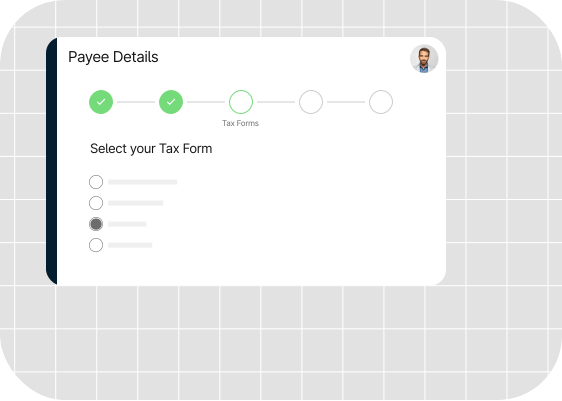
Tipalti’s guided tax form wizard captures tax information
TIN validation
When TIN validation is enabled, Tipalti checks eligible W-9 name-and-TIN combinations for SSNs and EINs.

Tipalti verifies local and global payee information
Reporting/e-filing
Tipalti integrates with Tax1099, powered by Zenwork. Teams can use Tipalti’s preparation data to review, edit, and e-file Forms 1099-NEC, 1099-MISC, and 1042-S through Tax1099.
At year-end, Tipalti generates 1099 and 1042-S tax preparation reports.
Withholding tax calculations
Tipalti automatically calculates the applicable withholding tax rate for both U.S. and non-U.S. payees.

TIN validation and tax reporting with Tipalti
Tipalti integrates with the IRS TIN Matching service and handles tax form collection, TIN validation, withholding calculations, and 1099/1042-S preparation reports as part of payee onboarding and payments. Your team catches errors earlier and spends less time chasing payees before 1099 filing with Tipalti.
Pay Contractors at Scale With Tax Compliance Built In
Staying compliant shouldn’t drain your team’s time. Tipalti checks U.S. payee TINs against IRS records, flags invalid payee data, and prepares 1099 reports for teams paying high volumes of contractors.
TIN Matching FAQs
What is the IRS TIN Matching Program?
The IRS TIN Matching Program is a free service that lets eligible payers and their authorized agents check payee name and TIN combinations against IRS records before filing certain information returns.
How to perform TIN matching for my vendors?
To perform TIN matching on the IRS website, follow these steps:
1. Confirm that your business meets the IRS eligibility requirements, including being listed in the Payer Account File (PAF).
2. Register for IRS e-services and obtain login credentials.
3. Apply for TIN matching and await approval.
4. Once approved, log in to the TIN Matching tool.
5. Enter the TIN and name combinations of vendors (in groups of 25 or in bulk)
6. The results are available immediately for Interactive TIN Matching and within 24 hours for Bulk TIN Matching.
What are the benefits of TIN Matching services?
TIN matching helps payers catch name and TIN errors before filing. Correcting those errors can reduce backup withholding notices, penalties tied to incorrect payee information, and manual follow-up.
What is the IRS TIN matching bulk file format?
Bulk TIN Matching uses a .txt file with one record per line: TIN type; TIN; name; account number (optional). TIN type is 1 for EIN, 2 for SSN, or 3 for unknown. A file can hold up to 100,000 name/TIN combinations, and results come back within 24 hours.
What happens if TIN matching returns a mismatch?
Check the name and TIN against the payee’s Form W-9 and ask the payee to confirm or correct it before you file. A mismatch found before filing doesn’t trigger a B Notice; B Notices follow an IRS CP2100 or CP2100A notice after filing.
Is TIN matching the same as identity verification?
No. TIN matching only confirms that a name and TIN combination matches IRS records. It doesn’t verify a payee’s identity, confirm that a business is legitimate, or screen against sanctions lists.
