
Processing invoices by hand slows down approvals, increases errors, and delays financial close. Some teams lose as many as 72 workdays per year to this kind of manual work.
OCR software helps finance teams extract data from invoices automatically—but the best tools go further, combining OCR with AI, validation, and AP workflow automation.
In this guide, you’ll learn how to pick the best OCR software for invoice processing based on data accuracy, automation potential, ERP system connectivity, and other key features. There’s also a handy decision-making checklist to support your procurement process.
Key Takeaways
- OCR software converts invoice content into structured data that finance teams can rely on for smooth payments, decision-making, and audit preparation.
- Automating data extraction reduces manual workloads while increasing data accuracy and consistency, giving teams more time for strategic work.
- On its own, OCR technology achieves accuracy of around 85–90%, but the best tools combine OCR with AI and automated controls to raise accuracy as high as 99%.
- The best OCR software for invoice processing helps to make the broader AP workflow more accurate and efficient, whether through in-built automation or seamless integration.
OCR Software for Invoice Processing: A Quick Comparison
The OCR solutions in this guide support different use cases. Some focus solely on data extraction or invoice digitization, while others embed OCR within broader AP automation tools to support the entire invoice lifecycle.
Before reviewing each option, here’s a quick comparison to help guide your shortlist.
| Software | Best For | Standout feature | Starting Price |
|---|---|---|---|
| Tipalti | End-to-end AP automation | Built-in approvals and supplier portal | $99/month |
| Rossum | AI invoice data capture | Aurora self-learning AI engine | $18k/year |
| Nanonets | Multi-document AI extraction | Handles IDs, forms, statements, invoices | Pricing on request |
| Docsumo | High-volume document indexing | Automatic document classification | Pricing on request |
| KlearStack | Regulated industry workflows | AI correction suggestions for reviews | Pricing on request |
| ABBYY FlexiCapture | Enterprise-scale intelligent document processing | Support for 200+ languages | Pricing on request |
| Docparser | Template-based invoice parsing | Custom zonal OCR rules | $32.50/month |
| Adobe Acrobat OCR | One-off PDF text extraction | Free browser-based OCR tool | Free |
Pricing and features were correct at the time of writing, but subject to change. Always check providers’ websites or contact their sales teams for the latest information.
Now, we’ll explore the top OCR invoice processing tools in more detail.
Note: For more information on the benefits and limitations of OCR invoice processing software, start with our previous guide: How OCR Invoice Processing Works and Why AP Teams Need It.
1. Tipalti: End-to-End AP Automation With AI-Powered OCR
Tipalti provides advanced OCR technology as part of an end-to-end AP automation solution that eliminates time-consuming manual data entry for busy finance teams.
Tipalti’s Invoice Capture Agent populates data fields at the header and line-item levels, and combines OCR with machine learning and AI to adapt to invoice variations.

By extracting data from complex line items, table data, and various invoice layouts, Tipalti’s AI-driven automation software enables faster processing while reducing human error.
The system’s key invoice data extraction features include:
- High-accuracy data capture across multiple invoice formats. OCR and AI populate data fields at the header and line-item levels, rapidly turning PDFs, Excel files, paper invoices, and other formats into extracted data ready for decision-making and audits.
- Auto-coding of invoice fields. AI and rule-based logic improve coding consistency over time by recognizing and learning from consistent patterns in custom fields such as departments, locations, tax codes, and expense accounts.
- Enterprise-grade data security. Tipalti’s robust privacy measures keep extracted invoice data—and other sensitive information belonging to you and your suppliers—secure at all times, supporting compliance and protecting relationships.
Tipalti handles data extraction as one stage in a wider accounts payable process that also supports e-invoicing.
The system applies automated controls, such as duplicate detection, tolerance checks, and two-way or three-way matching of purchase orders (POs) and goods receipt notes (GRNs), to reduce mismatches and prevent errors at scale.
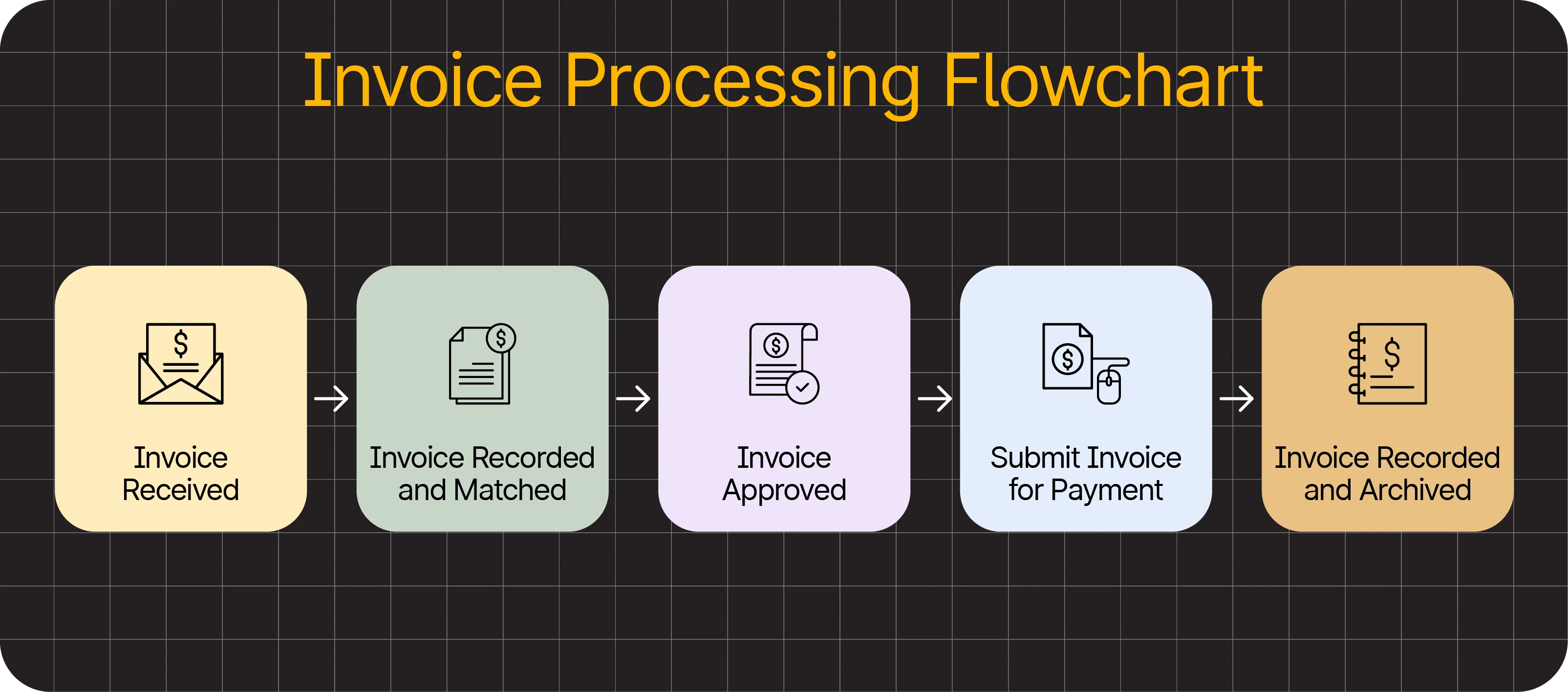
Validated invoices are routed to the appropriate parties for approval in accordance with your rules. Extracted invoice data flows into your accounting software to create up-to-date financial records and accurate audit trails. Seamless integrations with leading ERPs and accounting systems—including SAP, Microsoft Dynamics, and QuickBooks—ensure data consistency across your finance stack.
Meanwhile, automated alerts keep suppliers informed and reassured at every step of the invoicing process, with status updates via email and self-service access to payment history.
Price range
$99–$199/month, or custom pricing for a higher-tier Elevate plan. All plans include unlimited users.
Tipalti best suits
Fast-growing mid-market or enterprise-level businesses that want OCR as part of a fully integrated AP automation platform to handle invoice capture, approvals, supplier management, and ERP synchronization in one system.
Automate Invoice Processing From Capture to Payment
Connect every step of invoice processing—from data capture to payment execution—in a single automated workflow. Reduce errors, speed up approvals, and gain full visibility across your AP operations.
2. Rossum: AI-First Invoice Data Capture
Rossum focuses on intelligent data capture, using its Aurora AI engine to interpret invoice layouts and automatically trigger helpful actions further along the processing journey.

At its core are AI agents that automatically extract and validate invoice data, distribute emails to stakeholders, and sync information in real time with accounting systems.
The Aurora engine self-learns to improve accuracy and efficiency over time and supports 276 languages.
Rossum’s other stand-out features include:
- The ability to use existing standard operating procedures (SOPs) as rules for AI agents to follow when automating.
- Support for a wide range of file formats, including PDF, XML, CSV, and UBL—as well as scanned documents (i.e., images).
- A conversational AI interface for requesting insights based on the latest invoice processing data, like error rates and processing times.
Price range
Tiered pricing starts at $18,000 per year.
Rossum best suits
Enterprise finance teams with large budgets that need intelligent invoice data extraction and are comfortable using additional tools to manage the broader AP workflow.
3. Nanonets: OCR Tools for Diverse Document Types
Nanonets is an AI document processing and automation solution that handles data from many document types, rather than prioritizing invoices. That includes forms, bank statements, and ID records.

This broader focus makes it useful for automating multiple document workflows, such as supplier onboarding, identity verification, and claims processing, within a single system.
The software accepts invoices in many formats via desktop upload, connected email apps, cloud storage, RPA (robotic process automation), or API.
Nanonets’ key features include:
- Review options for quality-checking new invoice data and manually correcting errors (i.e., human-in-the-loop)
- Compatibility with a broad range of header and line fields, from invoice numbers and order quantities to tax identifiers, unit prices, and discounts.
- Flexibility to automate beyond invoicing in a single app, with options to streamline ticketing processes, customer feedback analysis, and identity verification.
Price range
Credit-based pricing model; precise costs available upon request.
Nanonets best suits
Organizations looking for flexible AI document processing across various document types, where invoicing isn’t necessarily the top priority.
4. Docsumo: Structured Document Data Extraction Across Departments
Docsumo is designed to extract data from large volumes of documents, helping teams classify and index information across departments. Although it can process invoices, the provider doesn’t target AP teams specifically.

While other tools automate the full accounts payable workflow, Docsumo focuses on capturing, organizing, and exporting document data for use in other systems.
For example, the software is built to rapidly index and extract data from high volumes of uploaded invoices (1M+), but routing those invoices for approval requires integration with a more comprehensive invoice management tool through Zapier.
Docsumo’s standout features include:
- Free access to extract data from up to 1,000 invoices or other documents, allowing substantial testing before commitment.
- Automatic classification of documents into pre-set or custom folders (e.g., organized by supplier or region).
- Export options for ERP platforms, customer relationship management (CRM) tools, and loan origination systems (LOS).
Price range
Three scalable tiers with pricing on request.
Docsumo best suits
Teams managing large volumes of documents—invoices and other types—that want tighter control over how information flows into and through their organizations.
5. KlearStack: Multi-Industry Document Capture Automation
Klearstack focuses on AI-driven document capture with built-in validation and correction measures designed to improve accuracy. Invoice processing is one of its intended use cases alongside logistics, healthcare, and retail.

The provider claims to automate invoice processing with up to 99.9% accuracy and reduce manual data entry by up to 80%, appealing to AP teams keen to cut errors from their workflows.
Notable features offered by KlearStack include:
- AI-driven correction suggestions to speed up human reviews post-extraction.
- Automatic checks flag discrepancies and duplicates while ensuring that documents comply with industry regulations.
- A two-month free trial allows the scanning of 200 pages per month before investing.
Price range
Three scalable tiers with pricing on request.
KlearStack best suits
Large businesses that need OCR to process and organize documents across departments, with invoice data extraction handled separately from approval workflows.
6. ABBYY FlexiCapture: Smart, Versatile Document Handling
ABBYY FlexiCapture is an intelligent document processing (IDP) platform for enterprises. It uses OCR and AI to classify documents and extract structured data from complex files and image scans.

In addition to extraction, the software automatically sorts documents by type (e.g., invoices or purchase orders) and custom subcategories (e.g., supplier or region). Then it routes the information to connected RPA, CRM, ERP, BPM, and ECM tools.
FlexiCapture is part of a broader, well-established ecosystem of document management and automation solutions for firms in finance, insurance, transport, government, healthcare, and other sectors. In other words, supporting AP teams isn’t ABBYY’s main focus.
Some of ABBYY FlexiCapture’s notable features are:
- On-premise and cloud options to suit different accessibility and security requirements.
- Mobile document capture lets invoices be uploaded from any location using a smartphone camera, saving time and helping keep supply chains running smoothly.
- Support for country-specific validation rules and recognition of over 200 languages.
Price range
Pricing on request.
ABBYY best suits
Enterprise teams that process documents at scale in multiple languages and need flexible, AI-driven document classification and extraction to integrate with existing business systems.
7. Docparser: Rule-Based Invoice Parsing and Structured Exports
Docparser is a rule-based document parsing and file conversion tool that extracts structured data from PDFs, text files, images, and spreadsheets.

The software uses zonal OCR (or template OCR) to extract text from specific regions within scanned documents. The process requires users to create document parsers, which are like sets of rules that tell the system what data to look for.
As template OCR extracts data from predefined locations, it works best when layouts are consistent, like when all your suppliers use the same invoicing template.
That said, Docparser does offer pre-built data extraction rules for common document types, including invoices, purchase orders, work orders, bills of lading, and bank statements.
Standout features in Docparser include:
- Custom parsing rules for telling the engine what type of data you want to extract from invoices and other documents
- Versatile exporting options include the ability to download extracted invoice data in CSV, JSON, and XML formats to upload to other tools (e.g., a full AP automation system)
- Image pre-processing cleans and rotates documents before data extraction, improving accuracy and reducing the need for manual invoice review.
Price range
$32.50–$133/month; enterprise pricing available upon request.
Docparser best suits
Finance teams working with fairly predictable invoice layouts that want a rule-based parser to generate data they can use in other tools and systems.
8. Adobe Acrobat OCR: Basic Invoice Digitization for Microbusinesses
Adobe Acrobat OCR is a free web-based application for extracting text from individual PDF documents, and one of the most accessible OCR invoice processing tools available.

To process an invoice, log into Adobe, drag a PDF into the OCR interface, and select “recognize text”.
Once scanned, you’ll need to manually copy any text that you plan to use in other applications (e.g., your accounting software or Google Docs).
Uploading multiple documents at once requires paying for Acrobat Pro, though it also unlocks text editing, file conversions, e-signatures, and other functionality.
As well as its free option, Adobe Acrobat OCR’s key strengths include:
- Support for 35+ major languages, including English, Spanish, Chinese, and Korean.
- Easy access to other, more advanced PDF management and editing tools on paid plans.
- Backed by Adobe’s enterprise-grade infrastructure and customer support
Price range
Free–$29.99/month per license.
Adobe Acrobat OCR best suits
Small businesses that occasionally need a simple, lightweight OCR tool to extract text from individual PDF invoices and are happy to copy data into other applications manually.
What to Look for in Invoice OCR Software: A Buyer’s Checklist
You’ve seen some of the top OCR solutions available for processing invoices. The next step is to narrow your shortlist to find the best fit for your team’s needs.
Use the following criteria to objectively compare providers.
| Assessment Criteria | Capabilities to Check |
|---|---|
| Data extraction accuracy | • OCR captures invoice header fields correctly • Line-item tables are extracted reliably • AI improves accuracy across layouts |
| Invoice format capability | • Supports PDFs, scans, and image files • Processes structured formats like XML/UBL • Handles varied invoice layouts automatically |
| Automation and workflow management | • Extracted data flows into accounting systems • Invoices route automatically for approval • Automated alerts keep stakeholders informed |
| Validation and compliance checks | • Duplicate invoices are detected automatically • PO matching validates invoice details • Country-specific tax and compliance rules are supported |
| Exception handling and human review | • Low-confidence fields are flagged for review • Users can quickly correct extraction errors • Corrections improve future processing accuracy |
| ERP and system integrations | • Connects with ERP or accounting platforms • APIs support custom integrations • Works with RPA or workflow automation tools (e.g., Zapier) |
| Scalability and performance | • Handles large invoice volumes reliably • Processing speed remains stable at scale • Pricing scales predictably with usage |
| Security and compliance | • Financial data is encrypted in transit and at rest • Role-based permissions restrict sensitive data • Audit trails support compliance and reporting |
You don’t necessarily need to find all of these qualities in one system to settle on the best-fit invoice processing tool, just those that matter to your business.
However, if a tool on your list leaves most boxes unchecked, it’s a sign that better options are available, and continuing your search could lead to a better ROI.
Beyond Invoice Scanning: What Most AP Teams Really Need
OCR software has freed many professionals from the burden of manual data entry. But most modern finance teams demand more than just basic data extraction from their AP technology: they need greater accuracy, efficiency, and control.
After all, OCR data extraction is only one step in the typical invoice processing journey. Month-end close can’t happen without invoices also being reliably validated, matched against purchase orders, routed for approval, and synchronized with accounting systems.
Automating these tasks, with human-in-the-loop oversight, is the most effective way for AP teams to achieve efficient, accurate, compliant invoice processing at any scale.
See firsthand how Tipalti’s AI and automation increase AP efficiency by booking a personalized live demo.
OCR Software for Invoice Processing FAQs
How accurate is OCR for accounts payable?
On its own, OCR is estimated to be accurate 85–90% of the time.
However, the best tools can achieve accuracy rates of around 98–99% (comparable with human data entry but without the risk of fatigue or distraction) by layering automated checks, machine learning algorithms, and artificial intelligence.
Can OCR capture invoice line items?
Yes. The best OCR software for accounts payable can capture all types of data from an invoice, including line items.
What’s the difference between OCR and invoicing automation?
OCR is a technology that converts files and images—including invoices—into structured data.
Invoice automation (or, more broadly, AP automation) is a software feature that automates steps in the invoice processing workflow.
That can include OCR data extraction, conducting compliance checks, routing verified invoices for approval, synchronizing data with other systems, and more.
Automating repetitive tasks delivers many benefits for finance teams.
According to IFOL’s Accounts Payable Automation Trends 2025 report, the top reasons for teams to pursue AP automation are:
• To speed up invoice processing (which helps improve cash flow)
• To increase control and reduce risk
• To gain greater visibility across the invoice lifecycle (e.g., via dashboards)
Also, 92% of finance professionals said automating invoice and supplier payments would free their teams to focus on more strategic work.
