

 Back
Back 


Manual, disconnected accounts payable processes don’t just waste time. They open the door to payment errors, missed discounts, fraud risk, and strained vendor relationships.
Without clear visibility into cash flow or control over spending, even fast-growing companies can struggle to scale.
That’s why understanding and optimizing the full-cycle accounts payable process is no longer just a back-office concern. It’s a critical part of building a more efficient and resilient finance operation.
In this guide, we’ll break down what a full-cycle AP process looks like, step by step, and show you how automation helps finance teams eliminate inefficiencies and regain control.
Key Takeaways
- The full-cycle AP process spans from purchase orders to payment and reconciliation.
- Manual AP systems lead to invoice delays, compliance risk, and vendor friction.
- Core steps include 3-way matching, approvals, and general ledger integration.
- Common pain points: data silos, invoice exceptions, and missed early-payment discounts.
- Leading finance teams are adopting automation to eliminate 720+ hours of manual work, reduce errors, and scale AP across entities.
- Tipalti offers a global AP automation platform used by companies like Therabody and Uptake to streamline end-to-end payables.
What is the Full Cycle Accounts Payable Process?
As the name implies, full-cycle accounts payable is the complete cycle that an accounts payable department follows to complete and archive a purchase.
The AP process is part of the procure-to-pay business process, from receiving and approving invoices to paying vendors and suppliers for their goods and services.
Steps in the Accounts Payable Cycle
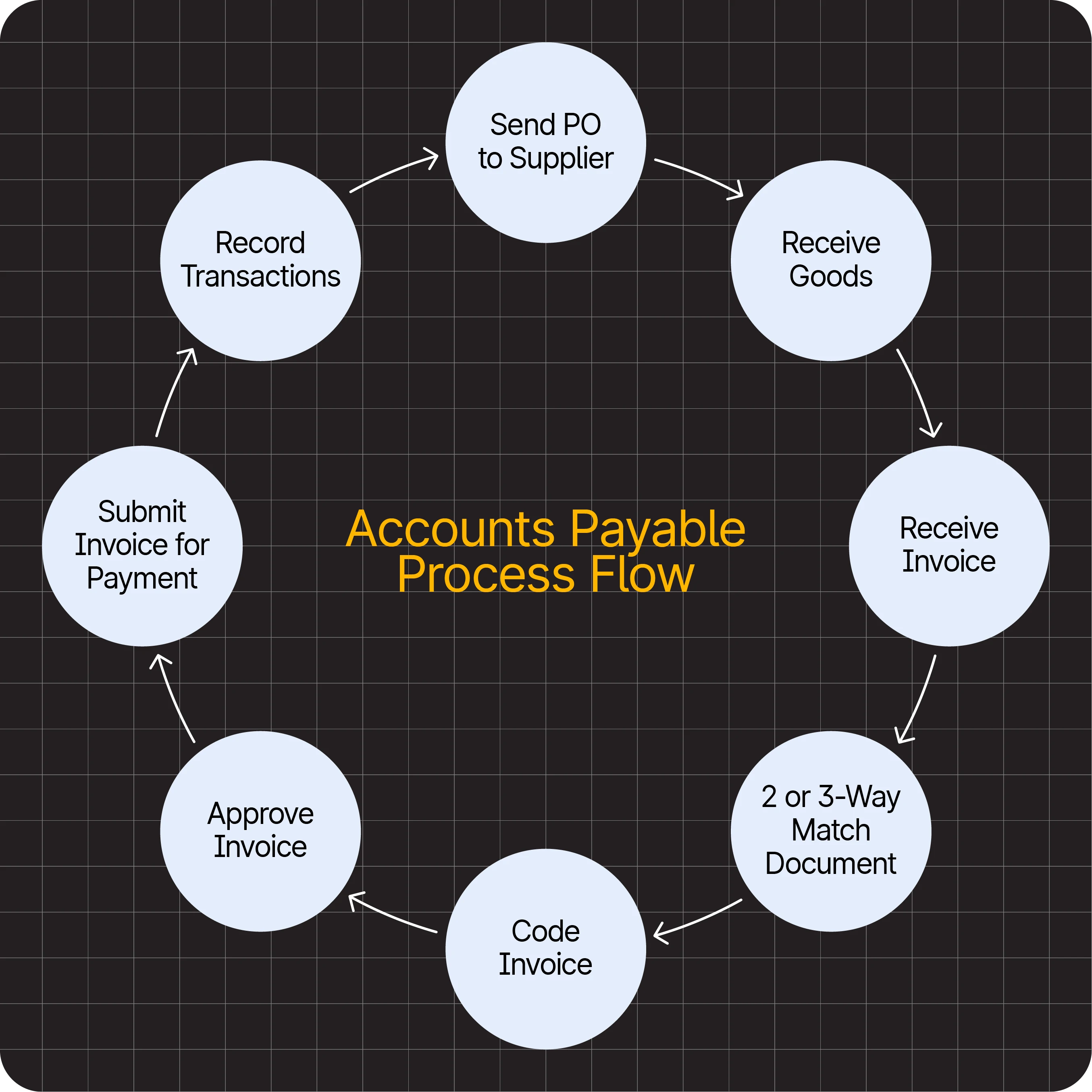
The steps in the end-to-end accounts payable cycle are as follows:
- Create, document, and send the purchase order (PO): Generate and issue a purchase order to confirm the items being ordered and the agreed-upon terms.
- Receive the invoice from the supplier: Collect the supplier’s invoice and verify that all details match the original PO.
- Code the invoice: Assign the correct account codes and cost centers to ensure accurate bookkeeping.
- Match the invoice with the PO and items receipt: Perform a 2-way or 3-way match to confirm pricing, quantities, and receipt of goods or services.
- Approve the invoice: Route the verified invoice to the appropriate manager or department for approval.
- Submit the invoice for payment: Process and schedule payment in accordance with the supplier’s terms and company policies.
- Record all transactions in the general ledger: Enter payment and invoice data to maintain complete, compliant financial records.
Pro Tip: The finance talent shortage doesn’t have to slow down your AP processes.
See how automation keeps your team efficient: Automating Finance Systems: The Critical Solution to Today’s Accounting Talent Shortage.
Here’s a visual accounts payable workflow diagram that shows how the different steps in the AP cycle:
Accounts Payable Process Flow Chart
While the steps address the broader AP cycle, the core AP tasks are distributed across four categories: invoice capture, invoice approval, payment authorization, and payment execution.
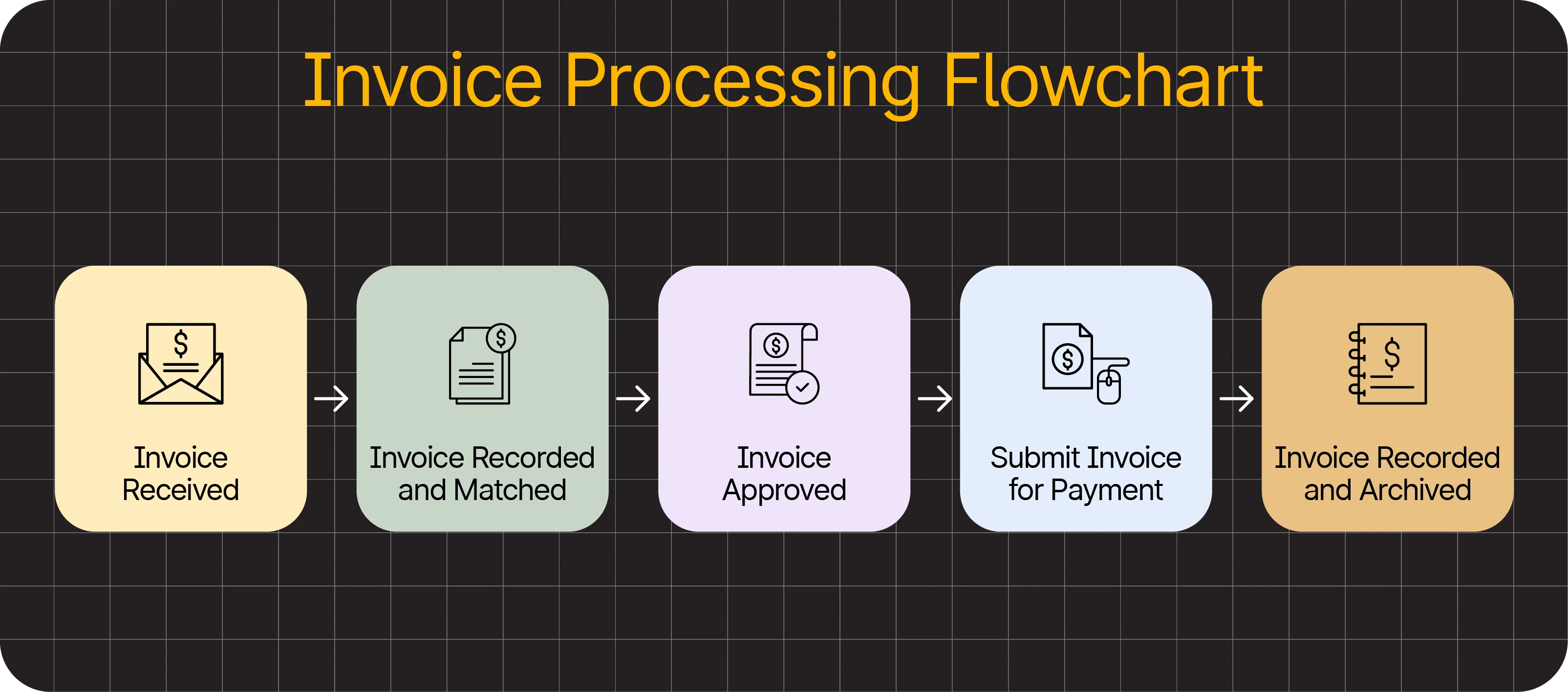
The next section provides a closer examination of the invoice processing flow.
Invoice Processing Flow Chart
Here are the key steps in an invoice processing flow chart:
- Receive supplier invoices: Collect invoices from suppliers and verify they’re complete and accurate before processing.
- Match document 2 or 3 ways: Ensure invoice details align with purchase orders and receiving reports to prevent discrepancies.
- Route invoice for approval: Send the verified invoice to the right approver or department for quick sign-off.
- Submit the invoice for payment: Schedule and issue payment according to supplier terms through your AP system.
- Record all transactions in the general ledger: Log each payment to maintain accurate financial records and audit trails.
The Three-Way Match
The 3-way match is a manual process to ensure the original purchase order aligns with the final payment made to the vendor. AP compares the PO, the receiving report, and the vendor invoice.
- The purchase order details what your organization has ordered and the expected cost of the goods.
- The receiving report shows what your organization has actually received from the vendor. AP teams verify this report to confirm whether they have received the correct quantity of product and whether the delivery is in acceptable condition.
- The vendor’s invoice comes from the supplier and shows what that vendor has billed your business.
Accounts payable management involves comparing these sources and checking whether any serious financial errors have been committed.
AP teams flag issues like overpayment and transaction problems early on, and now that the bookkeeping is finished, auditing is easy.
Sometimes, a business might opt for a two-way or four-way match instead.
Two-way matching only involves the invoice and purchase order, while a four-way match adds an additional step of inspection and verification post-delivery.
A 4-way match is the more secure method that takes extra time, but it’s ideal in situations where compliance and strong controls are necessary.
However, the three-way match generally offers the best balance between integrity and efficiency.
Cut Invoice Exceptions by 70% with AP Automation
See how finance teams use Tipalti to reduce manual work, improve vendor experience, and gain visibility across global entities.
For your end-to-end accounts payable process, use AP automation software with self-service supplier onboarding, accounts payable invoice processing, and global payments to simplify global regulatory and tax compliance and reduce fraud risk and errors.
The Flow of Full Cycle Accounts Payable
AP can be thought of as the bridge between procurement and payment. This “P2P pipeline” works both ways, handling “upstream” and “downstream” workflows to keep inventory stocked and vendors satisfied with payment terms.
Upstream. This is where procurement takes place.
The procurement department is typically involved in identifying the right vendors, monitoring risks, and negotiating payment terms with vendors.
Downstream. “Downstream” refers to everything that happens after procurement. In this second directional process, the company receives goods and services with an invoice.
The AP process is responsible for almost every business purchase, with the only exception of payroll. The team handles not only the transaction but also the search for potential savings and discount opportunities.
In both streams, it’s essential to continually strive to minimize human error, maximize efficiency, and implement modifications to achieve greater productivity and enhanced internal controls.
Challenges of the Accounts Payable Cycle
The AP department is busy and typically uses manual processes, such as cash management, paper invoices, data entry, and double-checking due dates.
The common challenges AP faces include outdated equipment, limited staff, lack of planning, cash flow issues, and manual bottlenecks.
Other challenges include:
- Duplicate payments or double-entry
- Lost/missing vendor invoices
- Diluted approval process
- Inaccurate balance sheet
- Late payments and late fees
Like a clock, the accounting process relies on various gears to operate seamlessly and function properly. Any small slip-up can result in strained relationships, late payments, and loss of discounts.
According to the Accounts Payable Automation Trends report by IFOL (Institute of Financial Operations and Leadership), finance teams are spending more time on AP tasks in 2025 compared to the previous year.
In other words, efficiency challenges are increasing.
How to Improve AP Process Efficiency
These are some of the proven ways to boost accounts payable process efficiency.
Tip #1: Evaluate and Benchmark AP Performance
Before you can start improving the AP process efficiency, you need to evaluate your current workflows and pain points.
Start with this question:
Do you know if your company’s AP performance is average, below average, or above average?
If you answered ‘yes’, you may want to reconsider your answer.
70% of AP leaders guessed wrong when asked the above question.
Decision-makers in AP are less likely to implement changes if they believe they are performing better than they actually are, and more likely to make poor decisions if they think they are performing worse than they actually are.
When evaluating your current processes, consider the following questions and the relevant benchmarks that apply to specific processes.
| Category | Questions | Benchmark | What to aim for |
|---|---|---|---|
| Invoice processing | Is the process simple or overly complex? i.e., low-value invoices may not need complex approval workflows.How long do approvals take? Where do bottlenecks exist in the flow? | Invoice cycle time | Less than 3 days |
| How many invoice exceptions does the team handle per week/month? | Invoice exception rate | Below 5% | |
| What is the cost for processing an invoice? | Cost per invoice | $2 per invoice | |
| Payment efficiency | How long does it take to pay vendors? | Days payables outstanding (DPO) | 30 days (or less) |
| Are you able to leverage opportunities for early payment discounts and cashback rewards? | Early payment discount | Top performers capture most of their early-pay opportunities. | |
| Supplier relationship | Are slow invoice processing and payment delays impacting supplier relationships? | Supplier satisfaction score | The higher, the better |
| AP team performance | Are AP teams experiencing burnout and feeling overworked due to manual processes? | Employee Net Promoter Score, Turnover rate, surveys. | A low turnover rate and a high NPS score. |
| Scalability | Is your current accounts payable process scalable? | The number of invoices and payments you can process per month without adding headcount | Varies by organization |
| Compliance | Does the current system meet compliance, data retention, and audit standards? | Compliance violations, audit objections, penalties | Zero to minimal |
Sources:
- Scheer, Jess. Keys to Driving AP Performance: Eight Benchmarks for Efficiency and Effectiveness in Shared Services (2025), Institute of Finance & Management (IOFM). PDF.
- “How Much Does It Cost to Process an Invoice? (Metric of the Month).” CFO.com, Informa, accessed [Dec 7, 2022].
- Wiggins, Perry D. “Manage Days Payable Outstanding to Improve Cash Flow: Metric of the Month.” CFO.com, May 8, 2024.
If you’re lacking visibility across entities or can’t pull real-time performance metrics, it’s often due to disconnected systems or manual tracking.
With automation platforms like Tipalti, finance teams can track KPIs—like invoice processing time, DPO, and exception rates—in a single dashboard, updated in real time.
Tip #2: Establish AP Policies and Procedures
If your organization hasn’t already created one, the next step is to prepare the AP policies and procedures manual. This helps standardize AP practices using industry best practices.
The manual lays down the guidelines for AP tasks, such as:
- Invoice receipt, capture, approval flow, responsibilities of approvers, and matching process
- Standard payment terms, payment runs, and methods
- Audit trails
- Fraud prevention measures
- Tax and regulatory compliance
- Document management
- Supplier onboarding and validation
- Communication tools and protocols for disputes
- AP automation tools
- Access and security controls
- Corrective actions for late payments
- Continuous improvement practices
When a company has multiple legal entities, it’s important to consider the varying needs of different units before standardizing procedures.
For instance, Cynthia MacGeagh, CTP, Treasury Manager at single-family home builder Clayton, found that the payables needs differed between units. While mortgage entities preferred wires, manufacturers used checks, and so on.
Standardizing processes—from invoice receipt to payment execution—improves accuracy and reduces risk.
A well-structured AP platform can enforce policy compliance automatically, such as multi-level approval chains, matching rules, and payment thresholds.
Tipalti lets you codify these controls into automated workflows, ensuring consistency across business units and geographies.
Tip #3: Eliminate Data Silos
Data silos between AP and other departments or entities can lead to duplicated efforts, challenges with cross-functional collaboration, and missed opportunities.
Multi-entity businesses often operate with fragmented AP processes across legal entities and departments. By centralizing data and workflows in a unified AP system, finance teams gain greater visibility, reduce redundancy, and streamline approvals across the organization.
One way to eliminate silos is to integrate procurement, expenses, and payments with accounts payable.
A connected suite maintains a consistent pipeline, from vendor onboarding and invoice approvals to payment and reconciliation.
Tipalti integrates with ERPs like NetSuite, QuickBooks, and Xero, while also syncing with procurement and expense platforms—giving finance teams unified control over the entire AP lifecycle.
Tip #4: Optimize Supplier Experience
For finance and procurement leaders, managing supplier relationships well is key to both AP performance and long-term supply chain strategy. Vendors want transparency, payment options, and fewer back-and-forth emails.
Studies show that optimizing vendor relationships helps companies boost growth, drive innovation, and maintain a competitive edge.
Self-service options via a vendor portal provide control and visibility into the process. The portal enables suppliers to select their preferred payment method, submit tax information, and securely store contracts, as well as receive real-time payment status updates.
A self-service portal enhances the supplier experience and significantly reduces invoice-related inquiries, enabling AP teams to focus on higher-value tasks.
Tipalti’s self-service supplier portal gives payees control to onboard, choose their preferred payment method, upload tax info, and check payment status—reducing invoice inquiries by up to 80%.
Tip #5: Upskill the AP Team
In 2025, accounts payable teams are no longer just transaction processors—they’re strategic contributors to finance and operations. 65% of finance leaders now view AP as a true business partner within their organization.
To meet this evolving role, AP professionals need skills in data analytics, compliance, process optimization, and supplier management.
At the same time, emerging AI capabilities, like Tipalti’s embedded AI Assistant, are transforming how AP teams work. Instead of toggling between systems or chasing approvals, users can interact with AI agents to surface invoices, track payment status, and flag exceptions instantly.
By automating routine tasks and enabling smarter decision-making, AI helps AP teams reclaim time for forecasting, vendor strategy, and process improvement—unlocking the true strategic value of finance operations.
Tip #6: Invest in Scalable Automation
The right accounts payable automation software can improve efficiency by:
- Speeding up invoice processing and monthly close
- Boosting invoice accuracy and minimizing exceptions
- Providing complete visibility into the invoice cycle
- Increasing control and reducing risk
- Facilitating access to documentation and audit trails
- Automating compliance and reporting
IFOL recommends that businesses start by automating a single process, such as invoice data capture, before scaling up.
To fully harness automation, companies must first identify pain points in their AP process to select software that directly addresses those challenges.
End-to-end automation enhances accuracy, reduces fraud, and accelerates invoice-to-payment cycles.
Tipalti automates OCR data capture, three-way matching, exception routing, and global payment execution across more than 200 countries, while handling tax compliance and audit trails behind the scenes.
This allows you to scale AP volume without adding headcount.
Tip #7: Review AP Processes Regularly
Review the AP processes regularly to identify challenges and make improvements as needed.
The review can include:
- Checking invoices for errors
- Identifying bottlenecks in the approval and payment cycle
- Monitoring compliance and audit readiness
- Assessing the AP team’s engagement levels
Above all, you need to evaluate if the AP automation software is delivering the ROI you seek.
If you’re still unsure about the benefits of AP automation, comparing the pros and cons of manual versus automated processing is a good starting point.
Regularly review workflows, team performance, and automation ROI.
Tipalti provides actionable reporting and audit-ready logs, making it easier to identify where bottlenecks occur or where automation can be leveraged.
Manual vs Automated Accounts Payable Processing: Pros and Cons
Here’s a quick look at the pros and cons of each approach to help you make an informed decision.
Pros of Manual AP Processes
While manual processing is cumbersome, small businesses and startups may find these benefits:
- Direct communication with vendors: When there are few vendors involved, AP teams can interact with each one directly. Personal interactions can help negotiate terms, resolve disputes, and improve relationships.
- Lower initial costs: With manual tasks, small teams can avoid the upfront costs of AP automation software.
- Human oversight: As each step involves human review, accuracy can improve, particularly with a low volume of invoices.
Cons of Manual AP Processes
As the business grows, manual processes become unsustainable. These are some of the common drawbacks:
- Delays: Manual processes often cause significant slowdowns, with many AP teams spending several days each month solely on invoice processing, leaving them with limited time for strategic initiatives.
- High exception rate: Manual data entry errors, missing paperwork, and discrepancies in PO matching can all lead to a high invoice exception rate.
- Difficulty with scaling: Manual AP processes are not scalable if invoice volumes increase.
- Process-related stress: The majority of AP teams that use time-consuming manual processes report process-related stress due to the inherent inefficiencies.
- Poor visibility into the AP cycle: Limited visibility hinders workflows, collaboration between departments, and impacts decision-making.
- Strained vendor relationships: Errors and the inability to make timely payments damage a business’s reputation and strain vendor relationships.
- Labor-intensive: As invoice volumes increase, companies will have to add headcount, leading to higher costs of hiring, training, and retaining finance talent.
Pros of Automating AP
Accounts payable automation makes every single aspect of the process simpler.
- Reduces costs: Automation reduces the average cost per invoice by about 20% by eliminating the need to expand the AP team.
- Fast-tracks invoice processing cycle: On average, companies can process invoices in under three days when they automate AP tasks, compared to ten or more days when using manual processing.
- Improves accuracy: Top-rated AP automation software leverages OCR, AI, and ML to extract invoice data accurately, reducing errors and exceptions.
- Enhances visibility: End-to-end AP automation software provides 360-degree visibility into the cycle.
- Helps strengthen supplier relationships: Seamless self-onboarding via a central supplier hub, timely updates on payment status, and communication tools enhance payee experience.
- Frees up time for strategic tasks: According to IFOL’s survey, 92% of finance professionals believe that automating tasks would allow their accounts payable teams to focus on strategic work.
Cons of Automating AP
- High setup costs: The initial costs of implementation can be high, depending on the software you choose. Some complex systems require intensive training, ongoing support, and technical expertise.
- Integration issues: Some AP automation software may not integrate seamlessly with your current tech stack, including ERP and collaboration platforms.
- Missing features: AP automation platforms that lack critical features, such as a vendor portal, AI-powered invoice processing, a custom approval flow builder, and deep integrations, may fail to deliver tangible value.
However, these drawbacks can be overcome by choosing a comprehensive, integrated AP automation platform proven to fast-track time to value.
Accounting Software for Full Cycle Accounts Payable
Advanced digital tools facilitate invoicing, data entry, cash flow tracking, and other functions in the payable process today, performing a wide variety of tasks that were unthinkable just a few decades ago.
Powerful AP platforms help you manage multiple entities, cross-border vendor payments, performance metrics, and reporting.
Tipalti: Global End-to-End AP Automation Solution
Tipalti is a purpose-built AP automation platform trusted by finance leaders to scale global payables, strengthen compliance, and accelerate the financial close, without adding headcount.

Global Payments
Pay suppliers in over 200 countries and 120+ currencies via 50+ methods, including ACH, wire, and PayPal. FX conversions, mass payouts, and payment routing handled natively.

AI-Powered Invoice Processing
Automated OCR, 3-way matching, and exception handling reduce manual work by up to 80%.

Compliance and Tax Automation
Collect and validate tax forms (W-9, W-8, VAT, etc.) across 62 countries. Built-in fraud screening and year-end reporting included.

ERP Integration
Seamlessly connects to QuickBooks, NetSuite, Sage, and others. Syncs payables data to your ERP in real time.

Supplier Self-Service
Vendors onboard, submit tax info, and track payments in a branded portal, cutting inquiries and delays.
Trusted by companies like Therabody, Stack Overflow, and Uptake—Tipalti processes over $65B in annual remittance.
QuickBooks
Intuit’s QuickBooks is an accounting system that offers several accounting features, such as:
- Audit trail: Displays a history of all changes made to a transaction, including the date and time of the edits, the user who made the modifications, and the specific changes made.
- Roles and Permissions: You can create custom permissions for various employee types.
QuickBooks is especially popular among SMBs and high-growth companies for its ease of use, cloud-based accessibility, and built-in financial tools. It provides core capabilities for AP tracking, bank reconciliation, expense categorization, and cash flow forecasting, making it a strong foundation for early-stage finance teams.
When paired with Tipalti’s AP automation platform, QuickBooks users gain full visibility and control over the payables lifecycle, without leaving their accounting system. The two platforms integrate seamlessly to sync vendor data, invoices, approvals, and payment statuses in real time.
Together, Tipalti and QuickBooks help companies scale payables while maintaining compliance, improving accuracy, and accelerating monthly close. Explore the Tipalti and QuickBooks integration in-depth.
Accounts Payable vs. Accounts Receivable
The difference between accounts payable and accounts receivable is that accounts payable are short-term debts your business owes to suppliers.
Accounts receivable deals with money the business expects to receive from customers or partners on credit. In short, accounts payable is money your business owes, and accounts receivable is money your business is owed.
Accounts payable works whenever the organization orders from suppliers or service providers; it handles all the money owed by the company. Accounts receivable go the other way; they cover the products and services your own business sells to customers on credit.
AP and AR exist because the moment you choose to purchase products rarely coincides with the moment you pay and receive the goods.
Because spending and receiving money happen on a schedule, ensuring that you are never stuck without enough to make a payment requires finance, AP, and AR to work together and coordinate budgeting, cash flow management, and working capital management.
Next Steps: Streamline Your Accounts Payable Process
Despite growing awareness, IFOL finds that 27% of finance teams have no automation in place, while 73% are only partially automated.
Data errors, delays, and process-related stress continue to be the top challenges that impact AP operations and, consequently, business performance.
Automation with sophisticated AP automation solutions, such as Tipalti, removes these hurdles, improves AP efficiency, and helps solidify vendor relationships.
With the right combination of knowledge, experience, and an intelligent AP software, every AP office can efficiently manage cash flow and payment processing.
See how Therabody eliminated 720 hours of manual AP work through automation by downloading “The Ultimate AP Survival Guide.”