

PayPal is one of the most widely used and requested rails for a reason—recipients already have accounts, trust the platform, and expect funds to be delivered quickly.
On the business side, setting up PayPal’s Payout API isn’t always straightforward, especially if you’re scaling to multiple recipients or regions.
In this guide, you’ll learn what the PayPal Payout API is, how it works, and how to get started. We’ll also cover the pros and cons and explore when alternatives might be better suited to your business needs.
Key Takeaways
- PayPal Payouts API lets businesses send mass payments to PayPal and Venmo users from your website or app.
- Verified business account holders can configure the API to send money in multiple currencies and track payment status in real time.
- PayPal Payouts API works best when your supplier base is on PayPal. Businesses with complex payee needs may prefer a more diverse payout solution.
- Tipalti supports PayPal payouts alongside 50+ other payment methods, with compliance, fraud prevention, and FX management features to streamline the payout lifecycle.
What is the PayPal Payouts API?
PayPal’s Payout API enables businesses to make multiple payments to PayPal and Venmo accounts from your website or app. It’s a fast way to send commissions, rebates, rewards, and general disbursements—without building payment infrastructure from scratch.
Unlike standard peer-to-peer PayPal payments, finance teams can send up to 15,000 payouts to multiple countries in various currencies per API call.
It makes it easier to automate payouts at scale and reduce manual effort. The result is faster payments to recipient wallets, reducing chasing and improving working relationships. Additionally, a more streamlined workflow frees up your team to focus on tasks such as supplier management and cash flow planning.
Here are some key features of PayPal’s Payout API and how they improve payment efficiency.
| PayPal Payout API Feature | PayPal Payout API Benefit |
|---|---|
| Batch payouts | Send mass payments to thousands of recipients, eliminating the need for multiple individual transfers. |
| Multi-currency support | Pay in 24 currencies by specifying the appropriate currency code (no separate payment arrangements needed). |
| Webhook notifications | Receive automated alerts when a payout succeeds, fails, or requires attention, reducing manual checks. |
| Sandbox testing environment | Configure payouts before going live to reduce the risk of live errors. |
| Email or phone identification | Reach recipients using basic details, without additional account numbers or banking information. |
| Real-time tracking | Monitor payout status in real time. |
Note: While the PayPal Payout API supports cross-border payments to PayPal accounts, Venmo is for US payouts only in USD.
How the PayPal Payouts API Works
At a high level, PayPal’s payment API works as follows: you initiate a mass payout, PayPal processes it, and then funds your payees’ PayPal or Venmo accounts.
Here’s how the payout process works in practice:
1) Fund Payouts From Your PayPal Balance
PayPal’s API uses a sender-funder model, meaning your business account needs to hold sufficient funds to initiate bulk payouts.
PayPal debits your balance as you make payments. It keeps transactions simple, but makes cash flow visibility an important operational consideration for managing large or frequent payout runs.
2) Define Recipients and Amounts
Each bulk payment contains individual payout items (often identified by a sender_item_id and a custom email_subject in the API to track who is being paid and how much).
Upload recipient details to your payee database via a CSV file. Developers can then create a script that runs at scheduled intervals to allow the PayPal Payout API to pull payout details.
3) PayPal Payout API Processes Payments
PayPal automatically validates recipient details, processes transactions, and delivers funds.
Payouts to PayPal and Venmo accounts are instant, but withdrawal times can vary by method and account type. New users need to sign up for PayPal or Venmo to claim their money.
4) Track Payment Status
Each batch payout includes a unique “sender_batch_id” and corresponding “payout_batch_id” to monitor payouts in internal accounting systems and prevent duplicate processing.
Finance teams can also drill down into individual payouts within the batch status to see whether a payment was successful, pending, or failed.
This is useful for reconciliation and exception handling. It enables finance teams to quickly identify and resolve issues, keep payees informed, and ensure records are up to date.
PayPal Payout API Solutions
Payout API features and functionality depend on your specific solution. PayPal offers two plans:
- Standard Payouts allows fast, automated API payouts to recipients via email, phone number, or PayPal ID in over 20 currencies to 96 countries and regions, with no complex integration required.
- Advanced Payouts, powered by Hyperwallet, support specialized payment workflows. Additional features include white-label branding, embedded compliance, and support for payment methods beyond PayPal accounts (e.g., bank accounts, prepaid cards, and checks). Advanced users can make payouts in over 50 currencies to 240+ countries and regions.
Small to mid-sized businesses that need quick API integration and a simple way to automate bulk payments will benefit from the Standard Payouts solution.
Rapidly growing companies and large enterprises that need a customized, branded payee experience with greater compliance and financial control may prefer the Advanced Payouts API. However, this will require greater engineering resources.
How to Get Started with the PayPal Payouts API
To use either payout solution, PayPal requires the following:
- A PayPal business account.
- Access to PayPal Payouts.
- A confirmed ID, email, and bank account linked to your PayPal business account.
- Sufficient funds in your PayPal business account.
You should also check eligibility. Some countries have limited payout features that prevent you from sending payouts.
For example, while PayPal account holders in Mexico can receive and withdraw funds, merchants can’t send payouts.
If you have a subsidiary in a country that doesn’t support payouts, consider another solution.
Once your business account is set up and verified, you can enable PayPal’s API features in your developer account at developer.paypal.com.
Note: It can take anywhere from a few hours to several days for PayPal to enable Payout API access. You’ll notice a green check mark signifying the API is live in the “Permissions” section of your “My Account” page.
Here’s an overview of the typical process:
1) Obtain Your API Credentials from the PayPal Developer Dashboard
Credentials include a unique client ID for your PayPal application and a secret key to authenticate API requests.
Developers can exchange these OAuth 2.0 access tokens to make secure PayPal API calls (i.e., batch payment requests), so it’s important to keep them safe.
While your IT or development team will likely control dashboard access, understanding requirements helps finance leaders oversee the process.
Note: Developers can explore PayPal’s Payout API in Postman’s API platform or via cURL commands without a developer account. It can be a useful way to test integrations before moving into sandbox testing.
2) Prepare Your Payee Data
Before you configure and test your API, take the time to get your payee data in order so PayPal can process payouts accurately. Ensure:
- Recipient email addresses and phone numbers are complete and accurate.
- All recipient types are correctly formatted to map to payout items.
- The database schema is set up to capture and store recipient data in JSON (JavaScript Object Notation) format, encoded in UTF-8, ensuring the correct content type is set for API requests.
- Information aligns with tax documentation requirements (e.g., W-9s and W-8BEN forms).
The quality of your data directly impacts how smoothly your payouts run, so it’s best to get organized and address issues now to avoid friction later.
3) Get Your Sandbox Account Credentials to Test Payouts
PayPal Payouts API sandbox environment mirrors your real-world payout workflows.
Developers can get sandbox login information by selecting “Testing Tools > Sandbox Accounts” in the Developer Dashboard, then signing in at sandbox.paypal.com/signin.
Use your sandbox to simulate payout requests before going live. Each test API call will show sandbox money moving between accounts.
PayPal’s REST API is well-documented and easy to integrate, with standardized HTTP status codes and a clear response body that helps developers get up and running quickly.
It allows finance teams to validate recipient list formats and align a payout workflow with your processes before you transfer real funds.
4) Go Live to Process Real Payouts
Once sandbox testing is complete, developers can switch to a live environment to process payouts. PayPal’s approval timeline can vary, but businesses with established accounts and straightforward use cases typically move through the process without significant delays.
Once live, you’ll want to ensure internal controls, such as approval workflows and reconciliation processes, align with how your API operates.
It’s also worth asking your technical team to configure webhook notifications at this stage.
Webhooks automatically alert your team when a payout succeeds, fails, or requires attention. They reduce the need for manual status checks and improve exception handling efficiency.
The Pros and Cons of the PayPal Payout API
PayPal’s mass payments API has a lot going for it, but it’s not the right fit for every business. Here’s a look at its biggest strengths and weaknesses:
| PayPal Payout API Pros | PayPal Payout API Cons |
|---|---|
| Large, active global user base. | Recipients must have a PayPal or Venmo account. |
| Developer-friendly API. | API access requires a separate application and approval process. |
| Free, fast way for payees to receive money. | Businesses must maintain a sufficient PayPal balance to initiate payments. |
| Streamlined mass payouts. | No multi-entity support for managing subsidiaries. |
| Secure encryption, PCI compliance, and transaction monitoring. | It is a common target for fraud due to its popularity and limited verification. |
| Supports multiple currencies across a broad range of countries. | Currency conversion fees can add up for high-volume global payouts. |
| Automated exception handling via webhooks. | Managing failed or unclaimed payouts requires extra operational oversight. |
| Built-in fraud protection measures to reduce unauthorized payment risk. | Limited tax compliance. 1099 filing reserved for Advanced Payouts. |
| Strong APIs and performance marketing integrations. | Lacking ERP integrations compared to other mass payment solutions. |
For businesses with basic payout needs and a recipient base of PayPal and Venmo users, PayPal’s API streamlines payment workflows and improves efficiency.
However, as payout complexity increases, some of its limitations can compound, adding more manual work to your processes.
PayPal Payouts API Pricing and Fees
There are no setup or ongoing subscription fees to use PayPal’s Payout API, making it an accessible starting point for businesses. Instead, fees are usage-based.
Learning how they work is important for understanding how they’ll impact global payouts at scale.
| PayPal Payout API Fee Types | PayPal Payout API Fee Costs |
|---|---|
| US domestic payment fees (via API) | $0.25 per transaction. |
| International mass payment fees | 2% per payment, capped at a specific amount depending on the recipient’s country. |
| Currency conversion fee | Typical markup of 3-4% above mid-market exchange rate. |
| Maximum limits | Up to $60,000 per transaction for verified accounts. |
| Recipient fees | Free for PayPal recipients. A 1.75% fee applies for instant transfers to a bank or credit card. |
Tipalti’s PayPal Fee Calculator will help you quickly determine the cost of any transaction. Use it to understand how much transfers will cost so you can better plan your global payout strategy.
When to Consider PayPal Payouts API Alternatives
As your business scales into new markets, a limited rail solution like PayPal’s Payout API can become harder to work around.
If any of the following scenarios sound familiar, it may be worth evaluating whether a more flexible payout solution better meets your long-term business needs.
1) Your Recipients Aren’t All on PayPal
While many people already have PayPal accounts, for recipients who don’t, opening one can be an unnecessary hassle. Plus, there’s the simple fact that not everyone can (or wants to) use PayPal.
If your payees live and work in areas where PayPal access is hindered by regulatory hurdles or where more popular alternatives are available, you risk missing out on top talent or partnerships.
As your payee base grows to include target suppliers who need or prefer local payment methods, PayPal’s Payout API can feel restrictive. An alternative solution may be a better fit to increase appeal and deliver a consistent payee experience—regardless of payment method.
2) You Need More than PayPal Can Offer as a Single Payout Method
In addition to PayPal’s restrictive reach in specific regions, relying on a single payout rail creates concentration risk.
If PayPal experiences downtime, account limitations, or regional constraints, it impacts your entire payout operation.
The flexibility of having multiple payout methods in one system allows you to scale meaningfully while catering to diverse needs.
3) You’re Paying Across Multiple Countries and Currencies
While the PayPal Payouts API supports cross-border payments, managing currency conversion fees, FX hedging, and country-specific payment requirements at scale can become complex and costly.
PayPal conversion exchange rate and markup costs are negligible at low volume. However, at scale, margins can add up quickly, eroding payout value.
PayPal’s conversion rates can also shift between when you initiate and process a batch payment.
The variability can make budgeting and forecasting global payouts more difficult. If you have a growing global payee base, you may find you need more control and transparency over cross-border payments than PayPal’s API can offer.
4) Tax and Compliance Requirements Are Adding Operational Overhead
As payout volume grows, so does your compliance burden. Automating payments via PayPal’s API will free up time for tax collection or reporting, but it lacks some native compliance and onboarding features to reduce manual effort.
If your team is manually collecting W-9s or W-8s, running sanctions checks, and preparing 1099 filings, choose an end-to-end mass payout API that integrates compliance workflows directly into your payout process.
Automating tax form collection and OFAC/SAN checks will save time, reduce errors, and protect you against potential regulatory penalties.
5) You Want an End-to-End Payout Solution
PayPal’s Payout API primarily streamlines payouts to improve payee satisfaction.
However, standard payouts lack the features to offer a complete payment experience.
It means tasks like supplier onboarding, validating and verifying payees, managing approvals, and handling reconciliation fall on your team to manage in separate tools. PayPal’s webhook capabilities also have limits at higher volumes—making it harder to rely on automated alerts as your payout operation scales.
A dedicated end-to-end solution gives your team the tools to consolidate payout operations into a growth-ready single, managed workflow.
An API that supports supplier onboarding, verification, and payment reconciliation, along with payout automation, reduces labor across your payment lifecycle. The result is fewer errors and a faster financial close that keeps up as you expand.
Tip: Explore the top PayPal alternatives for business payouts. Our guide breaks down 10 alternative payment solutions, including pricing, strengths, and weaknesses.
Automate and scale PayPal payouts with a global API
Get robust API infrastructure to streamline PayPal payouts and grow globally with 50+ other payment methods, across 200+ countries and territories in 120 currencies.
How Tipalti Handles PayPal Payouts (And More)
For businesses limited by a PayPal-only system, Tipalti offers a more diverse solution. Rather than build payout operations around one payment rail, finance teams get robust infrastructure to handle the full complexity of global payments.
Here’s how Tipalti’s Payout API helps you automate global payments and ensure compliance without complex setup.
PayPal Support as Part of a Diverse Range of Payment Methods
Tipalti helps businesses reduce reliance on a single payout method by giving payees more ways to get paid.
PayPal is one of over 50 payment methods included in Tipalti’s Payout platform and API. It allows you to send money to PayPal recipients while broadening your reach with payout methods including global ACH, wire transfer, SWIFT, SEPA, prepaid card, and paper check.

Payment methods span over 200+ countries and territories and 120 currencies, allowing payees to choose how they’re paid without requiring PayPal. It helps your business support global recipients, without forcing everyone to adopt PayPal.
If you have a diverse, international recipient base, the extra flexibility reduces friction and gives you a competitive advantage over PayPal-only setups.
Tax Compliance and Security Built in to Your Workflows
Tipalti’s automated KPMG engine keeps you IRS-compliant while enabling local and VAT tax ID collection to ensure you meet cross-border payout tax regulations.
Its guided tax form wizard guides new payees through tax form requirements, then digitizes and validates data against more than 1,000 rules to ensure accuracy.
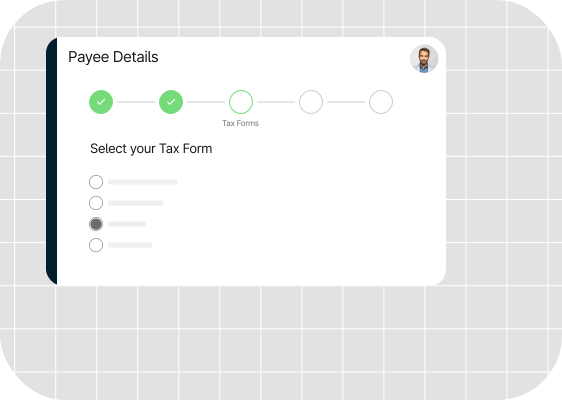
At year-end, Tipalti generates 1099/1042-S tax preparation reports and calculates any necessary withholdings.
Built-in controls help reduce fraud risk and support secure global payouts. For example, Tipalti protects you with:
- 26,000 rules that validate every payment.
- OFAC and SDN screening to flag bad actors.
- API compliance features, including SSO, MFA, and IP restrictions, to protect sensitive data.
Real-time audit trails log transactions and sync reports with your ERP or accounting systems to improve analysis and support decision-making.
With these processes running in the background, your payout workflows stay on the right side of regulatory requirements, without adding to your financial workload.
Advanced Currency Management for Global Payouts
Tipalti’s advanced FX features enable you to manage global payments with ease.
For businesses that make frequent cross-border payments, Tipalti gives finance teams greater control over cost projections. From a single user interface, finance teams can:
- Track foreign exchange and currency conversion status.
- Lock in FX rates to reduce exchange rate volatility.

With a clear view of spending, you can better manage your budget and ensure stable payments, improving cash flow control.
Tipalti also lets you fund your virtual account in your preferred currency and convert to a local currency. It ensures payouts run smoothly, even when your local operating balance is low.
Custom Workflows Across Your Payment Lifecycle
Tipalti lets users manage onboarding, approvals, reconciliation, and reporting in a single platform.
Its payout REST API for payouts gives developers the flexibility to build end-to-end payout workflows that improve efficiency across your payment process and scale with your business.

Teams can configure and test a hosted payee portal, embed an onboarding iFrame, run a sample payment, and establish integrations in a sandbox environment to ensure a successful launch.
Robust documentation and sample code support development, making it easy to get up and running quickly.
For multi-entity companies that want to automate financial workflows, compliance, and fraud prevention, and as payouts scale, Tipalti is a reliable alternative to PayPal, as this payment platform comparison shows.
Tipalti in Action
Software firm Honeygain faced inefficiencies due to error-prone manual onboarding, CSV uploads, and compliance hurdles—delays in payouts and frustration for both team members and payees.
By implementing Tipalti’s mass payments technology and API, the company streamlined and automated data collection, enhanced controls, and reduced the need for manual intervention.
The result was faster payment cycles, improved data accuracy and compliance adherence, and an enhanced payee experience.

Tipalti’s solution allowed us to shift from a manual, multi-day workflow to a real-time, robust system that delivers on both efficiency and compliance.
Sandra Krikstaponyte, Product Director, Honeygain
Build Smarter Payment Workflows with the Right Payout API
PayPal Payouts API is a practical option when your recipients already use PayPal and payout needs are relatively simple.
However, if your business needs broader payment choice, stronger controls, or scalable global workflows, it may be time to evaluate a more complete payout platform.
Tipalti is a PayPal partner, allowing us to offer PayPal payouts alongside a broad range of payment methods in one platform. It gives your payees a choice and your finance team a payout API to centralize compliance, control and reconciliation.
Book a free personalized demo to learn how it can automate global payouts and enhance payee experience.
PayPal Payouts API FAQs
Can I use the PayPal Payouts API without a developer?
PayPal’s Payouts API will require a developer to code, authenticate, structure, and send HTTP requests. You’ll also need development resources to maintain it. This is true of most payout API solutions.
An end-to-end mass payment API can deliver more development investment than a standalone payout API by embedding onboarding, compliance, and reconciliation into payment workflows. It means developers use a single tool rather than several.
How do I integrate the PayPal Payout API into my application?
Developers can integrate PayPal’s Payout REST API using PayPal’s API documentation and sample code. PayPal also offers a Payouts SDK to handle OAuth2 authentication and get started quickly with the REST API and complete common actions.
How much money can I send via PayPal Payouts?
There is no limit on the total amount you can send via PayPal Payouts if you have a verified account, but individual limits apply. These vary by region, currency, and account.
Generally, the limit for a single transaction is $60,000.00 USD, but PayPal may limit that amount to $10,000.00 USD for new account holders. Payouts are funded via your PayPal balance.
